
Granting credit to issue contributors
This page explains how a project maintainer can grant credit on an issue. Contributors wanting to manage who they can attribute their work to, such as themselves and/or one or more organizations should read Getting credit for work on issues.
As a project maintainer, it is your responsibility, when marking an issue as Fixed or closed, to grant credit to people who actually helped resolve the issue. Only project maintainers can grant credit for issues in a project.
- Each contributed project may grant credit differently at their own discretion
- No one is credited automatically, not even the issue creator
- Credit is only granted via the checkbox next to each user name
- The commit message is not for credit attribution, only for Gitlab history
Contributions to credit
The following are examples of types of contributions that should be recognized:
- Creating a well-written issue that describes a problem
- Proposing a solution (either in the form of a patch, or a text comment)
- Reviewing or testing a patch
- Adding before/after screenshots of User Interface, styling, or other UI changes that have not already been posted by another user.
- Adding documentation
It is ultimately up to the issue maintainer to ensure fair crediting is applied, though issue maintainers should refer to the notes on how Drupal core maintainers grant credit and consider similar policies themselves. See also the credit section of the Issue etiquette page.
How to credit contributions on issues
Crediting contributions is done via "Contribution record" linked to the issue. On Drupal.org issues, you can find this link on the sidebar block.
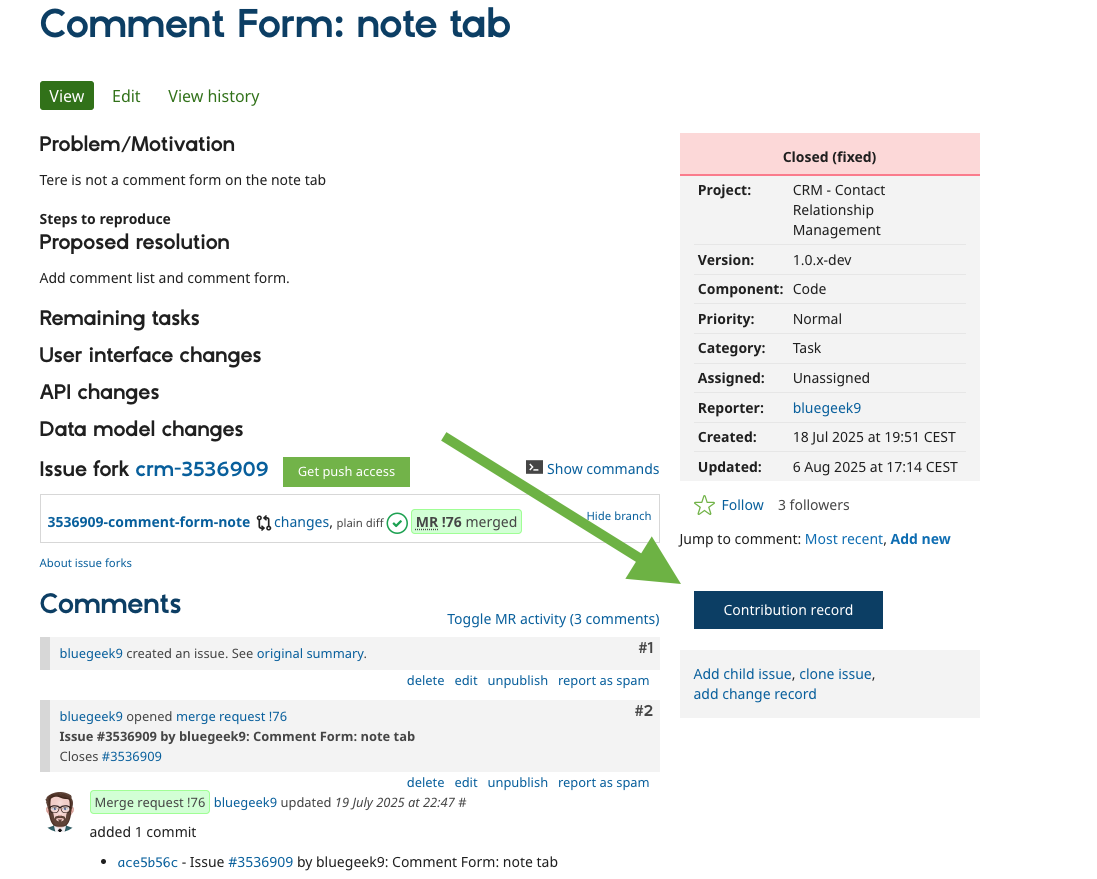
Once you navigate there, use the checkboxes next to each user name in the Contributors table:
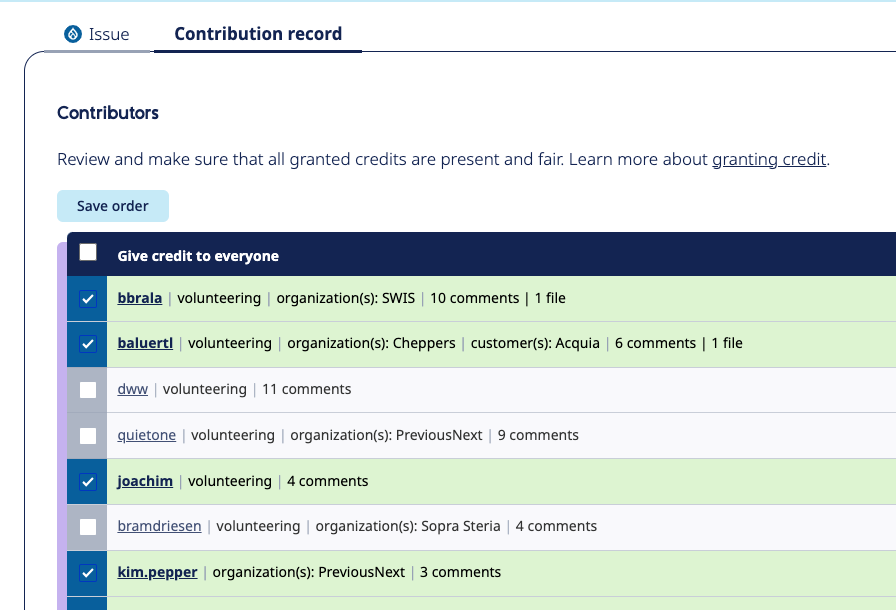
Initially, no one will be listed as a potential contributor, so no one will be credited automatically.
- Giving credit: Check and uncheck the names of users listed in the table, depending on whether they contributed to moving the issue towards resolution.
- What triggers the attribution: The credits will appear on the user and organization profiles when the issue status is Fixed, or any Closed status, including when it automatically changes to Closed (Fixed).
Even after the issue is closed, you can grant credit to a user:
Simply check the checkbox next to the user name, and save the form. - Gitlab commit message generator: The commit message is not used for credit attribution, it's all done via the above table. Use the checkboxes and Git commit message field to generate a suggested commit message for the issue. While issue credits may be modified after the commit, commit message mentions can only be changed by amending the commit message (for git commits that are not yet pushed) or with reverting the commit and making the correction in a new commit (for commits that are pushed). Drupal.org prohibits the use of
git force pushto release branches, so making commit message changes that way is not possible. - Credit non-issue users: Add more users who did not actually comment on the issue (for instance, they might have worked on a duplicate issue) by entering their user names in the Credit others box.
Recognizing large contributions
An individual or organization who contributes significantly to a project over time can also be recognized by adding a "Sponsors" or "Credits" section to the project home page. Attributing credit highlights the "good citizenship" efforts of companies, clients, and individuals who not only benefit from Drupal, but also help to sustain its growth. Providing credit encourages others to give back as well.
Significant contributions might include:
- Paying a theme maintainer to add a particularly difficult feature
- Porting a tricky module from an earlier major version of Drupal to the upcoming version (for example from D7 to D10)
- Subsidizing employees' time for major development efforts
- Paying a module maintainer for regular module maintenance or for an extended period of time
Help improve this page
You can:
- Log in, click Edit, and edit this page
- Log in, click Discuss, update the Page status value, and suggest an improvement
- Log in and create a Documentation issue with your suggestion
