Closed (fixed)
Project:
SWF Tools
Version:
6.x-2.5
Component:
Code
Priority:
Normal
Category:
Bug report
Assigned:
Unassigned
Reporter:
Created:
18 Jul 2009 at 18:09 UTC
Updated:
12 May 2010 at 21:40 UTC


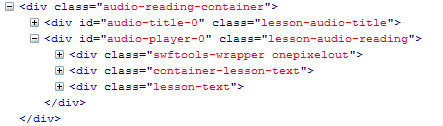
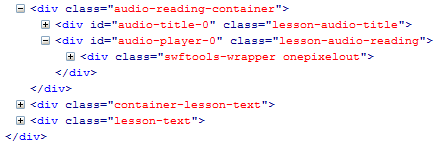
When I changed from using the Direct embedding method to SWFObject2 with 1pixelout I found that the HTML markup after the player was being altered, due to an additional </div> being added.
I was marking up the output of the Direct embedding 1pixelout player like this:
<div id="audio-player-0" class="lesson-audio-reading"><?php print $node->field_audio_reading[0]['view']; ?></div>
But in the case of SWFObject2 I had to change it to the following in order for it not to break my HTML:
<div id="audio-player-0" class="lesson-audio-reading"><?php print $node->field_audio_reading[0]['view']; ?>
This has led me to think that the SWFObject2 is adding an unnecessary </div> after the player is displayed.
I have attached 3 images from Firebug to show the difference in the HTML:
1. Without SWFTools being used on the site - HTML OK
2. Using SWF Tools Direct embedding method - HTML OK
3. Using SWF Tools with SWFObject 2 - HTML NOK
I am using 1pixelout and don't know if this effects other players.
| Comment | File | Size | Author |
|---|---|---|---|
| SWFObject 2.PNG | 4.9 KB | andrewsuth | |
| Direct embedding.PNG | 5.8 KB | andrewsuth | |
| No SWF tools.PNG | 4.67 KB | andrewsuth |


Comments
Comment #1
andrewsuth commentedI spoke too soon: the problem is that it is not adding enough
</div>'s, which is breaking the HTML markup.In order to avoid the markup issue, I need to output the following:
<div id="audio-player-0" class="lesson-audio-reading"><?php print $node->field_audio_reading[0]['view']; ?></div></div></div>(2 additional
</div>'s after the player)This way my HTML remains intact.
Comment #2
Stuart Greenfield commentedTested on DRUPAL-6--3 and seems ok now. Tried OnePixel + SWF Object 2 and code is valid.