

Needs review
Project:
Media Mover
Version:
6.x-1.x-dev
Component:
Code
Priority:
Normal
Category:
Bug report
Assigned:
Unassigned
Reporter:
Created:
20 Jul 2009 at 10:34 UTC
Updated:
3 Jul 2010 at 17:37 UTC
Jump to comment: Most recent file



Comments
Comment #1
jlevis commentedI am having the same problem.
When I re-save the node, the file is then moved to the correct place.
I'd rather not have to re-save the node everytime, however.
Comment #2
szczym commentedi get the same problem
Comment #3
arthurf commentedCan you check out the latest development version? I've done some modifications to how the file path is handled which I hope should resolve this.
Comment #4
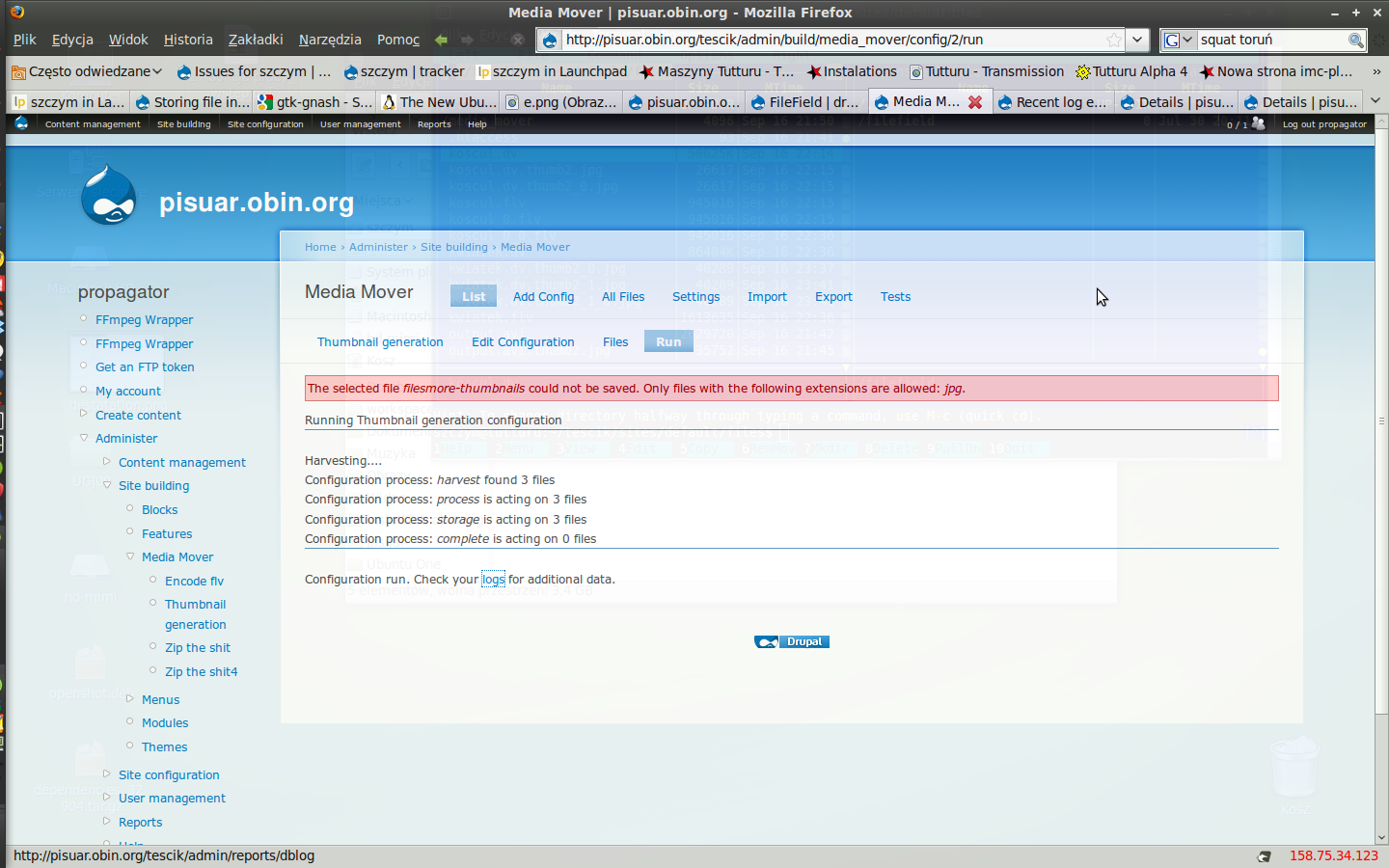
szczym commentedI just tested newest cvs version (2009-Sep-17 after #263908 commit ) on fresh* drupal install. its still not possible to save to filefiled with special path defined. i get error
* for all today`s tests im using one single fresh install
BTW after not storing the thumbnail, it did placed properly the flv file in filefiled (its been not placing it before, see -> #486206: Files transcoded but not added to filefiled
Comment #5
szczym commentedComment #6
arthurf commentedSo it looks the issue is:
Note the file path is wrong- Drupal can't create that directory. In watchdog, is this error coming from ffmpeg, or mm_cck?
Comment #7
szczym commentedits from filesystem
Comment #8
arthurf commentedCan you provide the log entry for the ffmpeg entry? I'm wondering if that is the source of the error.
Comment #9
szczym commentedsorry, my mistake: sites/default/files was not writable so i did chmod a+w ~/tescik2/sites/default/
than i re-submit the filefiled setting form with the custom path and sill getting error but from "MM Content"
it get a bit messy all ready, maybe i shout test it some other way?
Comment #10
arthurf commentedIn the watchdog log, can you see if the file referenced in event 57 (http://drupal.org/files/issues/zrzut_ekranu-3.png) is on the file system?
Comment #11
szczym commentedyes, its there
Comment #12
szczym commentedalso on hd is no directory defined here (look: screenshot)
Comment #13
szczym commentedSeems like the issue might be related to #564064: specified path has no effect
Comment #14
szczym commentedand #275293: Uploading to files/subfolder leads to files/ instead files/subfolder
Comment #15
szczym commentedwith dev version of filefiled the issue is still present despite #275293: Uploading to files/subfolder leads to files/ instead files/subfolder
Comment #16
szczym commentedSORRY, mistake: the #275293: Uploading to files/subfolder leads to files/ instead files/subfolder is for 5-x version
but any way dev version of filefiled is also not producing proper dir in /files. i will test the 3.0 version then according to #564064: specified path has no effect
Comment #17
arthurf commentedUsing filefield-3-0 things work correctly for me. Can you try upgrading and see if that works for you?
Comment #18
davebv commentedI think I just post a related topic here: http://drupal.org/node/604374
I get duplicate files, one stored in the path configured in filefield path settings and the other one in the root folder for files in drupal setup.
Comment #19
brunodboUsing Filefield 3.x, things work almost correctly here. When I use tokens in the file path settings (eg. to automatically create a YY/MM/DD file directory structure), new directories aren't being created (eg. the 'DD' directory of the YY/MM/DD token path).
So: things work fine when the file path's directory exists. When a directory doesn't exist and should be created on a token basis as configured in file path settings, the upload fails.
(Note: I chmodded /sites/default/files to 777 in my tests to be sure it wasn't a directory permissions problem).
Comment #20
brunodboDid some more testing: it seems that the upload fails (see #19) because token is creating files instead of directories (I'm assuming it's token that's doing this).
For example, when the file field is configured with a file path like [site-date-yy]/[site-date-mm]/[site-date-dd], token creates a file called '19' (today is the 19th) in /sites/default/files/09/10, instead of a directory with that name (the '09' & '10' directories already existed).
This leads to an incorrect $filepath in mm_cck_field_filefield() (mm_cck.module, line 514), so the upload fails.
(When I test the same field using the node form, the filefield behaves normally: token creates a directory, and the file is being saved.)
Any idea why this is happening with mm_cc?
Comment #21
arthurf commentedcan you give me the input file name and the output file name? I just want to make sure i have a better idea of what's going on
Comment #22
brunodboSince the upload fails (*), I don't have an output file name. Or am I mis-understanding your question?
(*) By 'upload', I mean the copy action from /files/media_mover/ffmpeg/converted// to my specified (token-created) directory path in the filefield's config.
Comment #23
futrick commentedIt might have to do with ownership of the subfolder.
Do a long listing (ls -l) to see who's set as the owner
If you create the subfolder then obviously you become the owner.
In my experience fileupload will only honor the path if apache is the owner.
If you set the fileupload path and let Drupal create the subfolder on the fly (on first upload) then it'll work.
Comment #24
ThePiano.SG commentedfutrick,
I have set the owner to apache for files/images, and chmod 777.
I have a CCK field, which has File type, and Image as widget. Path is set to images under system files/ directory.
System files/ directory was set to 777 for testing.
When I upload a picture in the add form, the picture ended up in the files directory.
So, I do not think it's a owner / permission problem.
Comment #25
brunodbo@futrick: I had checked directory ownership & permissions before, they're correct (owned by Apache, with 777 permissions for testing purposes).
Comment #26
arthurf commentedI just committed a change to mm_cck_field_widget_files_directory() which should now create the directory path when it doesn't exist. Can you give the development version a go and see if it is working?
Comment #27
brunodboWith the current dev version, I'm getting the following error (in watchdog, coming from mm_cck):
Shouldn't the destination be the directory set in the filefield's path settings?
Comment #28
brunodboDid some more testing.
The error above (#27) occurs when I set the filefield's path to use multiple subdirectories in /sites/files/default, something like:
When I change the filefield's path settings textfield so it contains only one directory, files are saved correctly after being transcoded by Media mover. It works using "a static path" (as in: not using tokens), as well as using token to create the path. In this case, the path is created and the file is saved to the correct location.
When I use mutliple subdirectories, the destination seems to be set incorrectly in mm_cck (and mm_cck throws the error, see #27).
When the path consisting of mutliple subdirectories exists before transcoding the file, things also work as expected.
Comment #29
homoludens commentedi'm having the same/similar problem, and problem is only when module http://drupal.org/project/filefield_paths is turned on. especially when using tokens that it provides. i have switched off filefield_paths and looking for some other solution (i need ogname token for directory name).
Comment #30
drewmacphee commentedI agree that it is because of filefield_paths module.
I had a path set before installing filefield_paths and it was keeping that path instead of the new one I entered after installing the module.
I tested this by disabling the module changing the path then re-enabling the module and it created new paths with [author-name] instead of the actual author name.
Comment #31
brunodboI think I found out what's wrong here.
In mm_cck.module, line 576, there is a call to file_check_directory() to create the file path if it doesn't exist. file_check_directory() however, doesn't seem to be able to create subdirectories recursively. (This is fixed in D7, see http://drupal.org/node/515280).
filefield.module's own field_file_check_directory() does create directories recursively. When I change file_check_directory() to field_file_check_directory() on line 576, things works as expected: filefield paths defined with tokens are created correctly.
We could do an explode() on the $path, and call file_check_directory() for each piece of the path? Or make Media Mover CCK dependent on filefield and 'fix' this issue like that :) even though I don't think the latter would be desirable.
Comment #32
jordanmagnuson commentedSubscribing.
Comment #33
agileware commentedOn a related note:
If you have your filefield set to save to a subdirectory that doesn't exist (if you have a typo in the directory name or something),
when you run media mover you get a confusing error.
For example I want to save my files to sites/default/files/video_thumbnails but my directory is video_thumnails
I get this error:
And in watchdog:
This error is pretty confusing.
It stems from not passing the full filepath destination into file_copy().
If you pass in the full file path and not just the directory it will still fail but the error message will be:
And in watchdog you get that same error plus a media mover one that says:
These errors make a bit more sense for what is actually happening.
This patch addresses this issue.
PS. When my directory is properly named and writable I have no problem regardless of how my filefields path is set up.
Comment #34
heacu commentedsub
Comment #35
agileware commentedCan people please review the patch submitted at #33. Then we can get this request moved along the workflow. Thanks!
Comment #36
hatsch commentedi got rid of all these "could not copy file errors" when using mediamover with filefield_paths by setting the following module weights
UPDATE system SET weight='-1' WHERE name='content'
UPDATE system SET weight='2' WHERE name='filefield_paths'
UPDATE system SET weight='2' WHERE name='media_mover_api'
UPDATE system SET weight='2' WHERE name='mm_token'
UPDATE system SET weight='2' WHERE name='mm_cck'
depending on which mediamover modules you use, you could set their weights too.
Comment #37
mbria commentedSubscribing
Comment #38
delykj commentedPlease, see 704756 for the fix.
Comment #39
nplus1 commentedi have the same issue but not with the path but the name. the behavior is exactly as described above. the name replacement does not work but if you save it a second time the replacement will be done. imo the replacement is done but not submitted back to the form... see http://drupal.org/node/844368.