

Closed (duplicate)
Project:
Administration menu
Version:
6.x-1.5
Component:
Code
Priority:
Normal
Category:
Bug report
Assigned:
Unassigned
Reporter:
Created:
28 Jul 2009 at 13:27 UTC
Updated:
26 May 2011 at 13:19 UTC
Jump to comment: Most recent file

Comments
Comment #1
sign commentedI can't replicate this with admin_menu 1.5
what version of admin_menu are you using?
Comment #2
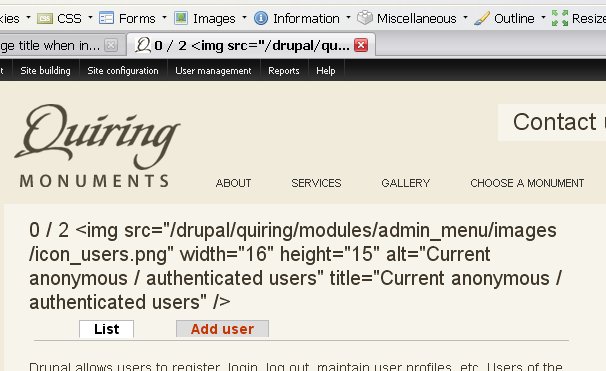
drm commentedI'm getting the same issue. I was brought on by a client to finish a site. We're using admin_menu 1.5, but not rootcandy (the form forced me to choose a version). It really is not a particularly complex site. The client says that this error only came up recently. Mostly all I did was add some content types and Views for them. One of the Views has some php snippets for the View header. If I disable the admin_menu module, then I get the normal page title. Note that the attribute is similarly affected, so the img tag shows in the browser tab as well as the page title. So far I can't find any other pages so affected, just admin/user/user.
I've attached a screenshot of the relevant parts of the screen.
Comment #3
sign commentedSo I would say this is not a rootcandy issue, but appears to be an admin_menu issue
I am moving this to admin_menu project and lets see if @sun agree
@drm btw your screenshot is not appearing
Comment #4
aaron commentedThe title
2 / 0 <img src="/sites/all/modules/admin_menu/images/icon_users.png" width="16" height="15" alt="Current anonymous / authenticated users" title="Current anonymous / authenticated users" />also appears on the user login screen, which is not on the RootCandy theme, so yes, it appears to be the Admin Menu module causing the problem, especially as the problem vanishes when that module is not installed.Using Administration menu 6.x-1.5 on Drupal 6.13.
Comment #5
aaron commentedchanging title to reflect issue
Comment #6
aaron commentedThe theme we're using is based on Zen, btw, so if it's the theme, I'll move it to that queue. Still investigating.
Comment #7
aaron commentedno, happens on garland too.
Comment #8
aaron commentedok, on further investigation (and actually reading #279767: User counter is output on login page for anonymous users), I see this is actually #303247: Menu Breadcrumb setting active menu to undesirable menus for menu_breadcrumbs. Marking this as duplicate.
Comment #9
agileware commentedSubscribing.
Comment #10
doublejosh commentedI have this issue, but DO NOT have Menu Breadcrumb installed. Thinking it could be the Menu Position module, as this does some breadcrumb setting with menu items.
Comment #11
milesw commentedI'm also getting this issue without Menu Breadcrumb installed. I do not have Menu Position installed either.
Comment #12
doublejosh commentedPerhaps you meant to write that the other way?
Comment #13
el_reverend commentedSame issue, but I am not using any of the above mentioned modules.
Comment #14
el_reverend commentedComment #15
niklp commentedThis issue is caused by having dual entries for the same path in the menu (router?) tables. A module will go looking for a path and find the wrong one (similar, but different?!) and this is what causes it.
You can get a vague idea of what's going on from reading here: http://drupal.org/node/303247 (menu_breadcrumb module problem) and comment #23 onwards (or before if you fancy) for Sun's opinion on the admin_menu side of it at http://drupal.org/node/279767.
Rootcandy might be demonstrating this problem, but it's basically like this... admin_menu is the root cause of it, becase that's where the duplicate paths come from, but that module isn't what makes the problem occur. The modules that expect the paths to be unique are what force the problem out into the open, and that's because they have wrongly assumed the path(s) to be unique. You need to modify your query according to the advice in those issues and it should be sorted.
HTH