Closed (fixed)
Project:
Advanced Forum
Version:
6.x-2.x-dev
Component:
Styles
Priority:
Normal
Category:
Support request
Assigned:
Unassigned
Reporter:
Created:
29 Jul 2009 at 18:49 UTC
Updated:
23 Aug 2009 at 06:01 UTC


Hi there,
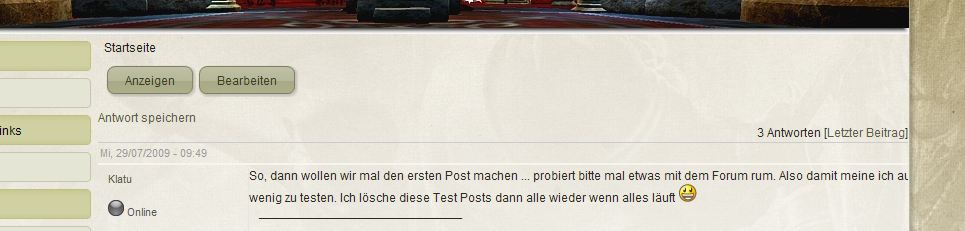
as you can see on the screenshot I attached several things are missing.
1. I miss the subject of the post. Is there any way to get the subject to the top of the post?
2. Behind "ich au" are 5 Words missing. How can I fix the wordwrap problem?
3. Shouldn't be there some other navigation link behinde "Startseite" like Container->Forum->Post?
It would be great if someone could help me with my problems.
Thank you in advance.
Cheers Leiche

Comments
Comment #1
michelle1) I don't know... 2.x always prints the title, even on the top post. Might be a bug in there somewhere.
2) That's a CSS conflict that's been around forever with some themes. I have no idea how to fix it.
3) AF doesn't have anything to do with breadcrumbs.
I'll leave this open for a while until I've had a chance to look at #1. Maybe someone will chime in on #2 because I have no idea.
Michelle
Comment #2
Leiche commentedThanks for your quick reply.
I was wondering about the breadcrumbs missing, because in general it works. The only path not shown up is the forum. Thats why I thought it could be a AF problem.
In terms of the CSS wordwrap problem, I will take a deeper look into CSS design if my time allows it.
Cheers Leiche
Edit: Aber some investigation I think I found the CSS Problem, but I don't know how to fix it :(
The style.css from the theme contains this code.
The advanced_forum-structures.css this one.
These are the two relevant segments. Now the problem:
The first one is loaded to style and size the main node, so the body of the forum (without navigation).
Now the second should be loaded to size the posts, but it isn't.
The ".forum-post-panel-main .content" is overridden by the fist code again, because it is interpreted as a regular node by the theme.
As you can see the wide is 810px and thats the reason why the text isn't wraped at the correct position and goes out of the frame.
Changing the width or margin in .forum-post-panel-main .content has no effect. So my suggestion is, that there are only two ways to solve this.
1. Locate the problem why the .forum-post-panel-main .content is overridden and fix it.
2. Try to modify the style.css that the node content has an auto wide, without ripping my layout appart.
Cheers Leiche
Comment #3
michelleOh, I can see the problem. Your theme has overflow: hidden; which means it's hiding anything that goes past to borders. Isn't there an overflow:wrap or something like that?
Also, advanced_forum-structure.css does not exist in 2.x so you must be using 1.x. Changing the version.
As for breadcrumbs, those are controlled by the menu and printed in page.tpl.php which AF does not alter in any way.
Michelle
Comment #4
Leiche commentedThe version missmatch was my fault. I thought the 2.0 is the most recent stable version. I will try out the 2.0 alpha. Is there anything I should look at, when updating AF?
The only options for the overflow command are.
On every option the text is cut, except
autoand-moz-scrollbars-horizontal. With this options I've got scrollbars that I have to move to see the text.I've tried a bit around with this variables
.contentLayout .contentand.forum-post-panel-main .content. Like I sayed before, the AF setting for the wide is ignored. When I change the wide or margin in the style.css, the change also includes the complete body of AF. The variable are seemingly the same, aren't they?Cheers Leiche
Comment #5
michelle1.1 is the stable version. You don't need to upgrade to 2.x. I just need to know what version we're discussing since a lot has changed.
Your theme's CSS comes last so it will override AF's CSS unless AF has a more specific selector (I think that's the name; not sure). In this case, they are both about the same so your theme will win.
This problem is beyond my CSS knowledge. I'm a programmer, not a designer. :) Maybe someone who's better with CSS will have a solution.
Michelle
Comment #6
Leiche commentedI will try to fix the CSS issue. As soon as I solve it, I will post the solution. Could be interesting for future issues depending on CSS ;-)
Cheers Leiche
PS: Shame on me, I postet under the worng version again :(
Comment #7
michelleWhy did you change it back to 2.x? I thought you were using 1.x? That's the version you should be using unless you're just testing.
Michelle
Comment #8
pawi81 commentedare you solve this problem?
i have same problem
http://sky-watcher.pl/blad.jpg
i have no clue how to solve it
when i disable advanced_forum - there is all ok, when i turn it on (nevermind with which theme) there is a problem
Comment #9
michelleThis has been open for some time and no one is jumping in to help. It's not something I can fix. If you're still having problems, maybe try the theming forum and catch folks who are better at CSS than me.
Michelle
Comment #10
pawi81 commentedthank you, I've do page with one column style and now it's ok http://sky--watcher.pl
but i have got still problems with breadcrumbs. There is breadcrumbs on main page, but when I will go to forum pages, there are only breadcrumbs when i'm editing content