

 Come together with the global Drupal community in Rotterdam, 28 Sept – 1 Oct 2026. Sessions, contribution, connection, and Early Bird savings until 8 June.
Hey michelle,
I've followed your tutorial for installing the kit on my site. I've had to include the view with the import instead of automaticly.
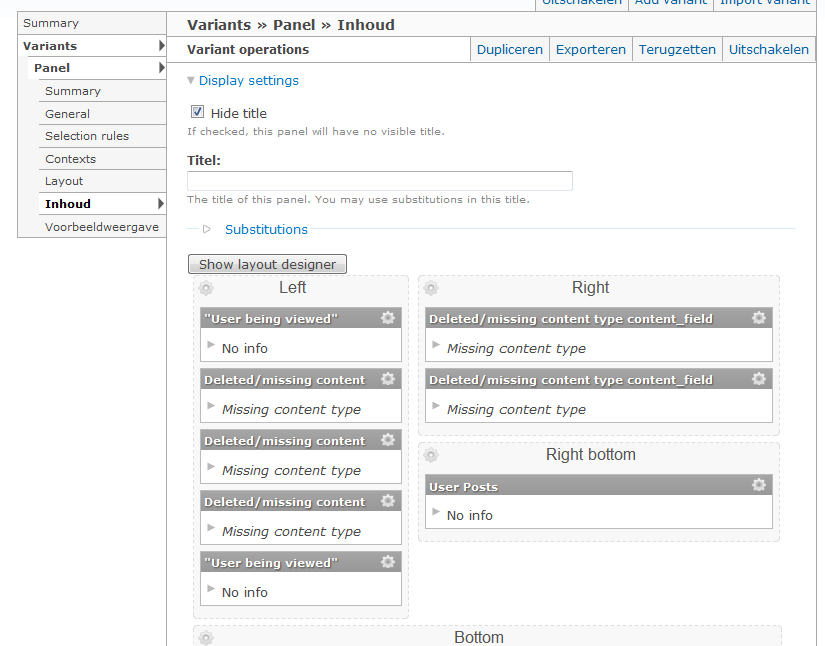
But when i visit my user info now i only get this:
When i go to the panel, it shows missing content type...
Please help me!
| Comment | File | Size | Author |
|---|---|---|---|
| #7 | panel_page.png | 24.05 KB | mkinnan |
| Capture.PNG | 60.01 KB | fusions |


Comments
Comment #1
michelleAll of those Panels content types assume you have the uprofile node type that comes with APK. You need to use Content Copy (part of CCK) to import the contents of uprofile.inc in the includes directory.
Michelle
Comment #2
fusions commentedI've done that... i've got a new content type with all the fields.
Comment #3
fusions commentedComment #4
michelleWell, my only other guess is you don't have it marked as a content profile type. That should be on by default but possibly wasn't somehow. If that's not it, then I have no idea.
Michelle
Comment #5
fusions commentedIs there any way i can contact you personaly?
The user profile is marked as content profile type..
Comment #6
michelleNo, I'm not freelancing right now.
I don't really have any more ideas, anyway. I'll leave this active for a while in case someone else has a thought.
Michelle
Comment #7
mkinnan commentedI have the same problem but for only two of the pane. I solved the issue for one of them by enabling more modules (http://drupal.org/node/517182). For example, when you enable Views you have to do Views and Views content panes.
However, there is one pane I cannot figure out what it is for to install/enable the right module. It is the Top pane on the Left. See attached image.
Any ideas?
Comment #8
mkinnan commentedThat's the Author Pane module. I didn't realize that I had installed Author Pane in one of my multisite modules location instead of the sites/all/modules location. All fixed.
Comment #9
michelle@mkinnan: That's Author Pane.
Michelle
Comment #10
michelleBeen a month... Closing.
Michelle