

 Come together with the global Drupal community in Rotterdam, 28 Sept – 1 Oct 2026. Sessions, contribution, connection, and Early Bird savings until 8 June.
Dear All,
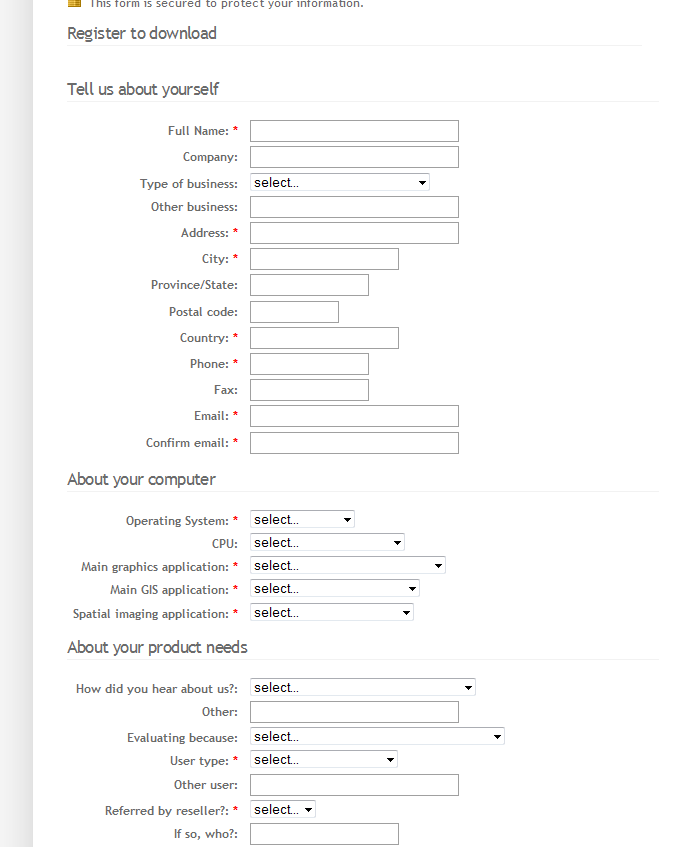
I'm newbie at drupal and trying the webform module to create a contact form something like attached image which seems very simple but I find it difficult. I have the following issues:-
1. I want to place all the labels on left side and some space between label and field.
2. And I dont know how the hide the Label of one field.
I'm desprately looking for a solution. I dont have php coding experience so I really want someone to help me here in this community of great developers.
Thanks in advance.
Alice Kahn
| Comment | File | Size | Author |
|---|---|---|---|
| #1 | sample_form.gif | 19.46 KB | mlaw |
| sample-form.JPG | 23.79 KB | alice-kahn |


Comments
Comment #1
mlaw commentedIt's all in your CSS. I'm currently using these CSS classes (in my style.css) to define the inline style that you are looking for.
You may want to adjust the width and margin spacing to get the look you want. Hope that helps.
Comment #2
alice-kahn commentedHi mlaw,
This is exactly what I was looking for. Thanks alot for the help.
Keep up the good work!
Many greetings
Comment #3
mlaw commentedGreat glad I could help.