

Closed (fixed)
Project:
Zero Point
Version:
6.x-1.20
Component:
Documentation
Priority:
Normal
Category:
Support request
Assigned:
Unassigned
Reporter:
Created:
2 Aug 2009 at 12:15 UTC
Updated:
11 Jul 2013 at 16:21 UTC
Jump to comment: Most recent file


Comments
Comment #1
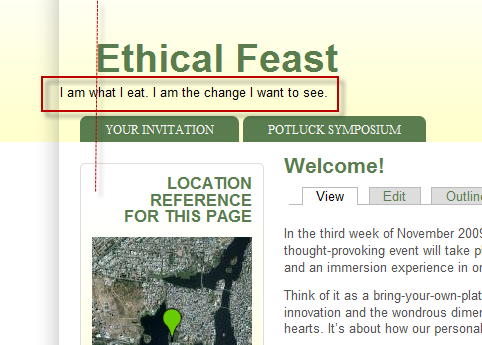
florian commentedThanks for the findings. the IE6 site slogan alignment if no logo is present will be corrected in the next release. I don't understand no.2, please explain.
To slide site-slogan use this lines in custom_style.css:
Comment #2
boabjohn commentedThanks for the fast help with the alignment (1), and my browser in the screenshot is FFox3.5 on Windows Vista.
(2) My apologies for a poor description. I'm referring to the regions labeled User1...8.
I have various content in new blocks for those regions. Mostly just text, or an embedded slideshow.
The vertical alignment for the block's cell is centre, so the block titles are not sitting on the same baseline running left-right. Is it possible to "valign = top"?
(3) Slogan? Is that only for the page display...ie, not visible in the page layout, only in the browser's page information display?
Thanks indeed.
Comment #3
florian commented(2) Use this code in /_custom/custom-style.css :
.. I will add this by default in the next release.
(3) Slogan, if enabled, appears on all pages.
Comment #4
george.g commentedI attached a screenshot with a similar problem. How can I align the pictures with the titles and how can I make all the user1,2,3,4 blocks equal? Now the first one is longer then the others. I would like all the content from those blocks to be equally distributed. Could you help me?
Comment #5
florian commentedYou have to ad some lines to _custom/custom-style.css. For example, if you have 4 blocks (user 1-4) and only 2 blocks (user 5-8) ad this:
Comment #6
george.g commentedThanks
Comment #7
george.g commentedJust one more thing: how can I make the custom.css to have priority over te sky.css (or any other css file)? What I want to do is this: change the default color of H2 tags and the colors of the menu items, but even if I have the proper code in the custom.css, the theme still loads first the sky.css file.
Comment #8
florian commentedAd !important to your css, like:
Comment #9
george.g commentedThanks, it worked for the H2 tags but for the nav-menu links it didn't. This is the code that I want to include in custom.css:
The problem is that in sky.css this code (background-color: #2f71a2 !important;) already has the !important tag and it doesn't get overwrite by the custom.css file.
Comment #10
florian commentedI think it may be better to modify sky.css at this point.
Comment #11
Turkish Delight commentedIn response to comment 5, what must we do if we have different column widths (due to more or less of user blocks being used) on different pages?
Example: I have on my frontpage Users 5-8 all used. However, according to your custom-style.css modifications, the widths would stay distributed to 25% not 33.3% if I removed one block.
I recall the Salamander/Ability themes with this feature of equal distribution upon removal; anyone have a hack for this theme?
Link to Ability theme: http://drupal.org/project/ability
Comment #12
florian commentedI know well ability because it is a full copy of Salamander theme, which is also designed by me :)
0 Point user regions behave proportionally with the blocks' width, the same as Salamanderskins , Salamander and it's copy, Ability. If you would like to have equal region width across the user regions it is the only method that came to my mind.
Comment #13
Turkish Delight commentedIn response to comment 12, I wanted to drop this code in if any of you want to have an 'auto-distribution' (50%/2 blocks, 33.3%/3 blocks and 25%/4 blocks) for your userblocks. I'm going to look into making this an option on the theme page similar to the fixed v. variable layout options (standard v. auto-distribution). Thanks to Florian to writing essentially this in Salamander/Ability.
In layout.css (in the css folder), post underneath
In page.tpl.php, (in the case of user blocks 1-4) replace
With this:
Comment #14
Turkish Delight commentedAlso want to add a piece of misleading code that does not display the borders just in case anyone runs into the issue.
echo $section1widthdisrupts the flow here, which is why instantiating $block2div, $block3div and $block4div (in comment 13) is necessary.Comment #15
florian commentedThanks. I will add this as an option in the next release of 0 Point.
Comment #16
asinnema commentedBoabjohn, use firefox and the addon firebug. I am not really a firefox user (Operagirl here) but it really helps when you want to tweak CSS settings.
Comment #17
florian commentedFixed in releases 6.x-1.9 and 6.x-2.2
Comment #18
florian commentedComment #19
timgray75 commentedFollowing on from the above workaround regarding column widths in user blocks 1-4, I want to go the other way and make all the user blocks fixed width. For blocks that I have created myself this isn't a problem as I can use a
However there are some blocks which are created by the system (Language Switcher / Active Forum Topics / Who's New etc) where I can't set the width, and because sometimes their content is dynamic, they vary in width, which means my fixed-width blocks can get wider to compensate (because "width" is setting only the minimum width for the block).
I've tried adding lines into custom_css to set the width of the system-generated blocks, but had to guess at what those blocks are called, and I don't know whether there is something overriding custom_css anyway.
All four user blocks are used on every page.
So iis there a way of fixing the width of the blocks?
Comment #20
florian commentedThe issues was fixed in versions 6.x-1.24 and 7.x-1.10.