Steps required to reproduce bug
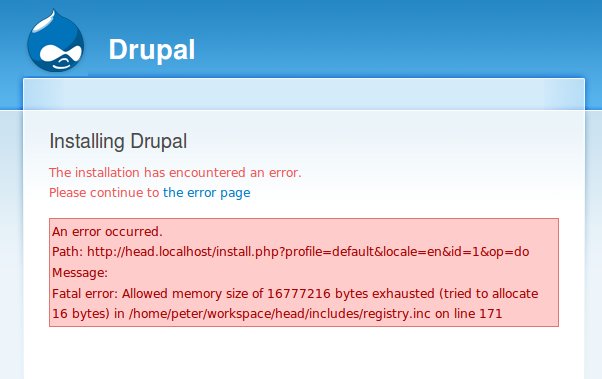
1. Attempt to install drupal 7 as normal, but with php.ini settings too low (specifically, memory_limit=16M and max_execution_time=30)
2. Proceed through installation (no warnings through configuration screen), next screen after that will be the error screen.
3. On the error screen, click the link to go to the error page - "the error page" is the link text.
4. You don't end up on an error page, but instead on the Configure Site page as if nothing had gone wrong.
5. You fill out the Configure Site page as if nothing is wrong, then after submit you get a hard PHP error, mine was...
"Fatal error: Call to undefined function field_attach_load() in /home/peter/workspace/head/modules/user/user.module on line 242"
... but frankly it is impossible to tell if that is germane to the problem.
Expected behavior would have been that the link to the "error page" would have gone to some sort of error page describing how to back out of the bad installation (delete the db, delete and recreate the settings.php), and what steps might be taken to correct the problems that caused the failed install (increase memory limits etc., which could just be a pointer to a documentation page since that will vary by environment).
Attaching two screen shots. First one shows the page with the link to the error page, second just shows the configuration screen coming up as if nothing went wrong after clicking the error page link.
This would be a pretty huge fail for a newbie!


Comments
Comment #1
karschsp commentedsubscribe
Comment #2
winston commentedSpent a bit of time looking in to the code, so here is a bit more detail.
1. "the error page" link in the first image above is generated not in install.php or install.inc, but rather in batch_process function in form.inc.
2. Here is the exact link href for "the error page"
http://head.localhost/install.php?profile=default&locale=en&id=1&op=fini...
3. The calling function is in install.php and is specifically this line...
batch_process(install_redirect_url($install_state), install_full_redirect_url($install_state));
That's as far as I can get without debugging as I'm not too familiar with the batch api.
Comment #3
ruharen commentedAccording to http://drupal.org/requirements :
PHP memory requirements can vary significantly depending on the modules in use on your site. Drupal 6 core requires PHP's memory_limit to be at least 16MB, and Drupal 7 core requires 40MB. Warning messages will be shown if the PHP configuration does not meet these requirements.
So if Drupal 7 needs 40MB as a minimum it should prevent you from install with 16MB and not even get you to the error show above... Isn't it?
¿What's wrong here?
Comment #4
ChrisH commentedI confirm this problem.
In my case I tried to install the beta2 with Dutch language on a local WAMP server using an aliased directory on localhost.
I got a timeout on the language import.
------
Result:
Fout bij het importeren van de interface-vertaling [Error importing interface translation]
Ga verder naar de fout pagina [Proceed to error page ]
-----
An AJAX HTTP error occurred.
HTTP Result Code: 200
Debugging information follows.
Path: http://localhost/drupal7/install.php?profile=standard&locale=nl&id=2&op=do
StatusText: OK
ResponseText: Fatal error: Maximum execution time of 60 seconds exceeded in D:\www\limited\mysites\drupal7\includes\database\database.inc on line 1970
------
I increased the time to 120 seconds and re-installed but that was not enough time either.
I suspect the problem behind this is an error in the translation import ( As the time bar stays at the total left, is not showing progress, and says "Import wordt voorbereid" (="Starting import").
). But this bug report is about how it is treated:
* the error page link is wrong, as stated in this bug: http://localhost/drupal7/install.php?profile=standard&locale=nl&id=2&op=... is not the proper one;
* an error during install IMHO should be a showstopper or at least trigger a severe warning and maybe even something that stays in the status page.
But now one can proceed thinking one has a correct Drupal install.
FWIW line 1970 is in class DatabaseStatementBase, function execute: $return = parent::execute($args);
Comment #5
armpogart commentedReproduced the same bug on development server (WAMP on Windows 7) with the following php.ini setting
memory_limit=128M
max_execution_time=30
then changed max_execution_time=150
After the change installation was successful. In my case the issue was with max_execution_time, but no any warnings.
Comment #6
David_Rothstein commentedLet's make sure to keep this issue focused on the original topic, which is fixing the user experience (and incorrect link behavior) when an error occurs. This issue isn't about the specific errors themselves.
For problems with maximum execution time while importing languages, please see e.g. #1024816: Increase time limit when doing batched .po imports and #569004: Add support for seek based batch import of .po files.
Comment #7
David_Rothstein commentedAlso for this issue:
There's some discussion of that problem at #951644: Requirement warnings (e.g. for PHP memory limit) are not shown on install or update unless there is a requirement error also.
Comment #8
royce.williams commentedI have researched this and related issues - often collectively referred to as "The 31 Tables Problem", because it interrupts the table creation process before all 73 or so tables are loaded. See this comment for a semi-exhaustive list of things that have helped people work through this issue. If your fix does not appear in my list, contact me and I will add it to the comment.