

Closed (won't fix)
Project:
Flexiblock
Version:
master
Component:
Code
Priority:
Normal
Category:
Support request
Assigned:
Reporter:
Created:
15 Mar 2006 at 13:14 UTC
Updated:
7 Jul 2007 at 23:13 UTC
Jump to comment: Most recent, Most recent file


Comments
Comment #1
stborchertHi.
Ups, I've forgotton to update the theme_functions. Ok, now it's done.
You can now get the blocks of let's say region 'menu 1' by calling
theme('flexiblock_html', 'menu 1');.impatiently waiting for your response ;-)
Comment #2
djnz commentedI am testing this and will patch into CVS over the weekend (25/26 March 06). for various reasons I do not have plans to move any of my live Drupal sites to 4.7 so my incentive to do it was low. I am therefore very grateful for your contribution - thanks very much.
Comment #3
kzeng commentedhi, I defined a new region at settings/regions but this region did not show up at the drop down menu of the block setting page. All I can see is the "flexible region" option instead of the region defined by myslef. Is it a bug? Thanks a lot!
Comment #4
stborchertDon't think so ;-)
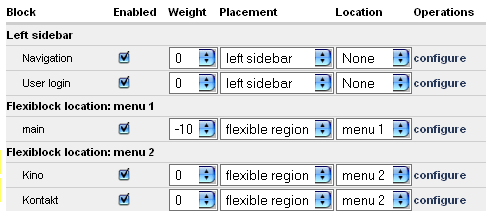
Do you have a column "location" (near to "placement")? As in the old version you have to select "flexible region" in "placement" and then the region in column "location" (please look at the screenshot).
hth,
Stefan
Comment #5
kzeng commentedThanks a lot from your help. But I did not have a dropdown under the "location" column. Instead, I only have a checkbox ( I attached a screenshot). It's really weird. I am running Drupal 4.7-beta6. What's your Drupal version? Thanks a lot!
cheers,
Kai
Comment #6
stborchertI am running Drupal 4.7-beta6. What's your Drupal version?
4.7b4, 4.7b5, 4.7b6
Ok, I see my error: "throttle" and "location" have to be changed. I haven't testes it with throttle activated yet.Try the atteched version.
hth,
Stefan
Comment #7
stborchertOh my god. Hint to myself: never post when you are exhausted :-)
Next try:
4.7b4, 4.7b5, 4.7b6
Ok, I see my error: "throttle" and "location" have to be changed. I haven't tested it with throttle activated yet.Try the (previously) attached version.
hth,
Stefan
Comment #8
joehudson commentedflexibly placed blocks is just what I need! However I'm not clear how to use flexiblock for standard php themes (.theme file plus css files.) If I want, for example a 'bottom right' block positioned at the bottom of the right side bar how, roughly speaking, do I do that?
many thanks,
Joe
Comment #9
stborchertHi.
Hm, I've never used ".theme" themes.
Lets see, if I can help you with your block:
with the following code:
I haven't tested it but it should work (perhaps).
hth,
Stefan
Comment #10
stborchertAddition:
You have to add
behind the last line of the replacement.
hth,
Stefan
Comment #11
joehudson commentedthanks stefan,
I've got the idea now. What I wasn't understanding before was that it's totally down to the theme to decide where block regions actually go and the theme has to provide all the enclosing structure, while the flexiblock module provides a neat and very convenient way of specifying blocks to go in those different regions... It's all working nicely now :)
Joe
Comment #12
lunas commentedI've tried to install this on 4.7 RC3 and am getting:
Warning: Invalid argument supplied for foreach() in /yadda/yadda/modules/flexiblock/flexiblock.module on line 390
Whenever I try to access the admin page to add regions.
Comment #13
DrLou commentedguys:
Am still getting this error, with a (May 4?) cvs versio of flexinode:
Fatal error: Call to undefined function: form_checkbox() in /
/drupal/modules/flexiblock/flexiblock.module on line 141
Are the various fixes proposed in this thread applied already in cvs? TIA Lou
Comment #14
stborchertNo. I don't have a cvs-account and djnz doesn't seem to have the time to upload it.
But for 4.7 you do not need flexiblock anymore because of the new region handling in themes.
hth,
Stefan
Comment #15
drupalxykon commentedI didnt get the impression from documentation that 'theme regions' will do everything flexiblock can do.
Essentially, I want to be able to call a block from any position I want in the theme (could be between nodes, next to primary navigation whatever).
Is flexiblock going to be ported to 4.7?
Regards,
V
Comment #16
stborchertThe version on top of this page is already ported to 4.7.
Comment #17
Anonymous (not verified) commentedThere is something in this code when I activate the module my admin > modules screen goes blank, then I refresh the page and then everything is back.
Furthermore, I get the blank screen whenever I activate/deactivate a module while the flexiblock 4.7 module is active.
I am running the 4.7.2
Is there something I am missing? Please let me know
Comment #18
stborchertComment #19
summit commentedHi,
Could somebody please port Flexiblock to drupal 5.1?
Or is it allready ported?
Thanks in advance.
greetings,
Martijn
Comment #20
stborchertHi.
Flexiblock development isn't continued since drupal 4.7.x because of the region handling introduced in 4.7.x.
You don't need it anymore because you can define as many regions as you want in your template or you can use panels.
hth,
Stefan