I created a simple one-column non-Ajax view of nodes filtering by one content type I needed to delete, setting the VBO style, but whatever way I configured it the 'select all' button did not show in the view!
What was driving me particularly crazy was the fact that Views2 live preview does show this button, but not when I go to the actual view. Tried really everything.
Also tried the current (Aug 4) dev version - no luck. I am sure it's a bug.
(Luckily I found your demo content management at /admin/content/node2 ... that one does show the button so my immediate problem is solved, but the above needs to be looked at.)


Comments
Comment #1
vacilando commentedI was too fast.. /admin/content/node2 does not solve my immediate problem either because it apparently does not have the batch functionality switched on. (Can it be set on?)
Comment #2
infojunkieWith the demo VBO, what is the problem that you encounter? Are you referring to the ability to select all nodes across all pages, or the ability to use the Batch API to process your nodes? Please explain in detail what you expect versus what you see. Thanks.
Comment #3
vacilando commentedThanks so much for getting back on this kratib.
Yes, in fact there are two issues here.
1) 'select all' button available on views preview but not when the view is accessed on its path
2) the demo account has the 'select all' button but does not have batch processing on, so it is not able to delete the 30k nodes I have in a content type.
Quick help on how to tweak at least the 2nd to get it to work using batch processing would be extremely helpful... thanks!
(I tried to change 'execution_type' => '1' to 'execution_type' => '2' in views_bulk_operations.views_default.inc but that did not do the trick.)
Comment #4
vacilando commentedTo be absolutely precise, (2) was only tested on the dev version, so I adapt the issue status here.
Comment #5
infojunkieConcerning (2), do you mean that the VBO style settings do not show the Batch API option?
Comment #6
infojunkieConcerning (1), make sure your view has a pager because otherwise the Select All button will not appear.
Comment #7
vacilando commented(1) Pager has been on. Tried with or without AJAX. The select all button shows in live preview in views, but not on the view's link.
(2) I speak about the demo page /admin/content/node2 -- I don't see where I could set Batch API for that.
Please let me know if anything remains unclear. I am happy to clarify and help testing.
Comment #8
infojunkie(2) Edit the view, click the "Bulk Operations" settings (gear) icon. Choose "To execute operations" > "Use Batch API".
Comment #9
vacilando commentedAhh.. I did not realize I could change the default view in the same time. So (2) works fine - thanks! Only (1) remains as a problem now.
Comment #10
sja1 commentedI have the same problem. The select all button shows up in the live preview, but not on the view's live page. I've exported the view and posted the code below.
Any suggestions greatly appreciated!
Comment #12
sja1 commentedStill having this problem. Any suggestions welcome! thanks
Comment #13
infojunkieSorry I haven't gone back to this issue. I'll address it after I get back from vacation, one week from now - along with my full issue backlog. Thanks for your patience.
Comment #14
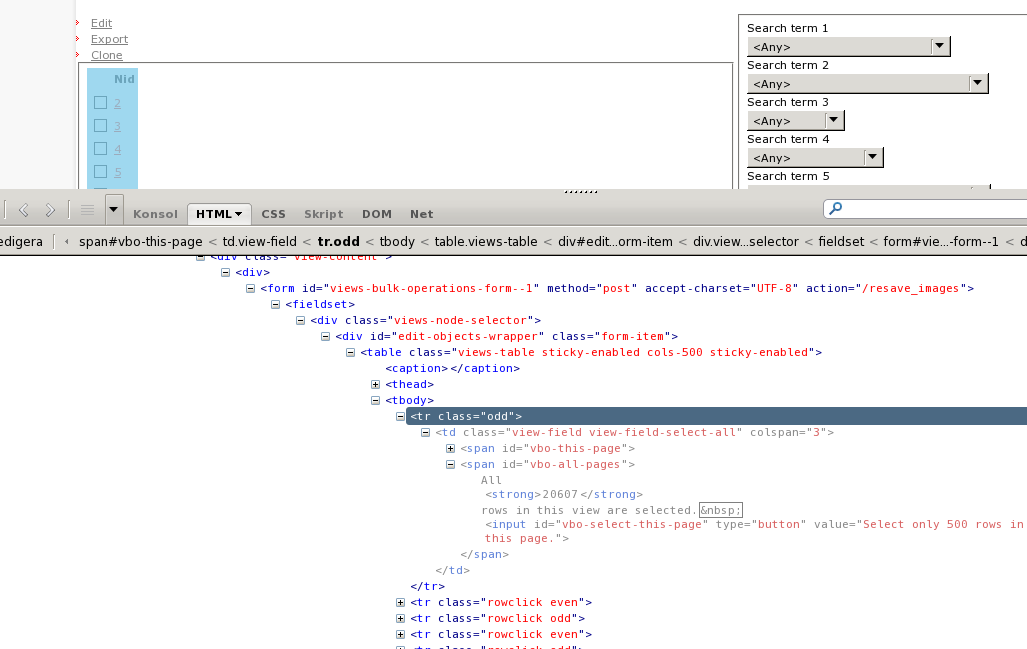
sja1 commentedThanks, I appreciate the time you put into this. If it helps at all, I created a copy of the website having this problem (same dedicated server, different domain), and on the copy the problem doesn't manifest itself... very strange. Looking at the source code generated, in firebug I do notice a difference in the html shown before before clicking any text boxes.
If I just use the "show source" option on my browser, both sites show the following line, with no differences between them:
However, if I use Firebug to inspect the html, I see that on the copy in which the "select all" button works, the TR has an additional attribute:
style = "display: none;"I can also see that in the source html of the site with the problem hat the button definitions are in the HTML, but the button just doesn't seem to be made visible when the select all check box is marked.
Could this possibly point to an issue involving javascript? Unfortunately, I don't know javascript, but it seems like its a javascript action that isn't executing (assuming javascript is what is used to make the button appear).
Comment #15
druplicate commentedIt's not obvious but the first check box in the left column is the select-all check box and when checked it activates the other button. It's just missing the "select all" label.
Comment #16
infojunkie@sja1, does druplicate's comment apply to you?
Comment #17
sja1 commentedI don't think so. I click that checkbox, all the rows gets selected that are visible on the current page, but the "select all" button never appears to allow me to expand the selection to all the rows that are on subsequent result pages.
Comment #18
grahamu commentedThis issue is also affecting me, subscribing.
Comment #19
cindyr commentedRe #15 - any patch for putting the "Select All" label back in? Looks like the problem is somewhere in here, but I haven't a clue how to fix it:
views_bulk_operations.js
Comment #20
summit commentedSubscribing, greetings, Martijn
Comment #21
infojunkieTo all posters: please upgrade to 1.10-beta1. Is there any change?
If not, please install the Firebug extension on Firefox and do the following:
* Open the Firebug console
* Click the Console tab in Firebug
* Navigate to your VBO that exhibits the problem
=> Is there any Javascript error that is displayed?
Also, please attach a screenshot of what you see to help me visualize the problem. Thanks!
Comment #22
Useful Idiot commentedI am having the same problem, the select all rows does not work for me. I opened firebug and clicked console, there are no javascript errors reporting.
Comment #23
verta commentedSubscribing.
Comment #24
Letharion commentedI have the same issue. Neither the select all checkbox, nor the select all pages button appear for me.
They are both in the source code, but neither is displayed. I tried manipulating the CSS in Firebug as a workaround, but that doesn't help, which is very strange in itself.
I thought it was a theme issue, so I went back to Garland, didn't make any difference.
While I have no JS errors in the error console, I tried disabling JS, still no effect.
Generally fiddled back and forth with pager/ajax/number of items, mainly in a random fashion, can't get anywhere.
Same issue in both Firefox 3.6 and Chromium 9.
Attaching two screenshots that hopefully makes the problem clear, if it's not already.
Comment #25
Letharion commentedI looked around some more, and I found both the div holding the checkbox and the button hidden behind the administrator menu (http://drupal.org/project/admin_menu). This despite me being on the "top" of the page.
I'll check if this is repeatable later, but wanted to write this down straight, in case I forget about it.
Comment #26
Letharion commented#25 isn't reproducible unfortunately.
Current, and repeatable situation.
The "checkbox" and button are both hidden by "display: none".
If I fix this with Firebug, then I get the text "All N rows in this page are selected", but they are not selected.
The button shows up, but doesn't work.
Comment #27
Letharion commentedAnd all of a sudden, the problem is gone.
I wish I could say what changed, but I don't know.
Comment #28
giorgio79 commentedTry clearing cache.
That solved the issue for me. Whenever there is an update to VBO or a change in the view, the cache can bork it for you :)
Comment #29
bojanz commentedReopen if you can still reproduce this with 6.x-1.x-dev (which changed the way it does select all compared to 6.x-1.10)
Comment #30
vchen commentedIt's been over 3 years since this original post, and I'm using 7.x-3.1 and I'm still having this problem. The preview for select all on all pages looks like it works as it should, however, once you go to the actual view, I can't click on the select all button. Sometimes it shows up, sometimes it's hidden. When it's there, I can't get it to even click.
One time I was able to click on it, but with the help of Firebug, but even then it doesn't do what it's supposed to...select all.
Any developments on this issue??
Comment #31
ressaI can access the "select all" checkbox via /admin/content/node2, but not via a custom view.
Comment #32
Yorgg commentedIn my case, I can only see this the checkbox in the view's preview.
Tested with jQuery 1.4, 1.5 and 1.7
The view was left untouched.
Comment #33
washburn commentedFor my missing "Select all" checkbox - It was working in the Dev environment but not on Test or Prod.
The difference was the version of jquery I was using for the theme. I changed it through jquery update configuration and the checkbox now appears.