

Wopular is a news aggregation site that displays the top five headlines from the top fifty newspapers. Each newspaper is displayed on top of another in a three-column format, resembling an online version of a newspaper rack. It covers ten main news subjects - World, U.S., Politics, Business, Movies, Books, Entertainment, Sports, Living, and Travel. It was a simple site built with just four Drupal modules - Aggregation, Views, Panels, and CCK. You can read more about how that was done here.
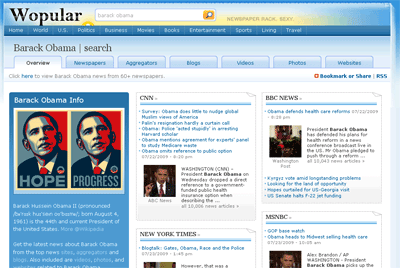
Since then, there have been several new features; the most significant being the new search bar, which is a search engine aggregator. It's located at center of the header, between the logo and the tagline. I wanted to expand beyond just 10 categories and cover every subject under the sun. However, since this is a one man operation, I didn't want to spend my days looking for a bunch of feeds for every single subject. That would make my days repetitive and quite boring. My solution was to find sites that generate rss feeds for their search results, put them all in a page, and organize them by tabs. The sites I'm using for this feature are top news sites (CNN, NY Times, LA Times), aggregation sites (Google News, Yahoo News, Digg), blog search sites (Twitter, Technorati, Google Blog Search), videos sites (YouTube, Hulu), photo sites (Google Images, Flickr, Yahoo News Images), and search engines (Yahoo, Bing). Oh yeah, I even include Wikipedia snippets. Overall, this search engine aggregates search results from over a hundred websites, mostly news related ones because that's the focus. As an example, here's a search for Barack Obama.
Still Sticking with Drupal 5
Since the Aggregation and Panels modules are integral to the site, I'm still waiting for those modules to release a final version for Drupal 6 before I upgrade.
History - Article Search or Aggregated Search
When I first implemented search on the site, it was to search individual feed articles so I started with Drupal's default search engine. After a couple weeks and racking up over 100,000 articles, search became really slow - 10-30 seconds for each search. A month and over half a million articles later, it became unusable, so I disabled it. It was apparent to me that database search was not the way to go for such a huge database, especially on a shared hosting plan. I'm sure with some tweaking, it could work, but I wasn't willing to invest the time. Besides, I figure if people wanted to do an article search on Wopular, they could always use Google ("site:www.wopular.com Barack Obama"). That's when I decided, in keeping with the spirit of the site, I should just search other sites and aggregate the resulting searches. That's right, let the other billion dollar enterprises do the database crunching for me. In return, I'll send them traffic (although at this moment, it's minuscule).
Requirements
I needed a module that would generate lightweight items (flat database records) from feeds instead of writing them directly into the mysql database, like my current setup. My current database is almost 4GB with 500 plus feeds writing to it. That's about 3 million nodes. Because of its size, I spend a decent chunk of my time optimizing queries to improve its performance. The lightweight route is interesting because no database is involved. Most of the existing aggregation modules in Drupal (Feed API, default Drupal aggregator) already have a lightweight option, so that's good.
I also needed this module to allow me to enter each feed url with a variable value for the search keywords; in other words, this module must accommodate a dynamic feed url.
Instead of a fixed feed url in this format:
http://www.rss_feed_url.com/?keyword=barack+obama
It needs to be one where the keyword can be changed dynamically:
http://www.rss_feed_url.com/?keyword=<?php print $keyword; ?>
This was where I ran into a brick wall, because none of the current aggregation modules would allow me to do that. The great thing with Drupal is if none of the existing modules does what you need, you can create your own. And that's what I did. Before I started coding the module, I needed to pick an XML parser. I heard of SimplePie from the Drupal community and started testing it out. With SimplePie, I can compose the feed url before sending it to the parser. It really was simple. Download it, set it up, and you can start retrieving data from rss feeds in minutes. I didn't use much more than what's on those links with SimplePie. The only other function I used was get_enclosure to grab the thumbnails. That's really it. Simple as pie. With that out of the way, I started designing the pages.
Design
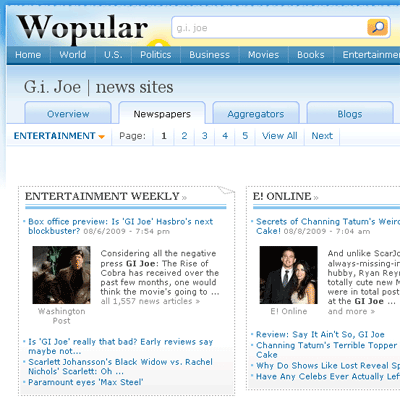
Because there were over 100 feeds, I wanted to break them up into several sections using a tabbed navigation - newspapers, aggregators, blogs, videos, photos, and websites. An overview page that displays a chunk of feeds from each section was added and served as the default page.
Overview Page
The overview page has two main components - the left sidebar and the content area. The left sidebar consists of four main (wikipedia description, photos, websites, and videos) and two optional modules (featured news, related topics). Those modules only highlight five or six items from each respective section. The content area consist of three main modules - top 18 newspapers at the top followed by aggregators and blogs. The content area selects a subset of feeds from each respective section.
The Newspaper Section
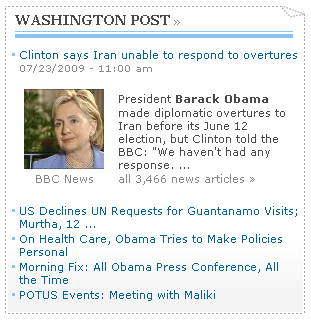
This is, by far, the most populated section with over 80 feeds from newspapers (NY Times, LA Times) and news sites (CNN, Fox News, MSNBC). Because there are so many feeds in this section, it's broken up into four pages with an option to view all of the feeds on one page. There's also a dropdown menu to add more feeds based on category (politics, business, movies, entertainment, and sports). If you click on the entertainment selection from the dropdown menu, you would get additional feeds from sites like Entertainment Weekly and E! online, for instance. The feeds are laid out in a three-column format like the Full News Rack pages. The design of the individual feeds is slightly different - the first item with an image from each feed is highlighted. Also, mousing over a headline will display a teaser for the full article.
Video & Photo Sections
In these sections, images (instead of headlines) are displayed when they're available. I wanted all of the images to have the same width and height without distortion, so they would stack up evenly. I used a user contributed php function called getjpegsize() from php.net to get the remote image's dimensions, and then use CSS to resize them to fit a fixed area. I had originally used getimagesize(), but the user contributed version was much faster. I just copied the code from php.net and stuck it in template.php. The awesomeness of open-source software.

Other Sections
The layout for the other sections are similar to the Newspaper section, except with no paging.
With the design done, I moved on to the actual coding of the module.
Custom Module - Aggregated Search
A custom drupal module using SimplePie was built to get the feed items, clean up their titles and descriptions, extract photos, and display the feeds. It works with the Panels module to put the feeds in a three-column format.
jQuery
At first, I resisted javascript and AJAX because I didn't know how to use either. But because these pages won't render until all of the feeds are done loading, they would take a while to display. I needed to use AJAX so that while each of the feeds are loading up, the page containing them would display immediately. I ended up using jQuery, a javascript library, because it's the most popular one. I also installed the jQuery Update module to make sure Drupal's using the latest version of jQuery. To learn jQuery, I went to the Tutorial section of the website and watched a couple video tutorials from "jQuery for Absolute Beginners: VIDEO SERIES" by ThemeForest. I watched the first 2 chapters (setting it up and syntax) and then skipped to chapter 10 (AJAX). They're 15-minute, easy-to-follow tutorials, so a total of 45 minutes is all you need.
Feed Types
Six types of feeds needed to be loaded with AJAX. The sidebar has five of them - the description image, wikipedia description, photo samples, list of websites, and video samples. The content area has the last feed type - a list of headlines with their moused-over descriptions. A drupal page was created for each of them (create content > page) with the input format set to php code. These pages use functions in the custom module to parse and retrieve the headlines and descriptions. Once that's done, AJAX is used on each main section (overview, newspapers, aggregators, blogs, videos, photos, websites) to load them up. For feeds with no results, jQuery was used to hide them. The "loading..." animation was created from ajaxload.info - a very handy site to create a customized loading animation.
Hosting
I eventually outgrew my shared hosting account at Hurricane Electric (he.net). I was sucking up more than my share of the resources, causing the shared server to crash at least once a day. They eventually found out and put a resource cap on my account which prevented my feeds from updating and my pages from rendering. I moved my site to a VPS at Linode because I've heard good things about them and their prices are cheap. They also have the best customer service through their IRC channel. I didn't know anything about setting up a LAMP environment, but they walked me through the entire process.
Other Upgrades
Like I said in the intro, the search bar is just one of a handful of updates to Wopular. Here's a couple more:
Nodes - converted default template to current design and added a related news module. I had originally used the Related Links module, but it was really slow because of the size of my database. I wrote a quicky and simple one based on the term. It's not fancy, but it works.
Taxonomy - converted default template to current design and added a related topics module. The related topics module looks at recent articles from one term and gathers other terms from those articles and lists them on the left sidebar. If you're looking at the taxonomy page for "Barack Obama," and you wanna know what he has to say about the economy, all you have to do is click on "economy" on the left sidebar.
Other Modules
Boost - I was using Drupal's default page caching and decided to test this out when I read about it on the Dogfish Head Craft Brewery showcase. Drupal uses database caching; Boost caches pages in flat html files so it's faster and doesn't hit your database. All I gotta say is "Wow!" It brought my server load down by at least half. My site usually crashes 4-8 times a day. I set it to reboot whenever it runs out of memory. It only takes a couple minutes to reboot, so I didn't mind that too much. It's just that once in a while a table would get corrupted, but that's usually an easy repair job (so far). Ever since I installed Boost (and APC), my server hasn't crashed at all (knock on wood). Awesome module. I might downgrade my account with less resources and save some money.
Taxonomy Manager - If you tag your articles, this is an indispensable tool to manage your terms. You can search, delete, merge, and edit taxonomy terms. Very handy. I use it on a daily basis.
Pathauto - Automatically generates search engine friendly urls.
Future
Currently, the search aggregator does exact searches only. It's not perfect. If you search "books," it can't tell whether or not you're searching for literature or you're trying to book a flight. I plan to incorporate other search options available from the original sites, like being able to use AND/OR operators, and do more fine-tuning. I also plan to add more sources - in particular, video and image sources. And no search engine is complete without a directory listing.

Comments
It is really a great
It is really a great work!!
Very good link for jQuery tutorials. Actually i was also hesitating to start learning jQuery. But i will certainly watch these tutorials to learn jQuery.
Thanks
---~~~***~~~---
aac
Performance
Glad to see boost is working wonders for your site! Since your on 5.x still, I would email and ask for pressflow as that has the no locks db patch as well as some other tweaks for speed (just a fair warning, pressflow and boost for 5.x might not be compatible, as I had to fix an issue with 6.x #530772: Work with Pressflow drupal). Next step would be to change the tables that get written to by multiple threads into InnoDB instead of MyISAM. Generally thats tables like comments, watchdog, ect...
When you upgrade to 6.x, it'll be worth it!
Hey Mikey, Um...I just found
Hey Mikey,
Um...I just found out that although the pages are caching, they're not expiring! Even though I set the cache limit to 1 hour, my site hasn't updated since I installed the module. My cron is set to run every 5 minutes. I'm temporarily disabling it the module just so new content can go up. Any idea what's causing that to happen? Thx.
Upgrade
I decided to tackle 6.x and leave 5.x in the dust, since none of my sites are on 5.x. I'll try to answer your question in the issue, but I can't guarantee anything.
The one good thing out of
The one good thing out of this is that without boost, my system is still very stable. So I think most of the gains I've seen from CPU and memory usage were from installing APC. And it's pretty significant. I reclaimed about 30-50% of memory usage and CPU usage went from about 60% to 20%.
So now I'll just wait for the Drupal 6 upgrade and install Boost then.
Upgrade to Drupal 6
Hiya,
I think the system looks great and im interested in implementing something like it for arts organisations in the UK, did the upgrade of the modules ever make it to Drupal version 6.
Cheers
Simon
Looks like Panels 3 for
Looks like Panels 3 for Drupal 6 is ready. Aggregation is still considered beta. You can try it out ... or use Feed API instead.
Hi, Great job! I am doing
Hi,
Great job! I am doing something like this here in Russia.
Now I am stuck with several problems. Feedapi doesn't retrieve pics, ones that have their own urls within a parent feed. Did you use emfield module to get videos?
Cheers)