

 The 2026 Drupal Business Survey is open. Your response will help shape the future of the Drupal business ecosystem.
Will it sort numbers naturally
for example
cat 1, cat 2, cat 3, cat 4, cat 5, cat 6, cat 7, cat 8, cat 9, cat 10, cat 11, cat 12.........
instead of
cat 1, cat 10, cat 11, cat 12, cat 13, cat 14, cat 15, cat 16, cat 17, cat 18, cat 19, cat 2......
which is how views sorts them now.


Comments
Comment #1
retsamedoc commentedI'm not currently up to the task as I am working on a few other modules, but there is some preliminary code in the older natsort (http://drupal.org/project/natsort) module for 5.x. It appears to be able to do numeric sorting (including numbers within a line of text) using SQL functions.
It should be possible to port some code and absorb the features of said module.
Comment #2
ari-meetai commentedA feature sorting like:
ORDER BY CAST(mid(c1, 1, LENGTH(c1) -5) AS unsigned)
Would be great.
Anyone knows how to accomplish this with a module?
Comment #3
Anonymous (not verified) commented@ arielon
It's not a solution to your post but I wanted to come back to this thread with an update.
In the end I 'cheated' and updated the single-digit nodes to have a preceding zero, effectively turning them into double digit numbers. I thought the order was more important than what the client would say about them being out of sequence!
I still think the idea of natural sorting is great.
Comment #4
sapark commentedWanted to share a 'cheat' for theming the column to not show the leading zeros while still sorting to look like natural sort:
in the Views template file for the field -- example views-view-field--field-myfield-value.tpl.php (copy views-view-field.tpl.php from views/theme to your theme)
you could enter
to get rid of leading zeros. Hope that helps.
Comment #5
Anonymous (not verified) commented@sapark Thank you for taking the time to post - it is appreciated.
Comment #6
bartezz commented+1 for this feature!
Comment #7
danchadwick commentedPossible solution here: Issue 558668
This is not a complete solution because it does not address negative number. I believe decimal numbers (positive non-integers) will work, although I haven't tested it. Scientific notation definitely won't work. It also hasn't been tested (since I'm not actually using this module).
Comment #8
generalredneckI'm not sure that scientific notation would be a big enough use-case, but this does present an interesting problem set.
DanCadwick's solution would work for Quartz's usecase, but I'm thinking I'm going to need to think this one through a bit to get it to work for decimals and negative numbers (assuming there is a use case for that). I'll keep this up to date with my progress.
Now this feature won't support something crazy such as
1 cat
cat 2
ca3t
and order it that way... just so everyone is clear... it would in fact, order based on number placement. So if you place all your numbers at the beginning of words, they will all be ordered together regardless of the word. such as:
2 apples
20 oranges
35 apples
112 mangos
instead of
2 apples
35 apples
112 mangos
20 oranges
Notice the words are ordered alphabetically and the numbers are ordered in increasing order.
Hope that makes sense and is acceptable. Any objections to these limitations?
Comment #9
deekayen commentedThis was originally posted to #1791950: Numeric Sort and #1711948: Numeric Sort . All I did was turn it into a patch file and test 6.x-1.x so mgbellaire should get the git attribution.
Comment #10
generalredneckThis is actually a step back from DanChadwick's work from #558668 where he implemented a fix in conjunction with adding a few other words. From what I can tell, it looks as if the numeric sorting can only be at the end of the word group. Unfortunately this is unacceptable for the feature.
With that said deekayen, I really appreciate you bring my attention back to this project. I've learned a lot since April and I can probably whip something out that does what I posted in post 8 above.
Comment #11
deekayen commented#9 does what I needed. I'm not entirely clear what scenario isn't covered, but the view I tested has node titles like this, which #9 showed "naturally".
Comment #12
generalredneck"|^([a-zA-Z]*[\.]*)([0-9]+[\.]*[0-9]*)|",So if you read this... it says At the beginning of the string, check for any or no letters, and possibly a period, then make sure there is at least 1 number. then any other periods (like a decimal) and then more numbers
so anything like
A1.0
A22.00
A.0.1
will match
But anything that has a space will not...
With that said then
A 1.0
A 22.00
A 0.1
will not match and therefore break the sorting order.
If you add the space, then you get this problem...
I only takes in to account that you will only want to ever sort by the first number you come across... However, this will cause complications in something like the following (edge case I know)...
Book of 1337 skills Vol 1
Book of 1337 skills Vol 10
Book of 1337 skills Vol 2
I hope this makes sense... I'm not trying to be harsh, I'm just stating the limitation of using that particular regex.
Comment #13
danchadwick commentedI don't use this module, but I keep seeing difficulty with this. I updated the code I use in my module, and I thought that I'd share. For a contrib module, I'd put some things in the variable table to allow admins to adjust them for other languages / countries. These would include the regular expression for leading articles, punctuation, and small words to ignore, plus the decimal and thousands character.
and for informal testing:
Calling test('123,456,789.123456,789000') results in:
I have no patch to offer, but it should be trivial to turn this into a patch / patches. I hope this helps.
Comment #14
generalredneckSo it looks like you are doing a simular thing I am with negative numbers. I just haven't gotten the code committed yet. I'll take a closer look at it since I used your work from one of my other issues.
Comment #15
generalredneckOk Here is a patch for d7. I'll roll one for d6 shortly. When this code gets taken, attribution will be given to DanChadwick. I've made some modification because of notices, and wanted to make the doc blocks a little nicer, but for the most part this is a port of Dan's code nearly to the letter. I just wanted to run it by all of yall before I committed it. In my tests I came up with the following:
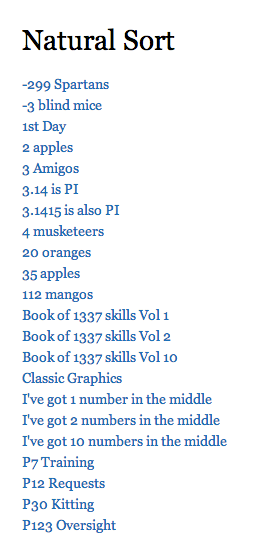
It may not be a complete set of use cases, but Dan's informal test most certainly would be for the number sorting alone. What says ye, the members of the community?
Comment #16
generalredneckI also wanted to note that this is a huge first step, but that I will work on the other bits like separators and what not when this goes in.
Comment #17
danchadwick commented@generalredneck: May I ask what notices you found? I didn't get any and the only change I can find is the stylistic one of concatenating two mutually-exclusive strings v. using a trinary operator "empty()?" test. I would like to roll fixes back into my code.
What other bits you want to add? I'd like to backport them too. One might try to strip anything that isn't a unicode character or number using \Pxxx, but I'm not sure if all PHP environments are compiled with this support. Or one could use str_replace to strip out some common punctuation.
I found this interesting reference: Unicode v. RegEx
Comment #18
generalredneckactually it's not just stylistic. I was getting notices when I was dealing with numbers that had decimals in them that said "Notice: Undefined offset: 4 in _views_natural_sort_number_encode_match_callback() (line 160 of /var/www/example/sites/all/modules/views_natural_sort/views_natural_sort.module).". Therefore, with this way, if 4 isn't available, 2 will be displayed and vise versa. Unless this is logically wrong of course... THe way I saw it, we would either have 2 or 4... but never both, which is what you were relying on when you concatenated the 2.
Most of it was doc block obviously. I think for the commas and stuff I'm going to use a variable like you said, but default it to what ever the local says it's supposed to be. We will see if I can get this all going...
Good thoughts on the extra strip outs...
Comment #19
danchadwick commentedInteresting. Must be a difference in PHP version, platform, or compilation options. I don't believe the preg_XXX spec specifies what will be returned if an alternative match path is not taken. On my development machine, it returns empty strings. Apparently on yours it returns nothing (missing array elements).
Alas, empty() isn't right either. On a machine like yours that returns nothing (rather than empty string), when $match[4] == "0", your code will then select $match[2], which would of course be NULL. empty("0") is FALSE. Casting NULL to an int would throw a notice on your machine.
So to handle all situations, I think we need:
Phew. Learned something today.
Comment #20
generalredneckWouldn't a simple
isset($match[4]) && $match[4] !== NULLwork? I would think it would be slightly more performant as well as more readable. What you think?Comment #21
generalredneckOoooooh I see. K yours it is... We don't want it to match an empty string either.
Comment #22
generalredneckAlright, I think I've got these worked out... Reviews are welcome... If these go in... this will be a 1.1 release for D6 & 7. There is a patch for both here.
Comment #23
generalredneckAlright guys, I've done some extensive testing on this. Any issues you all find with it in the new 1.2 release, please make a new issue.
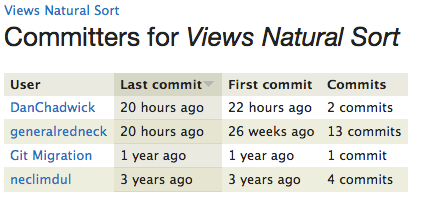
Want to say a big thanks to both DanChadwick and deekayen for all the help they have been! And of course Quartz for bringing up the issue originally. Over 3 years ago! (before my time as maintainer I might add).
Btw DanChadwick... Congratz
Comment #24
adam_b commentedyay! applause, congrats, etc - this is really helpful