I have an installation at:
uomeds.com
I am trying to get a background header image and then layer a logo over it, exactly as seen here:
http://www.spreadthunderbird.com/
I tried modifying style.css in my sub-theme to:
#header-wrapper {
background: #ffffff url('images/preface-wrapper-bg.png') repeat-x top;
padding-left: 15px; /* LTR */
}
As you can see, it can load the test image, but only shows the first bit of it, below which it just goes to white.
What is blocking out the background from displaying and how do I fix it?
It is a great theme, but I need this header. In all other respects, the theme is unmodified.
Thanks.




Comments
Comment #1
jwolf commentedUsing Firebug, I see that
#headerhasbackground-color: inherit;- you need to change that totransparentor just completely removebackground-color: inherit;.style.css (line 254)
Comment #2
uomeds commentedThanks. I removed it but with no effect.
I think the problem is somewhere in the primary links section. When primary links are disabled, the header background meets seamlessly with the slogan background. But when primary links are enabled, they produce a big white bar behind them as you see currently.
http://uomeds.com
Any further help would be very much appreciated.
Comment #3
uomeds commentedI figured it out. The key section is under "TYPOGRAPHY"
body {
background: #FFF url('images/BACKGROUND.png') repeat-x top; /* body background url goes here */
"#header-wrapper" should be:
background: transparent;
Also, under "#primary-menu":
margin-top: 0px; /* will adjust buffer above primary menu links */
Then you just have now mod the corners (tab-left.png and tab-right.png) of the primary menu to show transparency. I'm going to re-chop them out from the provided PSDs and overlay them over the existing PNGs to get perfect positioning.
And there you have it - Acquia Marina header backgrounds.
Comment #4
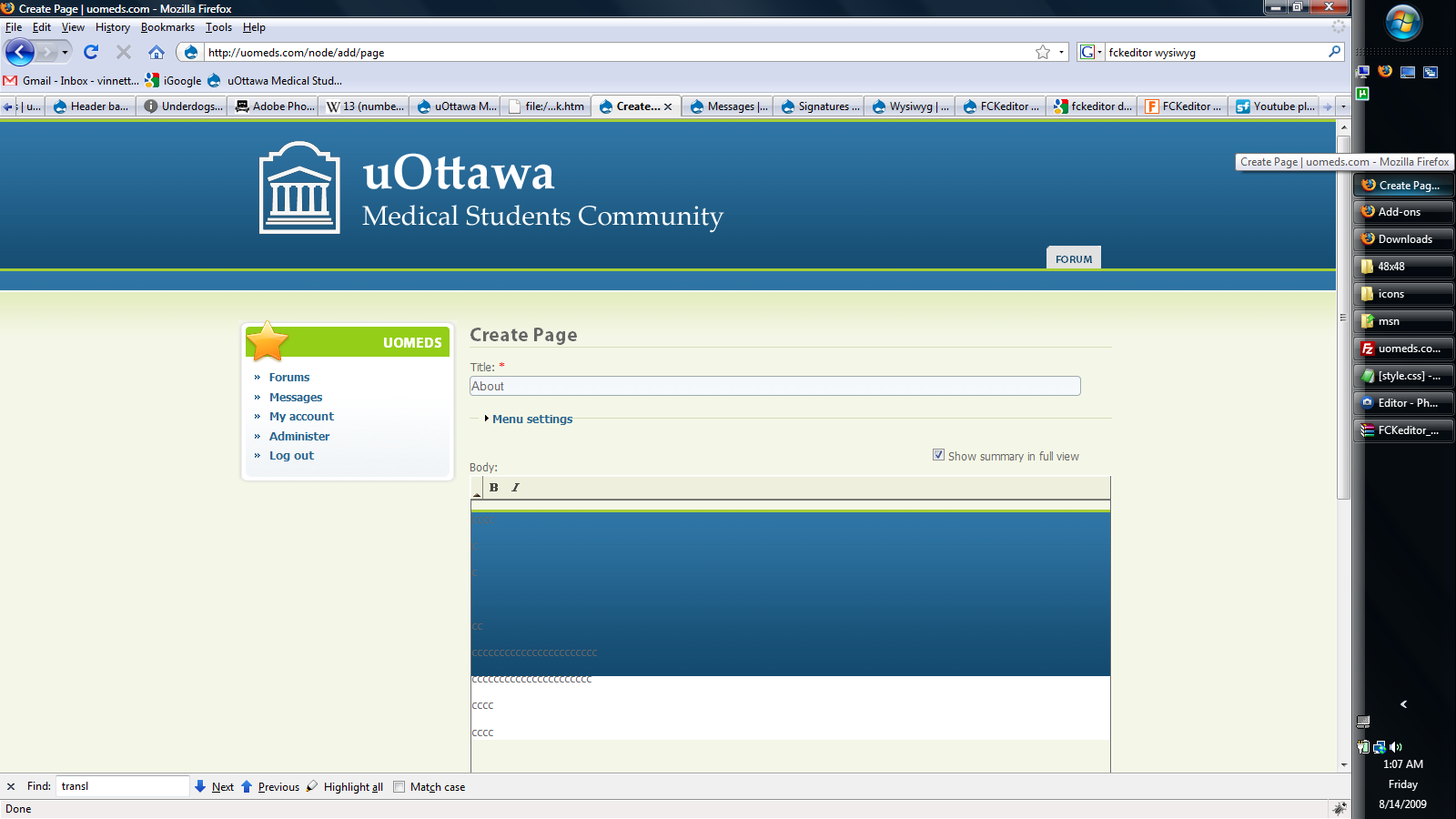
uomeds commentedProblem. The background image is being inherited to the background of content entry forms. It does not show up once these stories/pages/forum posts are made - only during editing.
I've attached a picture to demonstrate.
Does anyone know where the form format is specified in Acquia Marina? Perhaps I could make a new class for them in style.css called "form-body" with just a white background and tell them to use that instead.
Comment #5
uomeds commentedOkay, I figured it out. It seems to be a problem with sub-theming, so if you want to mod your Acquia, DO NOT do it via a subtheme. You must set up a new theme for this to work.
To do this, copy and paste the "acquia_marina" folder and rename it to say "acquia2". Then rename the "acquia_marina.info" inside this new folder to "acquia2.info". Inside "acquia2.info", change the name line to "name = Acquia2". Upload acquia2 folder to themes folder and set to default.
To get backgrounds is then very simple. Open style.css in your acquia2 folder.
Under the typography section set:
body {
background: #FFF url('images/headerbg.png') repeat-x fixed center top;
Under the headers section, set:
#header-wrapper {
background-color: transparent;
You can also if you want adjust the padding above the primary menu link tabs via:
#primary-menu {
margin-top: 12px;
That's it and it should work perfectly.
Comment #6
uomeds commentedFor future refernce, while the inherited background to my WYSIWYG forms went away by itself, when I switched to TinyMCE for other reasons, it returned.
Luckily, there was a simple fix here:
http://drupal.org/node/492770
Just add:
to your Acquia style.css, for example, under the TYPOGRAPHY body codes where you define the site/header background and this takes care of it.
Edit: a better fix is to go to admin/settings/wysiwyg/profile and set css to use default editor css.
Comment #7
markconroy commentedI'm still having problems with this.
I want to put the image (attached) header.png as the header but most of it is hidden under the primary links area. I've changed the theme name to a_walk_in_ireland and followed the instructions about about changing inherit to transparent and taking out repeat-x to no-repeat.
Also attached is screen shot of where I presently stand.
Any ideas? I'm doing the site for a friend.
Thanks,
Mark.
Comment #8
jwolf commented