

 The 2026 Drupal Business Survey is open. Your response will help shape the future of the Drupal business ecosystem.
1/ I tried to deleted the old content type, but found still show up in the navigation menu.
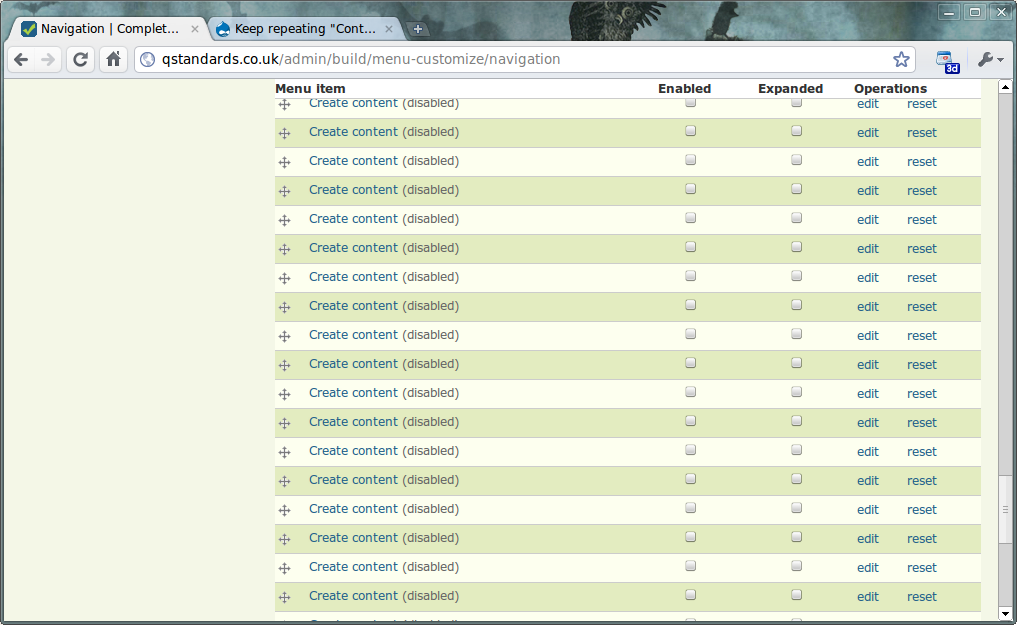
2/ Whenever I create a new content type, a new/repeated "Content Type" button will show up on the menu, cannot deleted, I can only disable, now I have like more than 10 disable "Content Type" Menu.
3/ When I create a new content type (e.g. Album), the "Alblum" menu did not shown up under the "Content Type" menu, but fall at the bottom of navigation menu.
4/ Recently, whenever I tried install new Modules, the menu does not fall in the right place, (e.g. Custom Link, it create another "Site Building" menu with the "Cusome Link" in, but it does not show up on the Adminster Page, I have to click on the navigation menu on the side to see them.
However, ther is no error message, but I just keep having repeating meun such as "Content type", "Site Building"...etc. Now I am using Drupal 6.13, with CCK
Thanks!
| Comment | File | Size | Author |
|---|---|---|---|
| #21 | delete_menu_item.jpg | 105.75 KB | jdoggett |
| #20 | Screenshot-Navigation.png | 140.18 KB | peternickson |


Comments
Comment #1
markus_petrux commentedThere should be something wrong in your installation.
When a content type is deleted, the node module invokes hook_node_type('delete'). This is implemented in content.module, and here CCK invokes content_type_delete() to delete all fields related to the content type being deleted. Also the fieldgroup module implements this hook to remove information about groups related to the content type being deleted. Once this is done, CCK clears its own cached information to force a rebuild of the cached data about fields and field groups in the system.
Regardless of this happening or not, the menu items under "Content types" are built by the node module. When a content type is deleted, the menu is rebuilt, so the changes should take effect and you should not see any option to create a content type that has already been removed. If you still see menu items related to content types that do not exist, this is something wrong in your installation.
You should analyze the modules installed, and see which is causing this malfunction in your system.
Comment #2
markus_petrux commentedComment #3
JirkaRybka commentedI had a lot of similar symptoms with menus, while testing my 6.x upgrade (on a testing server, fortunately). For instance, menu links of re-enabled contrib modules caused duplication of parent items (usually categories inside /admin/), or single items appeared in wrong hiearchy (i.e. on top-level of /admin/, not shown in the page-listing of admin links, only just in navigation sidebar block - happened with devel and fivestar in my case, but that's just coincidental). Also old, long disabled, 4.7.x items were back, and in weird places, and I even got error messages (in event.module, but it wasn't the real culprit). I deleted a lot of weird menu items manually from database, but new ones kept appearing once in a while.
The initial poster here didn't mention the history of his site, but in my case, this was a problem with the 5.x->6.x upgrade of the core menu system. After all my problems and testing, I concluded:
Drupal 5.x->6.x upgrade of menu system only works for links, that were NOT customized in any way.
So, my recipe for 5.x->6.x upgrade is: First, visit 5.x menu administration screen, and click "reset" operation on ALL links, where it's available. Only then proceed with the 6.x upgrade. Finally on 6.x, redo all your customizations (like reordering of menus and the like). This is the only way, how I managed to upgrade my site.
I wonder whether this is relevant to this issue, and aside from that, whether it's already included somewhere in upgrade documentation.
Re-opening this issue in hope, that my feedback gets a bit of attention, so that we can decide whether we've uncovered a bug with core menu system or not (or a missing bit in documentation - at least http://drupal.org/node/340073 doesn't say anything about this), before closing again. Now waiting for a feedback from original poster, to determine whether my input is relevant here - if so, this should be moved to core queue IMO, otherwise closed again.
Comment #4
michael.k commentedI'm having a problem that may relate to this issue. I'm using Devel Generate and Taxonomy Menu to create dropdown primary links for testing purposes (in preparation for a complex taxonomy structure). When I change the taxonomy content that originally built the menus and tell Devel to delete any previous nodes, the content is deleted but the primary menus remain with no viable page content attached.
No workaround at this point except that I've tried to reduce all content to one node with Devel and to make that a primary link with all the other null primary menu items as children, then to make it a secondary link while checking "Select to rebuild the menu on submit." That breaks apart the null menu items from the functional ones but I'm still left with primary menu items that can't be deleted.
Comment #5
markus_petrux commentedI think this is not related to CCK itself.
It is the node module who build the main links to add nodes and/or administer content types. If these menu entries are still there after deleting a content type, it could be that the nodes/node types tables are inconsistent, or there was an error when the menu was built. Try visit the module administrarion screen to force a new menu rebuild. If that doesn't help, then you may need to check the consistency of your nodes / node types related tables.
Comment #6
JirkaRybka commentedI would also suggest to "reset" customizations from menu administration screen, for any menu items, that are parent to the troublesome one (and have the "reset" link - as I outlined in #3), and THEN force rebuild.
Comment #7
kim123 commentedI did try to reset, it deleted that content type, but it create a duplicated "Create content" menu, very strange. Since I still have time. When I do is to rebuild the site and cut down the modules I need. I think it might be the conflict with one of the modules. So far it seems far, I just have to check once a while and whenever I install a new modules. Thanks all.
Comment #8
JirkaRybka commentedJust like my previous struggle with menu items in admin... Seems like some nasty bug is lurking in the menu system, but that needs its own issue (which I won't open, because I don't have enough information about the bug).
Comment #9
kim123 commentedAs today, I find another issue than, the Description of the Content Type is NOT updated or changed now on the Page of Create Content or node/add page. It is kind of strange. It is not a big issue now, but I am afraid it might cause other issue. Thanks!
Comment #10
Anonymous (not verified) commentedI have same issue
Comment #11
kim123 commentedI fixed them, but press the "reset" button. it seems now they are ok, the description and others things get update now.
Comment #12
tobiberlinI'd like to subscribe as I have the same issue: deleted content types are still listed in node/add page as well as in navigation - on the node/add page you find name and description of the content types but whe you click on the content type names (where a full and "correct" link is generated) you will be redirected to node/add.
@kim123 - which "reset" button do you mean?????
Comment #13
Ela commentedSame issue here.. old content types show on navigation menu.. any fix to this yet?
As the rest, when I click reset, it deletes the old content type but it also creates "Create Content" new menu that I can not delete.. (Can we delete any of the navigation items besides the ones we manually add???? ) .. I can only disable it.
Comment #14
webservant316 commentedsimilar here.
first, I noticed that my ubercart 'product' content types were visible to users that had no permission to create ubercart products. this may have happened when I upgraded to ubercart 2.2. so I began to poke around with permissions, my taxonomy access control module, and rebuilding permission to try to solve the problem. then I began to fight with the navigation menu thinking that the problem was there. I clicked the reset button on the ubercart 'product' type menu item and it renamed the menu to 'content type' moved it up a level and pointed it to node/add.
and now I cannot edit where it points to or delete the menu item. this is weird.
is it not possible to delete navigation menu items?
can I simply restore or rebuild my navigation menu to the defaults and start over?
how and what items get added and deleted from the navigation menu?
the navigation menu is becoming unusable. maybe I will simply discard it and build and maintain my own menu.
Comment #15
Ela commentedIt most likely has nothing to do with Content Construction Kit (CCK) as original post, but with Navigation itself ... it would still be great to get some help. (.. I'm sorry I was not sure how to change this from Content Construction Kit (CCK) ...)
Comment #16
webservant316 commentedreply to my own post fyi.
so I did a coupld more resets...fearfully and was able to straighten out the mess.
however, I still have mutiple 'create content' menu items that I cannot delete, so I just disabled them.
would be nice to know how to delete these or simply rebuild the whole navigation menu.
Comment #17
Ela commentedSame for me... stuck with extra 'create content' menu items
Comment #18
kims commentedi deleted all 3 menu tables from my DB, then i ran update.php, after that i disabled the menu module, uninstalled it, and reinstalled it, and all my troubles and custom menu items where gone, now i only have to make my custom menu items again.
My site seems a bit quicker after i made this dirty trick, does that make sense?
Comment #19
szantog commentedOk, there is the perfect solution:
1. disable the menu module
2. DON'T uninstall it, because your primary and secondary menus will be dropped!
3. run the query on your db: DELETE FROM `db_name`.`menu_links` WHERE `menu_name` = 'navigation'
4. If you made other menu to solve this problem (eg. you made a special menu to create new content menu items by content types) run this query DELETE FROM `db_name`.`menu_links` WHERE `menu_name` = 'YOURMENUNAME'
5. enable the menu module.
This will recreate the navigation menu, and will work well.
Comment #20
peternickson commentedI'm experiencing the same problem. I have CCK, however all of the content types were deleted didn't use any CCK fields. I agree with Ela that it's likely not a CCK issue. I've just dumped all the links into a new "deleteme" menu. Any cleaner solutions?
Comment #21
jdoggett commentedI made a post just recently with a dirty answer. If you have a means to open your database file and edit it directly, go to table-menu links-menu name. From there you can search by name the menu, or if no name, a blank space. I fixed mine this way, just be careful what you delete. See image attached of a few menus I had with no name. Deleted now.
Comment #22
dqdthanks szantog! that was the only solution which helped here on D6 and D7.
szantog++
menu_rebuild(), devel menu rebuild, deep cache clearing .. it all doesn't help in some weird cases ...
Comment #23
gpk commentedThis looks like a dupe of #550254: Menu links are sometimes not properly re-parented and #363040: Created a content type, deleted it, still shows up..
Comment #24
gpk commentedOops that was wrong status.