

Closed (fixed)
Project:
User Import
Version:
6.x-1.2
Component:
Code
Priority:
Critical
Category:
Bug report
Assigned:
Unassigned
Reporter:
Created:
19 Aug 2009 at 05:02 UTC
Updated:
2 Jul 2011 at 14:51 UTC
Jump to comment: Most recent file

Comments
Comment #1
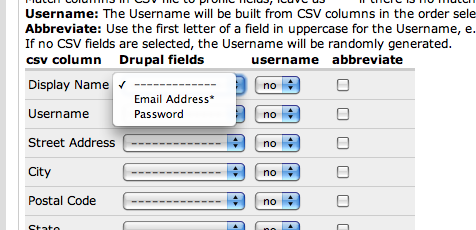
robert castelo commentedwhat other fields do you have set up on your site that you where expecting to see?
Comment #2
robert castelo commentedComment #3
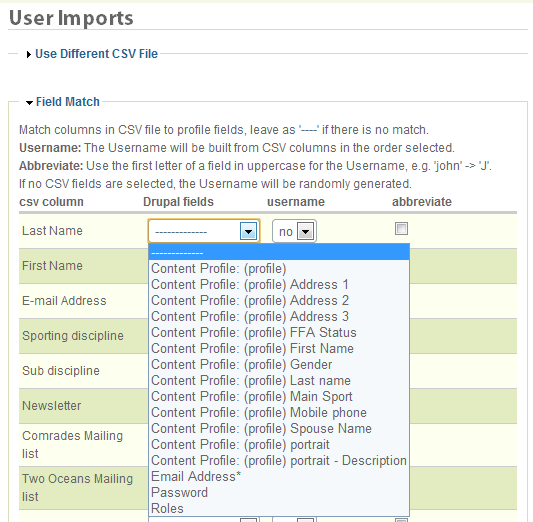
capoyeti commentedI'm assuming that @kenahoo is looking for content profile fields? I've got the same problem. I created a content type (called "person profile") that is used as a 'content profile' for my users on a site earlier this year, and can see the fields from this content type as per attachment.
Problem is - I don't remember what I did to make these visible. My new installation has the same content type - also set as a content profile for my users, but I don't see the fields when I setup an import (as per the original post here).
Any suggestions? - I don't believe it's a bug - just a setup issue.
Comment #4
capoyeti commentedUpdate.
I installed node import module, enabled it, and my content profile fields were available in the user import field mapping dialogue. I didn't make the change in the post mentioned above.. and got warnings when performing a test of the import.. hmm. Not happy.
Did more research and came across this post http://drupal.org/node/688766
Made the change to my content_profile.inc as suggested, and all is good! No warnings and working imports!!! Cool!
Comment #5
robert castelo commented