

Closed (fixed)
Project:
IMCE Wysiwyg bridge
Version:
6.x-1.0
Component:
Miscellaneous
Priority:
Normal
Category:
Support request
Assigned:
Unassigned
Reporter:
Created:
19 Aug 2009 at 14:27 UTC
Updated:
16 Mar 2012 at 10:52 UTC
Jump to comment: Most recent file

Comments
Comment #1
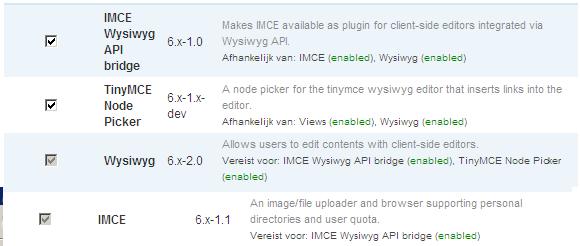
David.W commentedAlso here is a screen of the modules i installed.
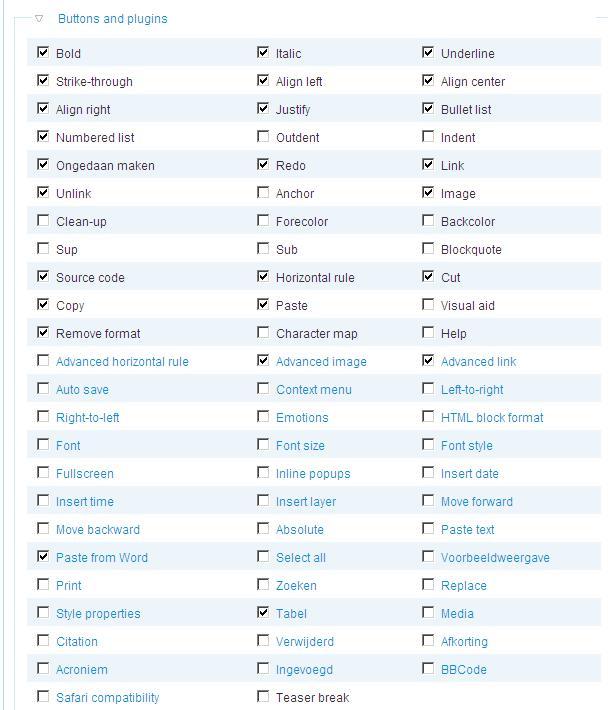
Both IMCE and Tiny MCE node Picker don't show up in the buttons and plugin page (screenshot from post above)
Comment #2
David.W commentedbump
Comment #3
Stephen Scholtz commentedAeroniro, can you try logging in as User 1 (superadmin) and see if the button shows up? We just ran into the exact same problem, checkbox not there for anybody, but as the super admin, it shows up.
Drupal: v6.13
WYSIWYG API: v2.0
IMCE: v1.2
IMCE WYSIWYG Bridge: v1.0
TinyMCE: v3.2.6
We were using this suite of modules a couple months ago, and didn't have this problem before:
Drupal: v6.12
WYSIWYG API: v1.1
IMCE: v1.2
IMCE WYSIWYG Bridge: v1.0
TinyMCE: v3.2.1.1
We have a role set up (Administrator) and have all the checkboxes available on the permissions page checked, but it only shows up for User-1.
Cheers...
UPDATE: Actually, even after you enable the IMCE button, the browse button on the insert image dialogue doesn't show up either, unless you're a super admin.
Comment #4
Stephen Scholtz commentedAhhhh...I forgot about setting up a IMCE profile. :P
#519174: Browse button only shows for User-1
Aeroniro, make sure you go to yoursite.com/admin/settings/imce and set up an IMCE profile (or use the existing Sample Profile) and assign it to the Roles you want to use the profile. Without a profile, and role doesn't have permission to use IMCE, and therefore the buttons don't show up (both in the editor and in the WYSIWYG settings). User 1 can see it because they always have a profile.
Double check your settings, and if you're still having issues, feel free to re-open this issue.
Comment #5
Jon Zeitgeist commentedHey guys,
I were with the same issue because I'm managing drupal with a common admin user (not User-1).
I just realize that, after install IMCE, I had no IMCE option at /admin/setting.
And to solve that we have to give a new permission to Admin roles.
Then, go to: /admin/user/permissions
imce module
- administer imce(execute PHP) --> Check this to Admin role!
Then, IMCE will be available at admin/settings.
Please, spread this information. Maybe it should be in IMCE's INSTALL.txt.
Jon