

 Come together with the global Drupal community in Rotterdam, 28 Sept – 1 Oct 2026. Sessions, contribution, connection, and Early Bird savings until 8 June.
This module will save me a TON of work if I can get it working!
I have an Address Book I've built using a Custom Content Type with a bunch of fields.
I have a Page View of it that is a Table, with all the fields in it.
I've tried creating a Mailing List display, attaching it to the Display of a subset of the entries.
I get 3 blank pages of output.
I've looked in the PDF files, and the pages don't actually contain anything.
So, I must be setting something up incorrectly. Any suggestions on what I should look for?
| Comment | File | Size | Author |
|---|---|---|---|
| #14 | Working01.zip | 698.63 KB | CasaDelGato |
| #11 | LabelExport.zip | 6.84 KB | CasaDelGato |
| #2 | LabelsViewSS.jpg | 103.29 KB | CasaDelGato |
| #2 | MLViewExport.txt | 69.6 KB | CasaDelGato |

Comments
Comment #1
acouch commented1) make sure that the Mailing Label display is attached to something
2) make sure of is that the fields and filters for the mailing label display are the same as the page display. if you've overridden either fields or filters the output will be different.
3) if you are using exposed filters make sure that the 'use exposed arguments' is set to true.
can you try these and see if that works?
Comment #2
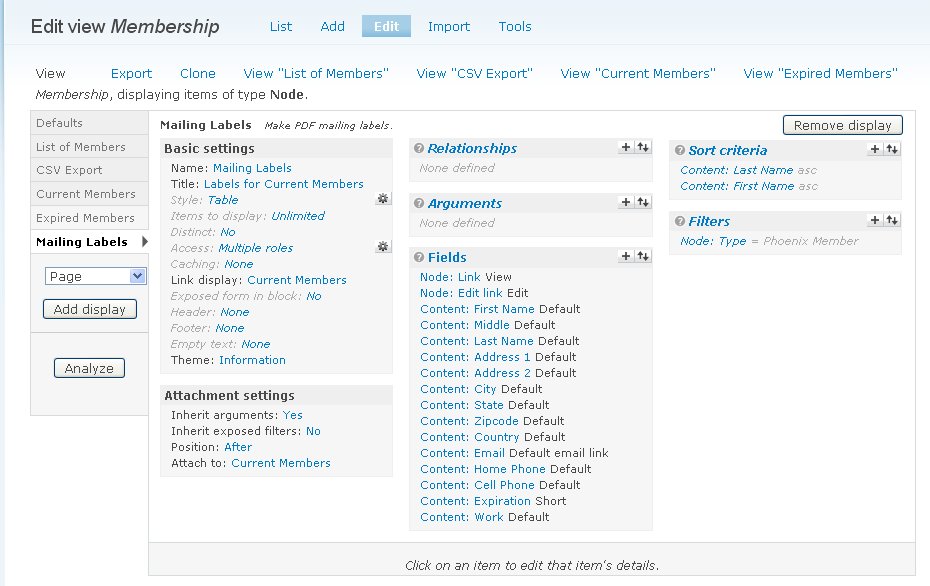
CasaDelGato commentedLabels are attached to a Page display.
No overrides from that.
No exposed filters.
I've attached a screen shot of the Labels view setup.
I've also attached the exported view.
I get a completely blank PDF generated, 3 pages.
Comment #3
CasaDelGato commentedNo other followup on this?
Comment #4
acouch commentedcan you tell what you get when you 1) turn on devel module 2) try and create a label and 3) got to http://yoursite.com/devel/variable/edit/mailing_label_results ?
Comment #5
CasaDelGato commentedOk, I had to figure out what you meant by 'turn on devel module', but I figured it out.
Installed devel, turned it on, generated labels, and checked the URL.
"warning: Invalid argument supplied for foreach() in /home/lussmyer/public_html/pewa/sites/all/modules/mailing_label/mailing_label.module on line 97."
Comment #6
CasaDelGato commentedOne other question, how does this module choose which fields to put where on the labels?
Comment #7
acouch commentedIt outputs labels in order that they are placed in the Fields section of the View.
I will have more time this weekend to troubleshoot your problem described above.
Comment #8
acouch commentedCan you try the newest version and let me know if you are still having the same issue?
Comment #9
CasaDelGato commentedOk, tried it. Still outputs a blank PDF. The devel output looks like this: (only a small portion shown)
NOTE!! One thing I just ran into with the .CSV export is that all of my values were getting a newline pre-pended to them. I have NO IDEA where this is coming from, as it's happening on 2 different sites using 2 different themes. (one of which is Garland)
I ended up adding a call to trim() around the value where it's collected, and that worked.
I haven't figured out where to try this on your label code.
Comment #10
CasaDelGato commentedI've attempted to do a tiny bit of debugging.
What I found is that in mailing_label.module, fcn mailing_label_create_label,
I added the call to DPM(), and the $val is just a bunch of newlines. No data.
Comment #11
CasaDelGato commentedSo, since I really needed something to use ASAP, I started fiddling with it.
Since the views_bonus pack export modules worked, I decided to clone one of them and create a pdf export using your label code.
It works!
Since I'm really really new at php and drupal changes, I was unable to make it a separate standalone plugin, so it's still setup to be just another export type in the bonus_views module.
The one other thing I could get to work was to use a copy of the ufpdf code under the views_bonus directory. I just couldn't get the code to FIND it there. So it still refers to the one in the mailing_label module:
and yes, I did have a renamed copy of the ufpdf class in the views_bonus/export directory as well as a copy of the ufpdf directory.
I've attached a copy of the code changes if you want to look at them.
Comment #12
acouch commentedhi John:
Can you re-attach your changes as a patch? http://drupal.org/patch/create
It is definitely something to learn how to do.
Comment #13
CasaDelGato commentedWhat I ended up with just won't work as a patch to the Mailing Label plugin.
It is a patch to the Bonus Views Export plugin, and adds PDF support to that one.
Comment #14
CasaDelGato commentedI'll upload the full code of the modified Views Bonus Plugin.
You could strip out everything except the PDF variation, and use that as a separate plugin.
I just haven't gotten around to trying that yet.
It's a different style plugin than your Mailing Label. It's a Feed style.
I did fix several bugs in the PDF output code as well.
Comment #15
darrellduane commentedNumber 3) above should read:
if you are using exposed filters, make sure that the 'Inherit Exposed Filters' is set to true.
A few things:
--It seems that the Inherit Exposed Filters should be set to 'on' as a default
--It seems that the setting for Inherit Exposed Filters and the Attach To: (display) settings aren't preserved when a view is exported and then imported. I think this may be more of a bug in views than in this module.
Comment #16
letapjar commentedIs this still an issue now that the beta is out?
I've been able to use the beta version correctly - anyone still having this issue or can we put it to bed?
Comment #17
bluegeek9 commented