

 Come together with the global Drupal community in Rotterdam, 28 Sept – 1 Oct 2026. Sessions, contribution, connection, and Early Bird savings until 8 June.
Modify node taxonomy terms
The module comes with a new action to manipulate nodes' taxonomy terms. Unlike Taxonomy Node Operations, which creates a new action for each single term, this module exposes a single configurable action that allows the user to choose which term(s) should be added to the selected nodes. The user can also choose to keep existing terms or to erase them.
I got following message when I try to set a term to a node:
Set parameters for 'Modify node taxonomy terms'
The selected nodes are not associated with any vocabulary. Please select other nodes and try again.
* warning: Variable passed to each() is not an array or object in /Applications/MAMP/htdocs/snowpedia/sites/all/modules/views_bulk_operations/taxonomy.action.inc on line 155.
* You did not select any term nor did you choose to replace existing terms. Please select one or more terms or choose to replace the terms.
* The selected nodes are not associated with any vocabulary. Please select other nodes and try again.| Comment | File | Size | Author |
|---|---|---|---|
| #15 | vbo-node-taxonomy-terms-replace.jpeg | 91.75 KB | asb |

Comments
Comment #1
infojunkieI assume you get this message on the second page of VBO. Is that right?
You need to make sure you have taxonomies associated with the nodes that you selected. Is that the case?
Comment #2
Anonymous (not verified) commentedyes you're are right, but I was trying to assign a new term, and not to change an existing one.
Comment #3
shane birley commentedFor what it is worth:
VBO appears to ignore existing taxonomy terms while editing. For example, if you select 30 nodes, and each is assigned into a separate vocabulary, and all you want to do is edit the tags on each of those nodes - you can't. There is no bulk formatting to edit terms. You can modify, sure. But unless you're doing a universal change (ie: changing all of the nodes you are editing to the same taxonomy configuration) you can't edit several terms at once to have different taxonomy selections.
This may be unrelated but I thought it was worth mentioning.
Comment #4
giorgio79 commentedI was just trying to assign both new and existing terms to nodes, but I am getting the same error messages in all the time.
I tick the nodes I want to modify the terms for. Click ok.
On the second page I select "Add the selected terms"
then I enter the new tags in "Tags (new tags):" (tags is my free tagging vocab)
and the error comes:
* No row selected. Please select one or more rows.
* No operation selected. Please select an operation to perform.
Any ideas?
Comment #5
infojunkieComment #6
infojunkie@giorgio79: are you still getting the same error? Please check #361871: VBO loses selection with caching module to see if it's related.
@giorez: is the latest version still giving you the same problem?
Comment #7
infojunkieClosed unless I hear back from OP or other posters.
Comment #8
asb commentedGreat, it seems that I've been hit by this issue as well, running the current dev release on D6. I'm getting the following message:
"The selected nodes are not associated with any vocabulary. Please select other nodes and try again." (localized: "Den ausgewählten Beiträgen sind keine Vokabular zugeordnet. Wählen Sie einen anderen Beitrag und versuchen Sie es erneut.")
This message is actually quite misleading as the selected nodes are associated with multiple vocabularies; actually they have several terms in it (created through 'Content Taxonomy'). What I'm trying to do is to bulk add one additional (existing) term to all selected nodes; the only thing I can reach is the selection page, as soon as I try to execute the selected operation, I'm getting the error message mentioned above.
Strange, I believe to have accomplished similar buld operations in the past ;-/
PS: The workaround mentioned in #1093602: VBO tells me my nodes aren't associated with any vocabulary... seems not to work (anymore).
Comment #9
infojunkie@asb, would you mind allowing me access to your site? I'd like to see this error in action.
Comment #10
asb commentedHere we go again ;) Since you requested this in some other issues as well, I've set up a cloned sandbox environment. Access credentials and further details via PM.
In the cloned setup (with English as default language), at first I couldn't reproduce the issue ("Modify content taxonomy terms"); then I tried "Modify node taxonomy terms" and got the error message again. Now I have to figure out the difference between these two actions and check if they're there as well in the localized live site, and if the behaviour is identical.
So far thanks a lot for your great support and helpfulness!
Edit: Yes, In the live site I have two taxonomy related actions as well; and no, they don't behave identical to the English sandbox:
This is really confusing :-(
Comment #11
infojunkieI am glad you will be forced to reproduce the problem. That way we're sure to find it :-)
Comment #12
infojunkieOn your site, the content type "Ausgabe" is not associated with taxonomies in the core Drupal sense. Instead, it uses Content Taxonomy CCK fields. That's why the action "Modify node taxonomy terms" won't work. However, I tried the action "Modify content taxonomy terms" and it seemed to work fine (check the new label "koftation" for example).
Comment #13
asb commentedYes, that was one of my first suspicions as well since 'Content Taxonomy' always interferes in numerous ways and in multiple places. But I believe it's not quite as easy as it seems.
Configuration A) The configuration of the 'Content Taxonomy' field 'Label' is to store the value in a separate table and in Drupal core's taxonomy (
./admin/content/node-type/ausgabe/fields/field_label_taxonomy). With this configuration, I can do a term replace operation with one of the taxonomy related actions (e.g. replace all occurences of the term "KNM" with "KNM Home Entertainment"), but the terms are not actually replaced. So far this might be an incompatibility with 'Content Taxonomy', since "the content type "Ausgabe" is not [fully] associated with taxonomies in the core Drupal sense", as you put it.Configuration B) If you "fix" this association at
./admin/content/taxonomy(make the vocabulary available to this content type in the full core Drupal sense), the vocabulary isn't listed for taxonomy term operations anymore in VBO (because of this and other oddities we use the dissocicated configuration from above, which seems to be the intended setup to use 'Content Taxonomy'). With this configuration, which shoud be fully "core compatble", if 'Content Taxonomy' doesn't interfere, the "Modify node taxonomy terms" still does not work for me - why? Obviously, there's also the question if operations on taxonomy terms are "valid" at all, if this vocabulary is associated with a 'Content Taxonomy' field. I simply don't know how 'Taxonomy' or 'Content Taxonomy' are even supposed to behave.Another issue are operations that span across multiple pages. E.g. try to do something on all "Ausgabe" nodes created by user "knm" (822 items); select "all" and try to apply some action to it; for me, the confirmation page announces that it will process "25 items", not the full result set. This always gets in my way when trying some tests on real data ;(
It is terrible hard to describe this behaviour without writing a whole novel or recording a screencast. Next I'll try to scribble down a procedure to reproduce this in the sandbox, then you can verify how it behaves for you, and then you might need to decide to which degree VBO is supposed to support stuff like 'Content Taxonomy' (it's broadly used, has several critial issues, but is de-facto unmaintained).
PS: Your request for shell access isn't forgotten, I "just" need to discuss this with the server's owner.
Comment #14
asb commentedThe sandbox is still running configuration A as described in #13; for me, neither "Modify node taxonomy terms", nor "Modify content taxonomy terms" allows to modify the terms in nodes of content type "Ausgabe". So I changed it to configuration B at
./admin/content/taxonomy/edit/vocabulary/10, and issued a clear all caches.After that, I'm still getting a "The selected nodes are not associated with any vocabulary" error with both actions, at least when trying to run an operaction across multiple pages. Also noteworthy might be that the selections in the VBO UI are still remembered after clearing "all" caches.
When I limit the operation to one page (= 25 items? 49 items?), the "Modify content taxonomy terms" allows to add a term into the 'Content Taxonomy' field; "Modify node taxonomy terms" works as well, at least at the moment. For now, the bigger issue seems to be the selection across pages (#1296626: Select All (All Pages) is hopelessly broken). Switching to this issue.
Comment #15
asb commentedProblem #1: Totally misleading translation
Since I'm usually working in a localized environment, the most obvious problem is the braindamaged translation of the two actions "Modify content taxonomy terms" and "Modify node taxonomy terms". While the English labels are indicative what the actions are supposed to do, the German translations are semantically identical. I can "fix" this locally, but this misleading terminology should be corrected upstream as well.
Currenty it is:
This probably should be changed to something like:
(Note to @self: Search for a translations issue queue)
Problem #2: Replace taxonomy terms with "Modify node taxonomy terms" action
The next problem I'm running into again and again is that I belive that replacing node taxonomy terms with the "Modify node taxonomy terms" action does not work reliably. I just tried to replace one term and leave the rest alone; the result was that all terms were gone, just the new one was added. This happened multipled times before, but currently I can reproduce it.
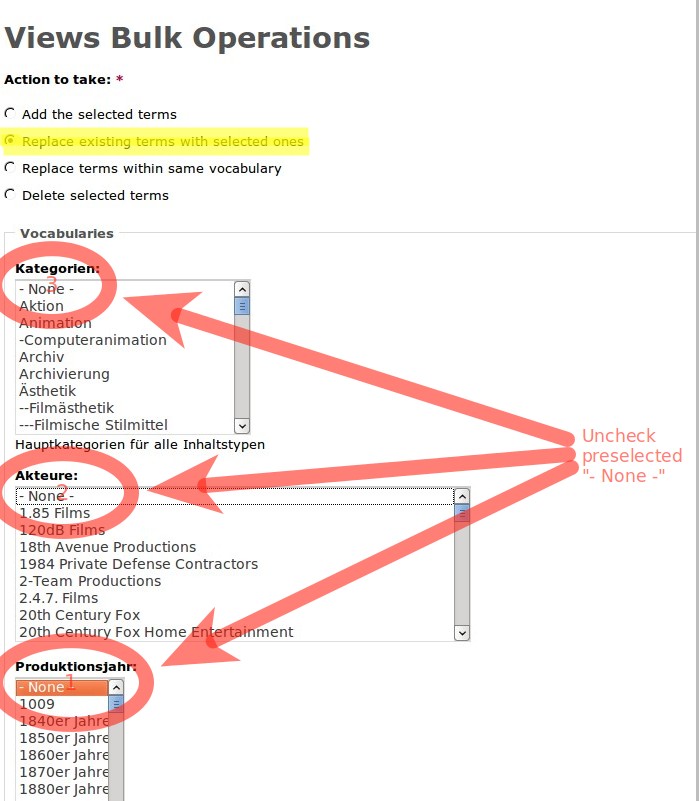
What I am doing: In the action's configuration page, all vocabularies are listed, the term "none" is preselected. If this preselection is not removed, all existing terms are removed, so I uncheck the "none" term from all vocabularies. Next I select the "Replace" operation and the term to replace, then I run the action. After running the operation, I get the results described above.
Attaching screenshot for illustration.
I reran a similar operation on the sandbox site with the view at
./admin/content/vbo/images. Filtered down for image nodes from a gallery, tried to replace one term, and in the result got the new term on the selected nodes, but all other terms were removed. On the sandbox site, the current dev release is installed.@infojunkie: Please try to reproduce this, if your time permits. Thanks!!!
Comment #16
infojunkieGreat report, thanks again asb.
Not much we can do about #1 unfortunately unless you join the German localization team at Drupal Translations and fix the VBO translations there.
Concerning #2, I will reproduce it on your server environment to track down the bug.
Comment #17
asb commentedI posted new translation suggestions for "Modify node taxonomy terms", "Modify node's taxonomy terms", and "Modify content taxonomy terms" at localize.drupal.org. Sadly, there is no way to comment why the existing translations are ambiguous. Those are "suggested", "approved", and "imported" by the same account (Thomas_Zahreddin), so there seem to be some strange conventions in place ;-/
Comment #18
infojunkieRegarding #2, I think there's a mismatch between your expectations and the way the action works: there's currently no way to replace a selected term with another. Instead, here's what the available options do:
* Replace existing terms with selected ones deletes all node terms and add the selected ones
* Replace terms within same vocabulary does the same, except within the vocabulary where the selected terms occur.
In your example above, why did you expect that Szenenbild would be replaced with Dreharbeiten? If they are the only terms from a certain vocabulary in the nodes of interest, then the second option above should cover it. Is that what you were doing? Can you confirm that it works?
Comment #19
asb commentedYes, I think you are right, there seems to be no bug here. Sorry for that!
If I am strictly using the actions by the definitions you gave, I'm neither getting accidentally deleted terms, nor an erratic behaviour (except for the occasional claim that there is no vocabulary connected; however, that always seems to go away if I re-apply the filter).
My misconception might derive from the localization as well; in the German version, "Replace terms within same vocabulary" suggests that the action is supposed to only work on a single vocabulary, while "Replace existing terms with selected ones" is supposed to do a term-by-term replacement across vocabularies (there are also other ways to interpret the description, so it simply might need to become less misunderstandable). I assume that I might have been unsure which of both actions to use, and sometimes I got the right (and received the intended result), and sometimes I got the wrong action, so in the end I thought to have experienced an erratic behaviour, but simply mixed both actions.
However, maybe you want to consider modifying the descritions a bit; what about:
Imho the important part is to point out that "Replace existing terms with selected ones" includes a global "Delete" operation while only "Replace terms within same vocabulary" leaves the existing terms intact and only does a selective replacement. Maybe it is even possible to add a more verbose description in the form?
I'd suggest to close this issue as "fixed" since the initial issue seems to derive from the way 'Content Taxonomy' is bridging between fields and Core's taxonomy; a better handling probably would require modifications in 'Content Taxonomy' (e.g. notify core somehow that the vocabulary is used even if it is unchecked for a certain content type), and these most probably won't happen as the module is de-facto unmaintained.
Comment #20
infojunkieThanks for the feedback. I've updated the description of the taxonomy action options.
Comment #22
szy commentedThe problem still exists for me - 1.14, 1.15, 1.16, today's dev
- no difference.
Am I the only one?
Szy.
Comment #23
bojanz commentedVBO for Drupal 6 is in maintenance mode, reopen if you have a patch to contribute. Thanks.
Comment #24
MakeOnlineShop commentedBulk edit nodes taxonomy ?
Hello,
I would like to delete all my BLOG nodes keywords and add the same keyword to all these nodes, can you tell me how to do ?
Thank you so much for your help.