This is for user 1, using 6.13.
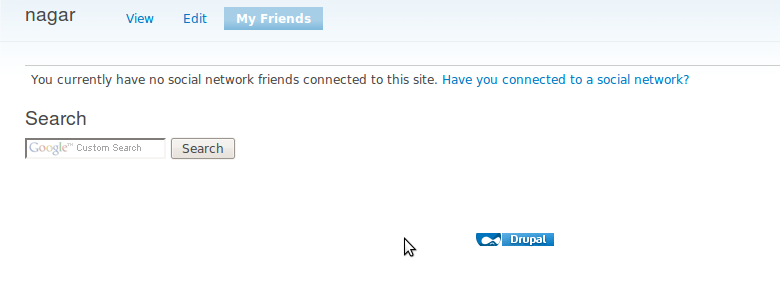
I go to My Account, then My Friends and see 'You currently have no social network friends connected to this site. Have you connected to a social network?' I click the link and the next thing I go to is an Edit tab with Save/Delete buttons but no other content - meaning no way to connect to any social network.
I followed the install instructions at http://wiki.gigya.com/030_Gigya_Socialize_API_2.0/050_Socialize_Plugins/... after requesting the API setup from Gigya. All the settings seem to be in order, and the login page shows the two social network icons that I've selected (Fb & Twitter).
How can I connect an existing account to a social network? I'm going to try Beta4 to see if it helps in the meantime.


Comments
Comment #1
Gigya commentedHi,
Did going to Beta4 help you?
We can't reproduce this issue on our side.
Comment #2
Bricks and Clicks MarketingNope - when I go to http://permaculturepros.com/user/1/edit/gigya there is no content on the page, just the Save/Delete buttons. I'm wondering if another module could possibly conflict with it? I dunno why that would prevent an empty edit page.
Comment #3
Gigya commentedSomething is wrong with your setup somehow... we are investigating this now.
Comment #4
jbrauer commentedPlease try with the latest -dev version.
If you haven't already please try this with the Garland theme and see if the results are the same. If it works in Garland please let us know what theme you're using.
What are your OS/Browser/JavaScript and Flash versions?
Does it work for any users other than user 1?
Comment #5
Bricks and Clicks MarketingI'm using a custom theme and I haven't let anyone site members try it (and I prefer not to until I know it works - they have nothing in the way of technical know-how or problem-solving ability). I'll try it with Garland and respond.
Comment #6
ddyrr commentedI took my comment out, as I realized it was a different issue.
Comment #7
Bricks and Clicks MarketingI haven't had a chance to check Garland yet but I added a new user (not an admin) and that page had an option to connect to a network. So I logged out & added myself as a new user - and the option was on the registration page. I connected to my Facebook account, and completed the registration. I see a 'Facebook Profile' section on the Profile page. But if I go to the My Friends tab, the behavior is the same as before - have I connected to a social network, and the next page has just a 'save' button.
Complicating things is the option for new users to select a role (via the Auto Assign Role module), which did not work.
Comment #8
Bricks and Clicks MarketingOK - justed tested in Garland. Same exact problem:
1. Go to my account or the non-admin user account
2. Go to the My Friends tab. Here I see 'You currently have no social network friends connected to this site. Have you connected to a social network?'
3. Click 'Have you connected to a social network?' link
4. There is no content on the following page, no actions possible - just a button or two. On my superadmin account, I see the buttons Save & Delete. On the non-admin user account, I only see a Save button.
All users have the permissions to Access & Sync Gigya.
I just rechecked the setup instructions at http://wiki.gigya.com/030_Gigya_Socialize_API_2.0/020_Socialize_Setup. The domain is listed, I have the keys (API stuff was setup by Gigya). The only change I just made was to enable Facebook wall updates. The site url seems to be there correctly (*.mydomain.com/*).
I then rechecked my Drupal config http://wiki.gigya.com/030_Gigya_Socialize_API_2.0/050_Socialize_Plugins/.... The keys are correct. I turned off suppressing the Drupal login, and the only capability required of a provider is login. Only Socialize or admins can create accounts. What other options should I be careful with?
Comment #9
Bricks and Clicks MarketingWould the Gigya UserInfo (debug) info shed any light? I'm going to turn off Gigya's ability to create an account and see if that helps.
Comment #10
pitpat commentedI have having the same issue. No content on the social networks page.
Comment #11
Bricks and Clicks MarketingI'm going to uninstall & reinstall Gigya. After I get Auto Assign Role module working to satisfaction and complete the profiles, I'll try Gigya again.
Comment #12
pitpat commentedreinstalling does not seem to work. hopefully this will be fixed in a future release.
Comment #13
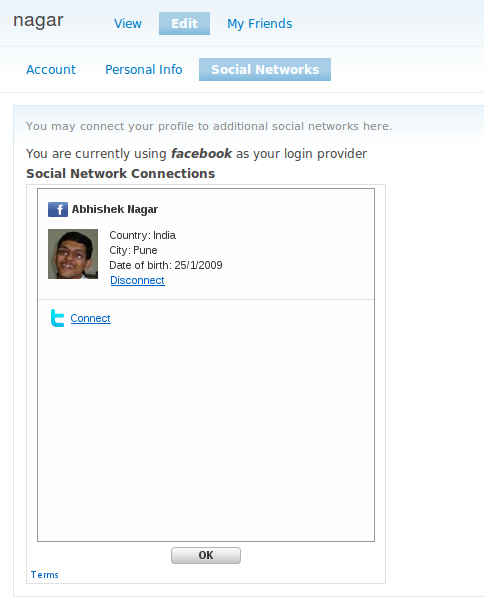
abhisheknagar commentedI installed Gigya Module basic login functionality is working fine but i see nothing under My Friends but i am connected to Facebook as shown on edit i am attaching screenshot of the same
Comment #14
abhisheknagar commentedand yes when a user wants to create an account using gigya he is able to create it but recieves a warning
warning: Invalid argument supplied for foreach() in /home/xx/xx/sites/all/modules/gigya/gigya.pages.inc on line 106.
Comment #15
Bricks and Clicks MarketingI've given up on this module, in favor of the Facebook connect plugin & the Gigya toolbar.
Comment #16
Gigya commentedThe issues mentioned here have been fixed now. closed.
The Gigya Team.