Closed (duplicate)
Project:
Node Gallery
Version:
6.x-2.x-dev
Component:
User interface
Priority:
Normal
Category:
Bug report
Assigned:
Unassigned
Reporter:
Created:
26 Aug 2009 at 11:52 UTC
Updated:
8 Sep 2009 at 23:49 UTC


Hi there,
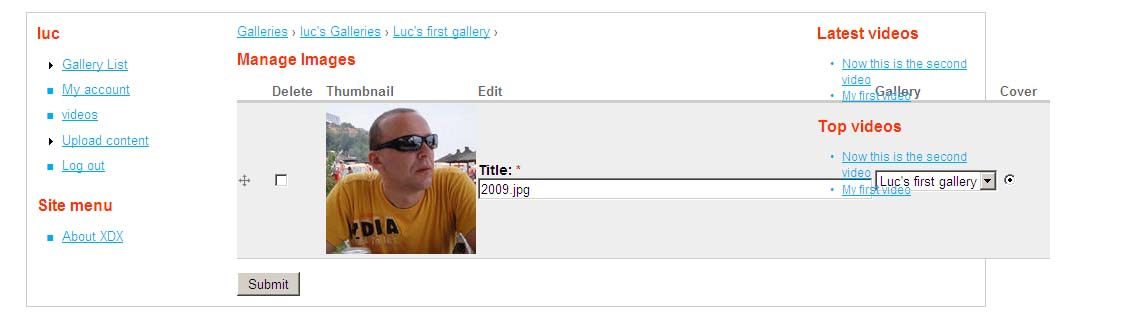
when I'm in the "Manage images" page, the table (see attached picture) spreads across my right sidebar.
I read the article here : Make the Upload/Manage Images template narrower and I manages to get rid of the Gallery column and it fixed the issue horizontally however it is still spreading over the right sidebar.
Maybe if the input textfield for the "Title" wouldn't be that long ...
Anyways, any ideas ?
Thanks
| Comment | File | Size | Author |
|---|---|---|---|
| nodegallery.jpg | 49.08 KB | lukebrenner |

Comments
Comment #1
lukebrenner commentedAh, I forgot to say, I was using the latest alpha 10 release, then I thought of upgrading to the dev version thinking that it'll fix the issue but it's the same.
I am using Drupal 6.13 and the ZEN theme which I am customizing.
Thanks
Comment #2
lukebrenner commentedNobody has any idea ?
Anyone ?
Thanks.
Comment #3
dbeall commentedthis is similar to these issues.
http://drupal.org/node/527910 ;Use admin theme on 'adding images' pages.
http://drupal.org/node/500460 ;Make the Upload/Manage Images template narrower.
I think Kmonty is looking at this. http://drupal.org/node/527910 comment 7.
Comment #4
lukebrenner commentedHi, thanks, I saw those 2 posts before.
But one is dealing with Garland theme as admin theme, which I don't do, I use ZEN for both admin theme and user theme.
Let's hope that a solution will be found for this, otherwise the module is just great.
Thanks
Comment #5
TapSkill commentedI'm sure there are a lot of useful modules which don't fit into every theme perfectly. Just modify the CSS to limit the width. That should be a quick fix if you know what you're doing with the site design.
Comment #6
dddave commentedas stated in #3