

Closed (works as designed)
Project:
Hostmaster (Aegir)
Version:
6.x-0.3-rc4
Component:
Code
Priority:
Normal
Category:
Support request
Assigned:
Unassigned
Reporter:
Created:
26 Aug 2009 at 17:34 UTC
Updated:
30 Nov 2009 at 10:47 UTC
Jump to comment: Most recent, Most recent file


Comments
Comment #1
Anonymous (not verified) commentedWhere have you put your 'provision' module, it should be in /var/aegir/.drush/provision if /var/aegir is the aegir user's home directory.
Please follow the excellent instructions in the INSTALL.txt and verify you have placed the components into the appropriate locations per the 'Checkpoint!' section.
Comment #2
gmmurugan commentedhi. thanks for ur reply
i used to put provision in .drush folder only.
and why the aegir account should have root folder as var/aegir/ as home directory?
is it a protocol.?
or shall i have it whole aegir installation in my Desktop of aegir user.
wats the difference.
moreover.
1.wats the problem in installing it in CentOS. report if any.
2.whether drush and .drush needs to be in root of aegir account/root account to identify provision?
3.i followed Install.txt only..
4.whether we need separate apache/mysql group account.
5.can i get a zip file where aegir installed with expoted .sql with passwords?[please upload]
Thanks in advance.
Comment #3
Anonymous (not verified) commentedIn answer to your questions:
It doesn't have to be, and as the INSTALL.txt stipulates:
Consistency helps is all :) As long as you've configured your apache config to point to the correct path to your platform etc, and told Aegir during install the correct path to your drush executable, configs dir, backups dir etc, that should be ok. In other words if you deviate from the INSTALL.txt instructions, you are responsible for making sure it works as expected :)
In answer to the other questions
1) No known issues with CentOS - if you think you have an issue that is OS/distro specific, open a ticket about what the problem is
2) the 'provision' module needs to be inside .drush folder, and .drush folder needs to be inside the home directory of the aegir user, wherever that may be. (folders with a '.' prefix are user-specific overrides typical in a unix-like system)
4) separate from what? I have user aegir, belonging to the www-data group, Apache runs as www-data user, and I use 'aegir' for both my MySQL user accounts.
5) Sorry, I can't provide you my zipped aegir installation with exported .sql with passwords. I think your problems are more specific to your aegir user, something that mysql passwords and things are not going to help with.
Comment #4
jonhattanComment #5
gmmurugan commentedHI ,
i think , by default when i create a new account in cpanel like aegir.mydomain.com with aegir as username, it creates a user and by default its having a own FTP and SSh Access.
its has a root/home directory as /filesystem/home/aegir/.....[folders like Desktop , Documents etc. in CentOS
but all u telling/Doc of Aegir shows var/aegir .
wat it makes different.
whether root user of Operating system too needs drush and .drush[for provision]?
Comment #6
adrian commentedaegir doesn't work with cpanel.
they are mutually exclusive, they are both trying to manage the same services without knowing what the other are doing.
even if you manage to somehow get it to work, it's very likely that one will break the other fairly regularly.
Comment #7
adrian commentedthere is no such thing as a critical support request.
Comment #8
adrian commentedthere is no such thing as a critical support request.
Comment #9
gmmurugan commentedthen how to overcome Mr.adrian?
even u create users thru cpanel , its just a script to create a separate home directory and access right?
i mean FTPby Creating a Subdomain.
I did by Creating simply a user by not using cpanel even . the same error occurs.
can i use /home/aegir/ istead of var/aegir...?
Comment #10
Anonymous (not verified) commentedThe aegir user does not *have* to have its home directory as /var/aegir, but this is the supported configuration.
As Adrian says,
Your issue is likely one or both of the two following scenarios:
1) Your 'provision' module is not in the .drush/ folder of the home directory of your user (and you still have not verified whether this is the case)
2) You did not run the 'hosting setup' drush command toward the end of the Hostmaster install wizard in the browser, i.e :
/var/aegir/drush/drush.php --uri=http://youraegirsite.com hosting setupIt is advised that you do not try to run an aegir installation on top of another management interface such as cpanel: this is irrelevant to whether you get past this initial error, but that you will run into future problems which cannot be supported.
Comment #11
gmmurugan commentedhi mig.
i sure that 2 problems u mentioned is acceptable. but i assure u that i have provision in .drush/provision in my var/aegir/
i also run ths before verifying i.e : /var/aegir/drush/drush.php --uri=http://youraegirsite.com hosting setup
cpanel doesnt have connection with aegir installtion.
i just created a subdomain and linux user account thru cpanel.
then i usually do other things by that documentation.. my aegir root has
i will access my aegir site my aegir.mydomain.com..so i created accounts using cpanel.. is it a problem ?
see my attached files
Comment #12
adrian commentedif you have cpanel on you server, aegir will not work on it.
if you have aegir on your server, cpanel will not work on it.
Comment #13
gmmurugan commentedi installed aegir with /var/aegir as home directory..
but after configuring Virtual host it shows
"permission denied" while access my host
wat to do?
i followed the complete documentation.. i sure my aegir login has www-data group.
but wats about apache group.
is it a problem here?
Comment #14
gmmurugan commentedHow to solve these errors atlast
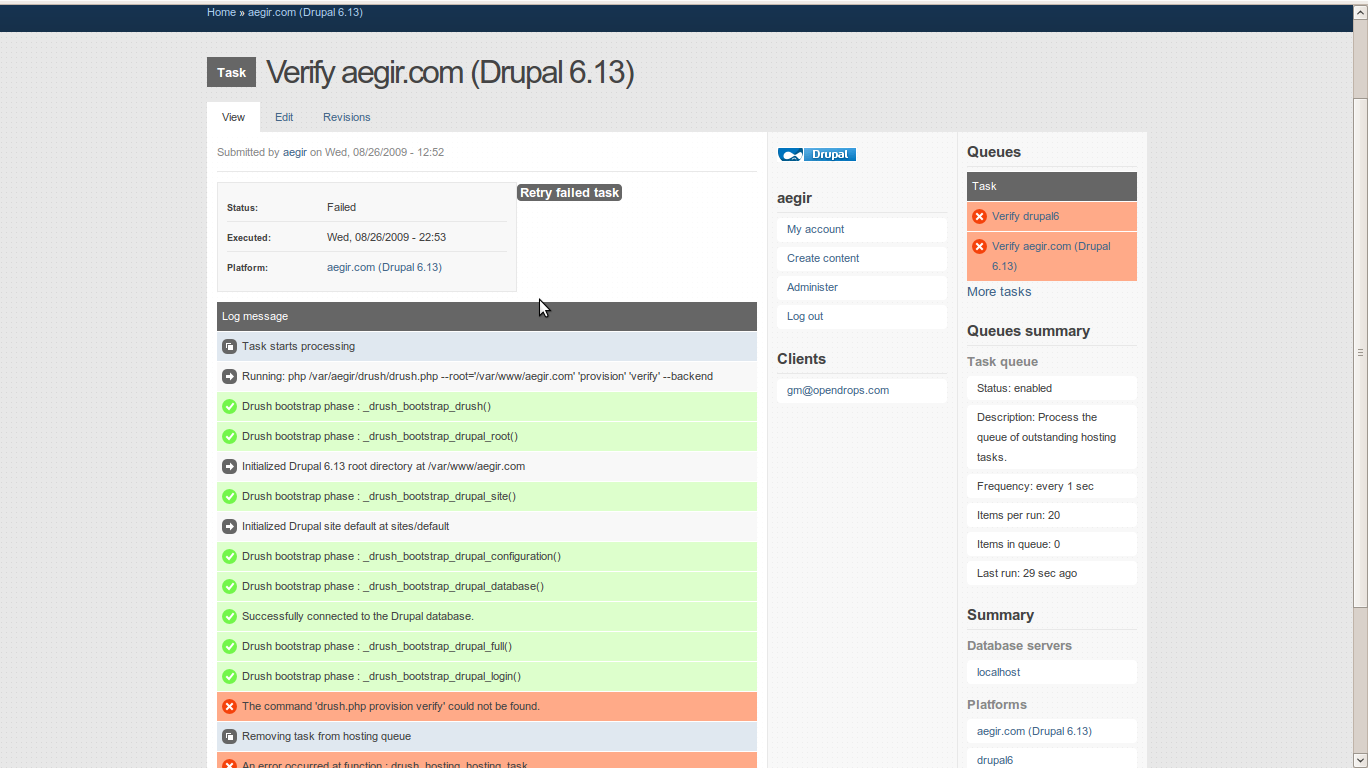
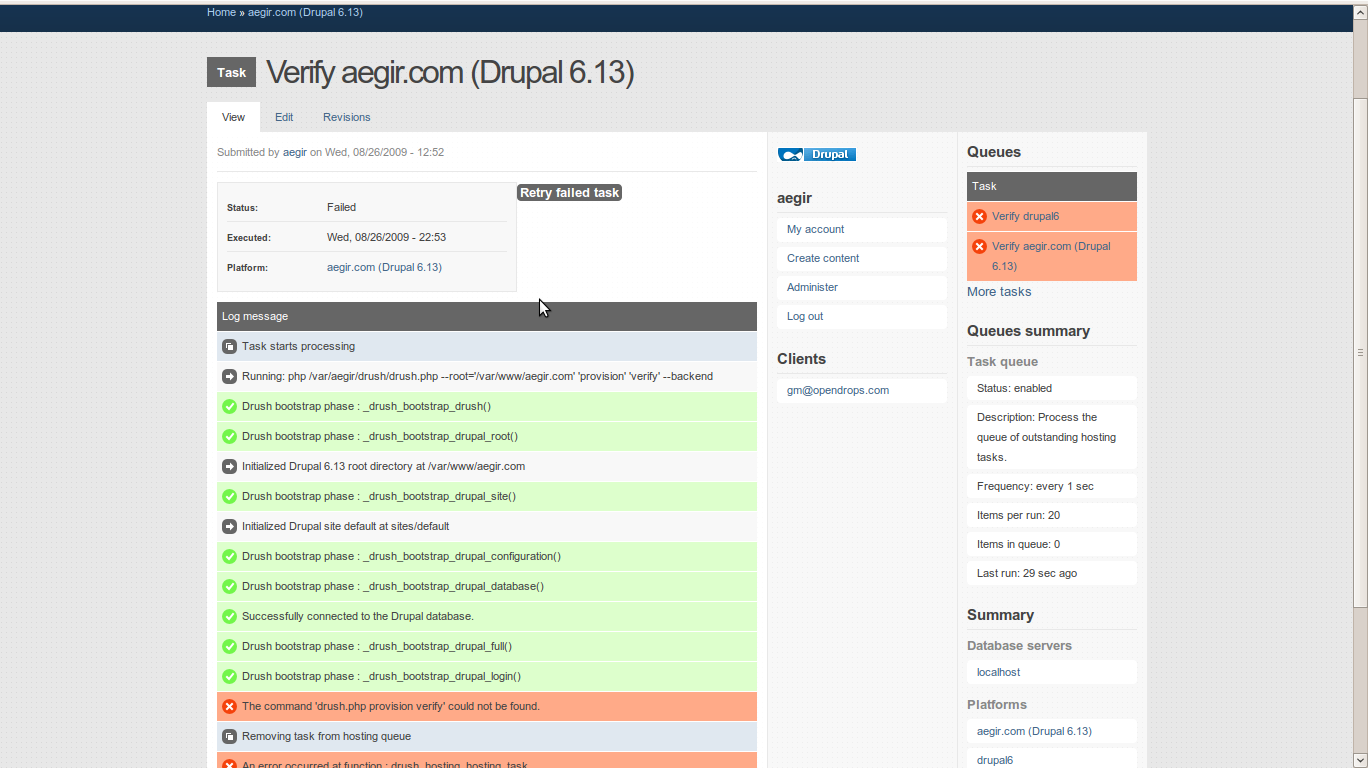
An error occurred at function : drush_hosting_hosting_task
Web server could not be restarted. Changes might not be available until this has been done
An error occurred at function : drush_provision_apache_provision_verify
Comment #15
Anonymous (not verified) commentedIssues like not being able to restart the web server are likely related to your aegir user not being able to restart the web server. But you have not provided enough information per the Bug submission guidelines.
There is no such thing as a critical support request.
Are you still trying to run Aegir in an environment alongside cpanel. If you are determined to run Aegir in an environment that is not supported (ie cpanel), it is unlikely that you'll be offered a solution.
Comment #16
anarcat commentedComment #17
lloydpearsoniv commentedwhat is the conflict with aegir and cpanel???
is it apache related???
if so...what if you gave each its own apache instance???
you think that would work???
i'm just curious
Comment #18
anarcat commentedSee #587554: Aegir working together with other control panels (cpanel, plesk, etc) for further discussions on conflicts with other control panels.
Comment #19
gmmurugan commentedits becoz. cpanel and aegir conflicts on permissions,
we need to override this problem.
Comment #20
jlab commentedHi I'm getting the same problem and errors... Aegir was installed on Ubuntu 8.04 via the shell script installer... I have also tried the instructions in the INSTALL.txt on a different virtual machine but both installations give me these errors ( screenshot attached to post).
I have a aegir user that was created... And his home directory is /var/aegir
I can see the following files in /var/aegir:
.bash_history
config
drupal-6.14
drush
.drush
And I can see the following files in the .drush directory:
provision
provision-->aegir.make
provision-->CVS
provision-->db_server
provision-->example.drushrc.php
provision-->example.sudoers
provision-->migrate.hostmaster.inc
provision-->platform
provision-->provision.drush.inc
provision-->provision.inc
provision-->provision.info
provision-->provision.path.inc
provision-->ssl
provision-->web_server
So I assume that the provision module? Is installed in the correct place?
Regards Julz
Comment #21
robin.puga commentedI just spent the last hour and half banging my head against the wall on this same error before realizing it user error. Doh!
I started installing Aegir with the install.sh script (http://groups.drupal.org/node/25495 - so awesome it almost made me cry). When I was running the install.sh I was logged into my server as root (as suggested). Everything worked great and I began installing and configuring Aegir via the browser until I finally came to verify the site and kept getting the error you talk about above.
Turns out that when I was running the drush commands to do the "hosting setup" during the Aegir install, I was still logged in as root. So if you want your install to work, YOU MUST BE LOGGED IN AS YOUR AEGIR USER TO RUN COMMAND:
/home/aegir/drush/drush.php --uri=http://aegir.mysite.coop hosting setup
Of course it says this during the install process, but I guess I only read code these days. :-P
Comment #22
wira.perdana commentedYes, I second you Robin.
Using automatic install.sh script lead me to the same problem. Even worse, I can not login as aegir easily (just by using "su - aegir").
FYI, I used debian image from ThoughtPolice and have to configure /etc/passwd in order to log in as aegir in shell.
I changed :/bin/false in aegir line to /bin/bash.
It works!!!
In case anyone got a same problem, hope it helps!
I also notice that in install.sh script, the command used to create aegir is:
adduser --system --group --home /home/$AEGIR_USER $AEGIR_USERWhat I read in man, this means that aegir user is created as a system user and doesn't have shell access by default, unless we override it with --shell option. I'm not sure about this option, I haven't test it by myself.
Comment #23
tusharkanta commentedI installed aegir following the install.txt (line by line) in centos. While verifying I got the following issues:
Undefined index: base_url
Undefined index: db_url
Web server could not be restarted. Changes might not be available until this has been done. (I have done all the necessary steps of adding aegir ALL=NOPASSWD: /usr/sbin/apachectl in /etc/sudoers)
Please go through the url to see the verification log status:
http://peppervillage.net/node/6
(username: peppervillageAdmin
password: peppervillageAdmin)
Please help me solve this issue at the earliest.
Thanks in advance.
Comment #24
Anonymous (not verified) commentedPlease don't open old, closed tickets, and don't cross-post from other old, unrelated tickets.
Please open a new support request if needed. As a hint, did you read the CentOS hints and check these user-contributed notes regarding sudoers on CentOS.
Comment #25
tusharkanta commentedThanks for your response. I will follow your suggestion about opening a new ticket. I have gone through the hints. I will check if anything is missed out and will go thru the notes also.