

Closed (fixed)
Project:
UC Multiprice
Version:
6.x-2.x-dev
Component:
Code
Priority:
Normal
Category:
Feature request
Assigned:
Reporter:
Created:
31 Aug 2009 at 09:16 UTC
Updated:
16 Oct 2010 at 14:14 UTC
Jump to comment: Most recent file





Comments
Comment #1
Docc commentedk the idea
Having some sort of global page where you can create "pricing functions".
These functions then can be added as token into the pricing fields. For example:
Function "function1" with the value: "0.5 x default price"
Then on the node form just put the token "[function1]" into the price field and it will execute the price function instead of a fixed price.
Should work...well in my mind it does :)
Any other ideas?
Comment #2
stefan81 commentedHi,
I think it should work whithout to having to pass in the token manually.
Example: user defines a Multiplier for Switzerland. On create/edit product page: If we enter no value into the override for switzerland, the multiplier defined in the admin is used automatically.
(maye thats what you thought?)
My approach would be:
I think to make this work as userfriendly as possible, this function will only work in dependence of "global settings".
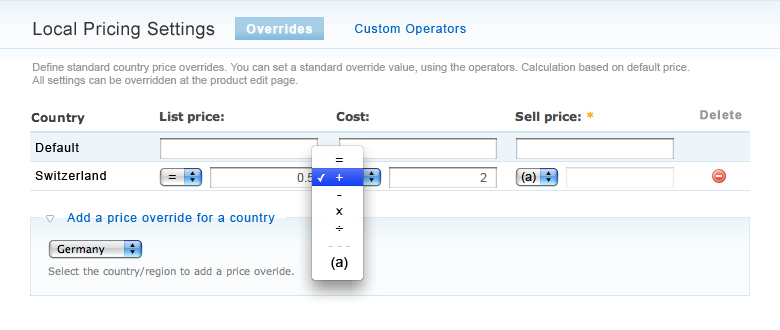
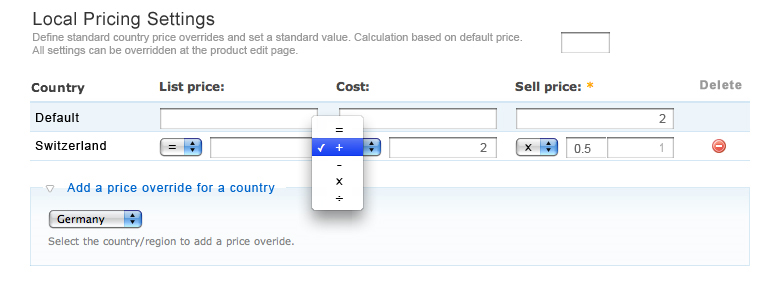
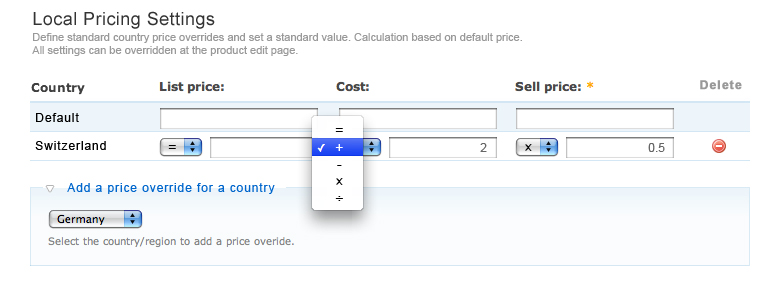
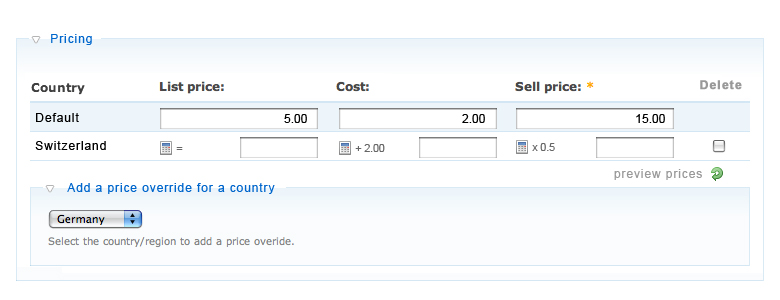
Below you find three layouts, how the admin and create/edit product page could look like.
The Admin would look almost as the product page.
The countries added there will show up per default on the product pages.
(see also "Global Settings")
Then we can work with the following operators: = + – × ÷ always based on the default value.
While = is the standard setting. Example:
= Left empty : nothing happens (also empty on product page)
= value entered : Value will be used as price (equal to an static price override).
Examples for the operators, while default is 10:
(10 = 3) = 3
(10 - 3) = 7
(10 x 1.5) = 10.5
create/edit product page:
If no value is entered, the default value is used. Otherwise the entered value works like a static override.
I attached two layouts for the create/edit product page ("standard" and "preview"):
Standard)
When we create a new product we need to enter a default price first.
Therefore we won't see the calculated prices initially.
But it would be nice to see a preview of the default calculations.
So, we could add a "preview prices" button to calculate the preview
Preview)
The user entered /or edited) the default prices and want's to see a preview of the prices, before he saves the page.
He clicks "preview prices" and sees the prices next to the calculator icon. It helps him to decide if the automatically calculated prices should be overriden manually.
In my example, he decided to override the price manually to get a round number.
PS:
If you also want to able to define a global standard price for the default price, we could also leave the the first row also in the admin page.
PPS:
This could be a submodule, dependending on "Global Settings", to extend the basic functionality if needed.
What do you think?
Comment #3
Docc commentedI like the idea of a operator field.
It seems where on the same wave, but using the operator field instead of token would make it more userfriendly indead.
A few comments
Instead of a difference between preview and edit form. Why not add a seperate field for the operator value?
This would enable live calculations (onchange) and no need for a seperate preview button. Though mayby the look is a bit less userfriendly?
"= Left empty : nothing happens (also empty on product page)"
Empty is not a option, of you send a empty value to the ubercart handler it still will show 0.00
Also it should be possible to leave the operator field empty. So a static value can be entered. (and for backwards compat)
Well all with all sounds goods, still i would like to see a custom function/operator. So you could enter a dynamic operator value (for example, get a currency rate from currency websites and use this as the value for the operator)
See Attachment for sell price with operator value field
Comment #4
stefan81 commentedYes, it seems that we are on the same wave, as I had all your suggestions in mind too :)
#1
Price preview:
I see your point. One Link less to klick = good!
But a few concerns:
1) This way, the value has to be entered first, before setting operator. What happens if the operator is set first, then the value? That would be natural because we read from left to right.
2) I would'nt give the abbility to change the operators on the product level. Because the idea is to keep the product settings as simple as possible. And I would encourage people to define global settings.
Two ideas emerging from your inputs (maybe for a future releases):
1) set operator overrides on product-class level
2) klick the calculator icon to change the gobal settings (either forwarding to admin or pop-up only with sell price operator)
The difference between preview and edit form in my idea wasn't that big.
It would be cool if it worked like an AJAX / Javascript refresh. Not the whole page reloads, just the grey text next to the input fields are updated.
Wouldn't that be simpler to use?
And again, I think previews are not always necessary. Only if the user is not shure if his "mental" calculation was right.
#2
Custom operators:
Yes, I agree completely.
For implementing external exchange rates, thats a must.
We could add a second tab "custom operators".
There one could define a opreator and give it a short name. Like "(a)".
This name would appear in the operator dropdown.
Probably we need to clear and grey out the input field, when the custom operator is selected.
(see layout attached)
But maybe that's also for a for a future release, or a submodule depending on "multiplier" submodule?
what do you think?
Comment #5
Docc commentedhmz i dont see how it will work without product specific operators.
Lets say you have 2 categories of products. 1 shoes and 2 shirts. Each category wich its own prices and calculations (different manufactorer, country specific costs etc etc).
You have to override the global operator.
Another thing if we are going to define custom operators in the future then it definitely should be able to be set operators on a product level.
Ofcourse you can go further and say you make global taxonomy based settings or product classes. (every class or term its own global setting)
so workflow
- Define global operaters and countries.
- User creates new product. Multiprice form is filled with global settings. Use can change these or leave them (including operators)
- User saves new product. At this moment the pricing including the operators is saved on a product level overriding the global pricing (operators).
- Global settings only for NEW products
Comment #6
stefan81 commentedOn the technical side, I agree with you!
But I have my concerns, that too many settings may confuse, a user with basic computer skills.
I really think we should find a way, to open up technical possibilities, but on the same time, keep the interface as simple as possible = at the first glance it should look very lean and reduced to the essential.
My philosophy is: as less buttons as possible.
But, I'm ok if it needs an additional click for advanced/expert settings, which are rarely used.
So, in the attachment two suggestions for the product edit page:
1) If cog icon at the right is clicked, the row expands and product specific operator overrides become visible.
2) If cog icon at the right is clicked, the override prices are replaced by the product specific operator overrides. Click again to accept and calculate.
... and I think that the overridden operators should be marked. In my layout, the overriden calculator has a red dot.
what do you think?
Comment #7
Docc commentedk where getting close.
How about putting the "Global" option into the operator field.
This would not require a override button for product specific settings = less clicks (the edit buttons can go aswell)
When a user select the Global option the field gets filled with the price value (with global function applied to it)
Comment #8
stefan81 commentedinteressting.
It simplyfies the whole thing.
Now we have a selector conaining:
- default : copies the default price (no text-input field, preview instead)
- global : insterts the global settings (no text-input field, preview instead)
- operators : = + – × ÷ (text-input field active, no preview)
- custom operators (no text-input field, preview instead)
to deactivate the operators set selector back to default/global.
(no delete icon needed anymore)
How about the following two rules:
- if no global opperator set, use " = & txt-input " per default
(then numbers can quickly be entered, whithout touching the selectbox, as usual)
- if global is set, use "global" per default
- "default" is an operator and can be used as pre-set in the global operator settings.
maybe "preset" is easier to understand as "global"?
what do you think about the submodule idea? (core / global / operators)
Maybe not all want to use operators, for example.
Comment #9
stefan81 commentedsame as above, but:
- it has a "normal-mode" and an "edit operators mode"
- the normal mode shows the preset-operators and a static price override, for quick changes.
- "edit" button at the right
- if klicked, row changes to "edit mode", operators can be overridden. klick confirm or cancel to return.
made edit-mode green, to make the changed row is more distinctive.
I think its version is not so bad too.
Because this way you see the auto. calculation (ex. 21.15) and think "oh that's a bad number" and you can quickly override it to "19.00" to make it look better.
But you still see the "original" price left to it. And you can simply cancel the override and use the original price, just by clearing the unput field.
probaly this kind of overrides are used more often than operator changes.
what do you think?
hard to decide...
Comment #10
Docc commentedIt could be even simpeler.
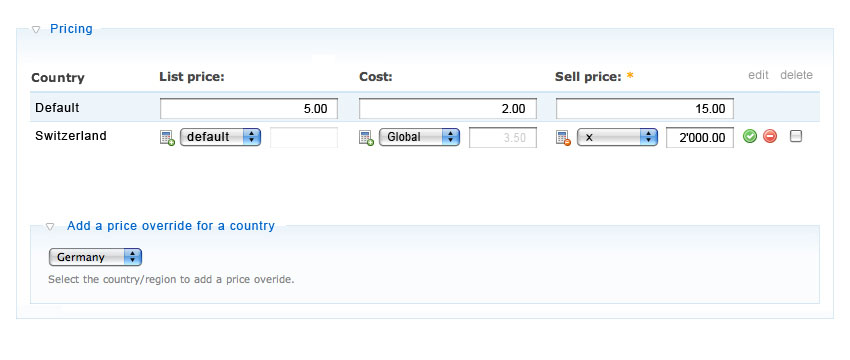
Add the calculator icon next to the fields. When a user press the calculator a popup shows up with the "calculator"
When calculator is active the calculator is in color and field disabled. If no calculation is active the other way around.
This way the price overview is as clean as can be. Also we can go a bit crazier with the calculations because we have more room for it in a popup.
And yes i think the calculator should be a submodule.
Global should be "core"
(really bad photo shopping, but you get the idea)
Comment #11
stefan81 commenteda pop up would be a nice solution indeed!
Question about your sample:
you're showing the original result in the deactivated input field?
I printed it as text, together with the operator.
(as I did in my previous samples)
I think this is easier to understand.
And wit only one input field, users understand quicker where they can enter a value.
Regarding the pop up:
If possible, accept the new value by pressing "enter" (keyboard) or the green button, cancel by clicking somewhere outside the pop up or pressing "esc", deleting override by clicking the red button.
Comment #12
Docc commentedThe final output will be shown in the (deactivated) input field.
I think this is the way togo. Ill start working on it and post back when i have a first patch.
Comment #13
stefan81 commentedok, I'm looking forward to it.
Comment #14
Docc commentedk while am at it i think its a good idea to make the first value before the operator dynamic aswell.
This will make if more flexible and allows for better integration with custom functions in the futher.
Comment #15
stefan81 commentedlooks good.
Thanks
Comment #16
Docc commentedheres a first patch for the dynamic pricing. Patch the latest HEAD and enable the new module "Multiprice Dynamic price"
Needs a lot of cleanup and more work but thought i would put it up.
If default value is changed, the other values that use "default" arent updated yet. On the TODO list.
ps use Fx to test. (ill bother about IE support later on)
Comment #17
stefan81 commentedHi thanks for your first patch.
I am using the newest FF and Safari on mac.
It works so far. nice fading. css cosmetics are needed though.
Can you send me the images you created by mail?
the "save and continue" button is a nice idea!
Have trouble to load the icons properly. ';
';
It included the node path (node/1/) in the img url.
Added "../../" in the image paths in uc_multiprice_calc.module:
$calc = '
The custom calculation works fine.
The result is saved, but the calculation in the pop-up not.
I think the select input field and the text input fields should remember the calculation.
If I set default product price and calculation for a country, and save, its works.
If I change the default product price, and save again, the calculation for the country isn't updated.
Probably if the issue above is fixed, this one works as well.
nice work so far!
Comment #18
stefan81 commentedHi, while I was fine-tuning the css, I came across an other issue which I find not so optimal.
This is how it occurs:
- text-field set to "default" is empty, which is ok.
- I set the dropdown to "custom", as expected.
- I change from "custom" back to "default", then the custom values are filled into the the text-field and a calculation is executed.
To be consistent, the values should be cleared again.
Otherwise there is no way to cancel the override.
Comment #19
Docc commentedNew patch.
Also a zip with the images (should go in /uc_mulltiprice_calc/images/)
Comment #20
jamesfk commentedHi guys,
I'm not sure I quite understand the use of this patch - should it be possible to set somewhere a global currency rate that is based on the products default price and currency? For example if the store default currency is GBP and all products have different prices in GBP, should it be possible to set a global rule for another currency to be for example 1.5 x the GBP rate unless a specific other price is set for another country and currency?
Comment #21
Docc commentedWell you got it right james, thats exactly what it does.
You should checkout HEAD, its in there. Ill push out a dev version of HEAD this week. Its close to a stable release.
Comment #22
Docc commentedCommited to 2.x
Comment #23
jamesfk commentedThanks Docc, have got head to give it a go, but don't seem to quite grasp how to set the rate once for all products and base it on the original in my case GBP price?
My use case is to have pricing in EUR for France, based on an arbitrary site wide rate from GBP to EUR...
Comment #24
Docc commentedAlthough this module supports this function (and beyond) you might be better of with modules like http://drupal.org/project/multicurrency
Though if you like to give it a shot global settings can be configured at admin/store/settings/multiprice
Comment #25
jamesfk commentedThanks Docc, I found multicurrency still has some issues post the RC2 changes to Ubercart, but fingers crossed the global settings on this module will do the trick. Will try out the latest 2.x-dev this evening and see if I can work out what's needed on the global page and convince paypal to accept payment in either currency :)
Comment #26
Docc commentedcheers please do post back your findings.
Comment #27
jamesfk commentedHi Docc,
Updated and found the global screen to adjust, I just dont get how I fill in the form to say that in my case the French price in EUR will be (for example) 1.5 times the UK price in GBP?
Might be having a brain meltdown, but I can only see default or custom as drop downs, and however I tweak these I don't seem to see any changes. However products where I have specifically put in a french price work fine....
Comment #28
Docc commented