

 Come together with the global Drupal community in Rotterdam, 28 Sept – 1 Oct 2026. Sessions, contribution, connection, and Early Bird savings until 8 June.
Surely I am not the first person to ever run this module through the Coder module. There are many coding standards violations here, not the least of which are t() calls on the menu. Also, the line endings in several of the files are messed up. I can submit a patch, but it is very large.
| Comment | File | Size | Author |
|---|---|---|---|
| #7 | node_export.patch | 32.76 KB | nancydru |
| #6 | node_export_crlf.jpg | 107.13 KB | nancydru |

Comments
Comment #1
danielb commentedYeah I know, I hadn't heard of the coding standards at the time of writing and then upgrading this module. I don't think I was even aware of the module developers guide on this site until I'd made about half a dozen modules - I feel a bit cheated by that as they were hidden in the 'handbooks' section, and the word handbooks meant absolutely nothing to me, books filled with hands? books to put in your hand? quite confusing since pretty much all books you can put in your hand, but not an online one ??? - it never appealed to me to click that link and I'd already found the drupal API, anyways they've changed it to 'documentation' and I've found it. I'm a lot more interested in the standards now, and several of my modules have received the coder treatment, and I'm even working a new module to automatically convert code to the drupal standards via a frontend interface. I'll get to it eventually I promise, unless there are specific spots that are more urgent to fix?
Comment #2
nancydruThere are already modules to apply the standards. IIRC, one ships with Coder, and there is another available in CVS somewhere. I can supply a patch, but, after fixing the line endings, it is big!
Comment #3
danielb commentedHmm I've run it through coder - not too many problems. It didn't mention anything about the t() in hook_menu but I'll remove those anyway.
Comment #4
danielb commentedThis has been added to the new release.
Comment #5
nancydruThanks. I think that check is only done if you select the "upgrade 5 to 6" option. The biggest problem was the line endings in node_export.pages.inc.
Comment #6
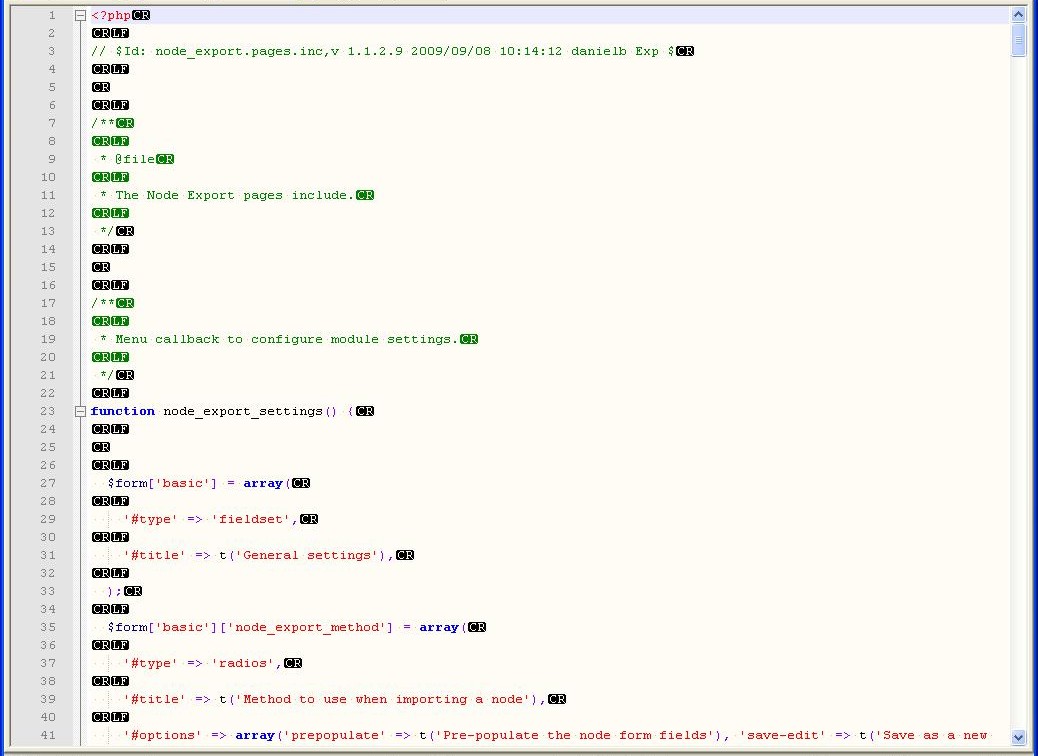
nancydruI just updated from CVS again and the line ending problem is still there. As you can see in the attached picture, there are extraneous CR's. This is also in some of the sub-directories.
Comment #7
nancydruComment #8
danielb commentedI'm just going to have to take your word for it, I've tried several text editors and IDEs and I just don't see those characters.
I tried to apply the patch but I get a heap of errors. All I did was put the patch file in the node_export directory and type
patch < node_export_0.patchand it complained that the patch file had trailing CRs which it stripped out first, and then it couldn't find views/node_export.views.inc which is totally there.For your own interest, I believe a few of these problems may have come from the clone module (node export was originally just a patch for node clone) and might still be there.
Comment #9
nancydruThat could be. I don't have that module.
With those extra CR's, Coder does not work correctly. For an editor, I use Notepad++ which is pretty nice.
Comment #10
danielb commentedI have another idea - that code formatting module I mentioned making http://drupal.org/project/beautifier already has a feature to strip out windows line breaks.
http://braksator.com/drupal6/beautifier
my host is being a dog at the moment though can hardly load a page
Comment #11
danielb commentedI've done this - the file size was slightly reduced so I assume it worked? New release coming.
Comment #12
nancydruGreat