

 Come together with the global Drupal community in Rotterdam, 28 Sept – 1 Oct 2026. Sessions, contribution, connection, and Early Bird savings until 8 June.
I want to be able to re-order nodes within a given taxonomy using Draggable Views, specifically for the teaser view.
This is the setup I have:
Views overrides the default taxonomy/term page
It uses the unformatted style
There are no fields selected because unformatted doesn't use fields.
If I change the style to draggable table etc then it stops displaying the information formatted as a teaser. Could I create a different view with a taxonomy filter on it or something, displayed as a table essentially for admins to sort the order and then have the original view use this to sort? If so, how do I go about that?

Comments
Comment #1
sevi commentedYes, that's possible with various approaches.
The easiest way:
Try and report back :)
Greetings,
sevi
Comment #2
sevi commentedReopen if there are still questions left.
Comment #3
x3ja commentedStill can't get this to work (although admittedly I've not been trying all the time since your reply!)... I just get the frame of my site, with the title of the relevant term and then a blank page with a "Save" button...
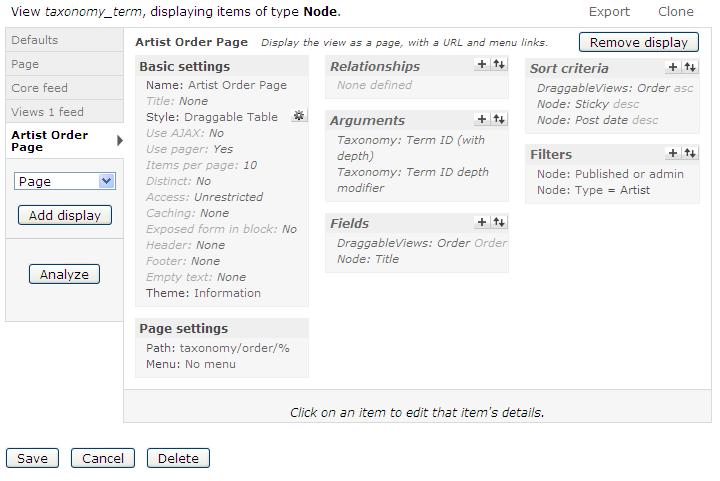
There's no easy way to show you the view settings I guess, but I'm attaching a screenshot of the settings I'm using... any ideas?
Here's the site by the way...
http://www.musicandevents.co.uk/
Normal taxonomy page: http://www.musicandevents.co.uk/taxonomy/term/10
My attempt at a draggable one: http://www.musicandevents.co.uk/taxonomy/order/10
Comment #4
sevi commentedUpgrade to the newest version 6.x-3.3-beta2. Some theme-registry issues have been fixed. I guess this is the problem.
But clearing the cache should also do it. But a update is recommended anyway :)
Comment #5
sevi commentedCode changed very much. Please reopen if problem persists.