

 Come together with the global Drupal community in Rotterdam, 28 Sept – 1 Oct 2026. Sessions, contribution, connection, and Early Bird savings until 8 June.
How do you check periodically (perhaps with cron jobs, rules, or in general) whether a CCK field which contains a date value (M-D-Y) has passed? Currently, I have created a content type with field that asks users to enter in a due date for when they want a project to be completed by. Several nodes are generated of this content type that contains this "due date" field.
I would like to check once a day whether the due date has been passed (check it against the current date) and send an e-mail to the set of users working on the project. I was hoping to use the rules scheduler but in many ways, it seems to be tied to triggered rules, meaning it can only be invoked when a certain event occurs, which doesnt happen for my set of users if they forget about a project.
I've tried looking around google and the forums without any luck, but maybe someone can point me in the right direction.
I appreciate it.
Thanks
| Comment | File | Size | Author |
|---|---|---|---|
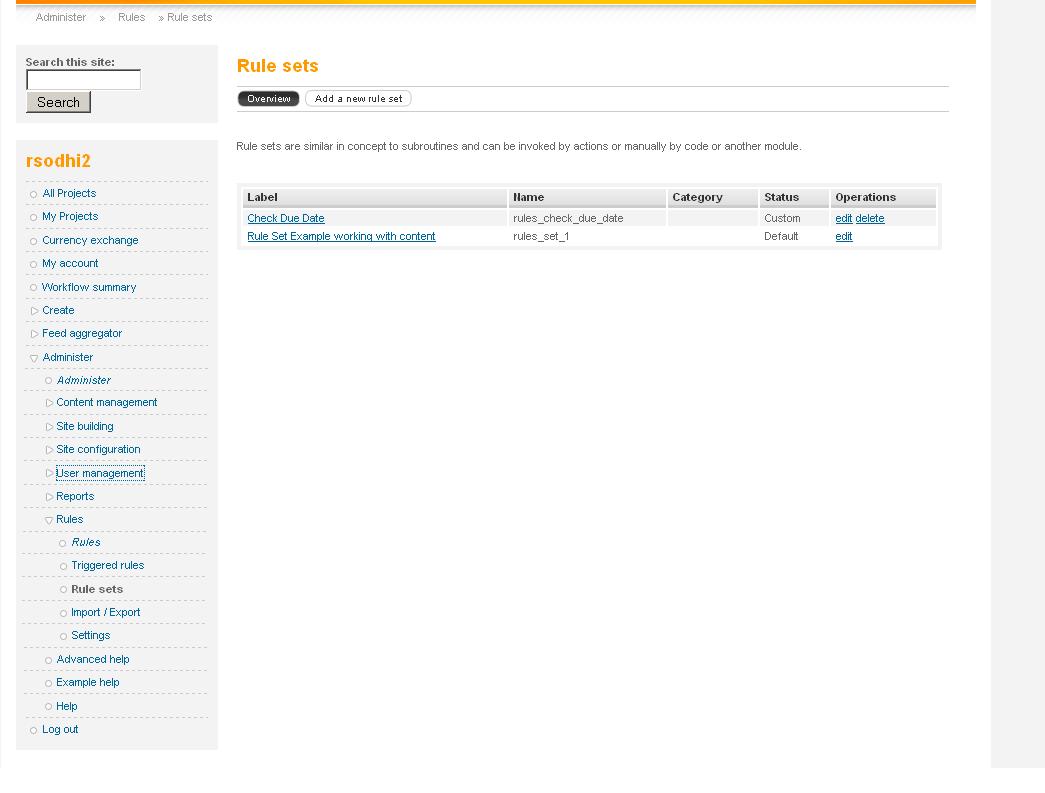
| #5 | ruleSets.JPG | 54.3 KB | mrtm3050 |
| #5 | rulesModule.JPG | 23.36 KB | mrtm3050 |


Comments
Comment #1
klausiShould be covered in this tutorial:
http://drupal.org/node/520012
Comment #2
mrtm3050 commentedThanks Klausi for the link.
The direction:
Go to the scheduling page ("admin/rules/rule_sets/scheduling") and look at the list of scheduled tasks, your node should be listed with the scheduling date you entered during node creation.
I dont see a "scheduling" option under rule_sets, just a list of the rule sets I created.
I created a rule set with argument type "content" and its action is to send an email to a user. The rule set is scheduled for execution based on a date specified by a user in the field called "due date." The rule set is scheduled for execution when the "saving new content" event is invoked.
I see this message:
"The evaluation of the rule set is going to be scheduled by cron. So make sure you have configured cron correctly by checking your site's Status report. Also note that the scheduling time accuracy depends on your configured cron interval."
when I am on this part of the tutorial:
"Here comes the tricky part: fill out "Scheduled evaluation date" with something like "[node:field_publish_date-datetime]" where "field_publish_date" is the identifier of your date CCK field."
Am I just looking in the wrong spot of the list of scheduled tasks? or is it not getting scheduled properly or am I missing something in general. Do I have to use cron in anyway?
Comment #3
klausiYou have to activate the Rules Scheduler module, then you should get the scheduling page.
Comment #4
mrtm3050 commentedhmm, rules scheduler is checked and enabled in my list of modules.
Comment #5
mrtm3050 commentedAttached are screen shots of what I see in my modules page for Rules and the missing "scheduler" under the rule sets link.
I'm probably just missing something obvious.
Comment #6
mrtm3050 commentedAny ideas?
Comment #7
mrtm3050 commentedGot it, thought I had the newest dev version, but I didnt. Simple mistake. Sorry about that.
Did get this error though when looking at the scheduling page:
user warning: Unknown column 'rules_scheduler.identifier' in 'field list' query: SELECT rules_scheduler.tid AS tid, rules_scheduler.set_name AS rules_scheduler_set_name, rules_scheduler.date AS rules_scheduler_date, rules_scheduler.identifier AS rules_scheduler_identifier FROM rules_scheduler rules_scheduler ORDER BY rules_scheduler_date ASC LIMIT 0, 30 in view.inc on line 725.
Then when an event occurs that invokes a rule (which schedules the rule set), I get:
user warning: Unknown column 'identifier' in 'where clause' query: DELETE FROM rules_scheduler WHERE set_name = 'rules_check_due_date' AND identifier = '2009-09-12 00:00:00' in /rules/rules_scheduler/rules_scheduler.module on line 100.
user warning: Unknown column 'identifier' in 'field list' query: INSERT INTO rules_scheduler (set_name, arguments, identifier) VALUES ('rules_check_due_date', 'a:2:{s:9:\"variables\";a:0:{}s:4:\"data\";a:0:{}}', '2009-09-12 00:00:00') in /var/www/includes/common.inc on line 3324.
Comment #8
klausiYou have to run update.php