

 Come together with the global Drupal community in Rotterdam, 28 Sept – 1 Oct 2026. Sessions, contribution, connection, and Early Bird savings until 8 June.
On my stock 4.7.0-beta6, I installed the latest webform from CVS. Installed the databases and activated the module; that all worked.
Then I tried setting up a new webform. That also works but for the presentation of the labels.
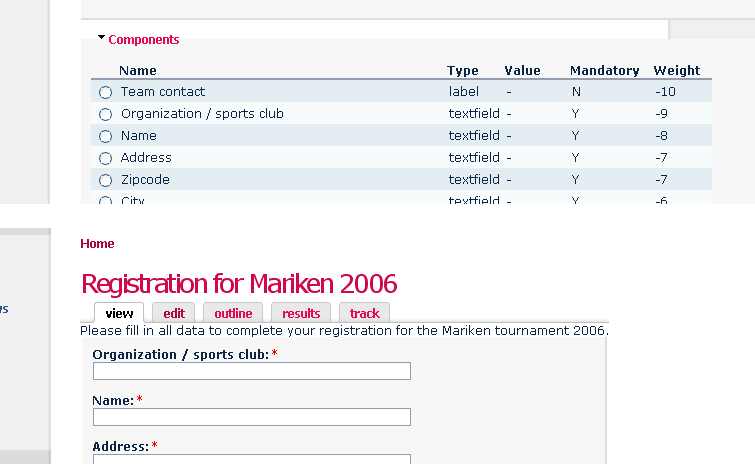
That is, any component with type='label' is not displayed in a preview or final (full) view of a webform. It is also not present in the source code of the concerning node. However, they are present in the webform_component table (for that particular node). Therefore, it seems as if they're completely ignored when presenting the webform node.
The upper panel of the attachment shows that I really entered the label, but then it is not displayed in the view of the finished node in the bottom panel.
The issue is quite critical (at least for me), so I really want to help. Unfortunately while looking through the code I could not find any pointers that might lead to the bug. If anyone could provide a hint to the appropriate function or section of the module, I would gladly look again and try to provide a patch.
| Comment | File | Size | Author |
|---|---|---|---|
| webform-bug.png | 18 KB | Lappie |

Comments
Comment #1
quicksketchI've fixed this problem in the latest CVS version. In this version the components have been seperated from the core code, so make sure you include all those new files when you update your version. The new version also requires running update.php.
Let me know of any problems!
(nice theming in your screenshot btw)
Comment #2
Lappie commentedI hoped to bring other news, but the update doesn't seem to work. Uhm. I'm still on beta6 and not on the RC1 (should that matter). So this is what I did.
1) Update the module from CVS (on XP with tortoise)
2) Put the new directory on the server in place of the old webform directory
3) Ran update.php (as admin)
This all went flawless.
4) Previewed the form that I'm working on ... nothing unfortunately
5) Edited the form and previewed ... nothing
6) Submitted ... nothing
So the labels still don't show up.
What I think changed between the previous version and this one:
- I can make a label mandatory again. IIRC this was not possible in the previous version. In step 5 I activated this option, but that didn't change the situation.
HTH!
Comment #3
Lappie commentedOT: the theme you saw in the screenshot that I provided is just vanilla FriendsElectric!
Comment #4
quicksketchI can't reproduce the problem you're describing. I've downloaded the latest DRUPAL from CVS and RC1 and started with a fresh copy of webform. Everything seems to work fine, though the "mandatory" checkbox should not be present for labels. Maybe there's some problem handling your existing webform? I'm not really sure. I'll keep looking, please post any updates on this issue. Thanks.
Comment #5
quicksketchThis problem should be fixed now in CVS and 4.7. See http://drupal.org/node/57520. Thanks for your patience with this.
Comment #6
(not verified) commented