Closed (fixed)
Project:
Gallery
Version:
6.x-1.0
Component:
User Interface / Theming
Priority:
Normal
Category:
Support request
Assigned:
Unassigned
Reporter:
Created:
9 Sep 2009 at 00:07 UTC
Updated:
26 Sep 2012 at 08:19 UTC


Hi,
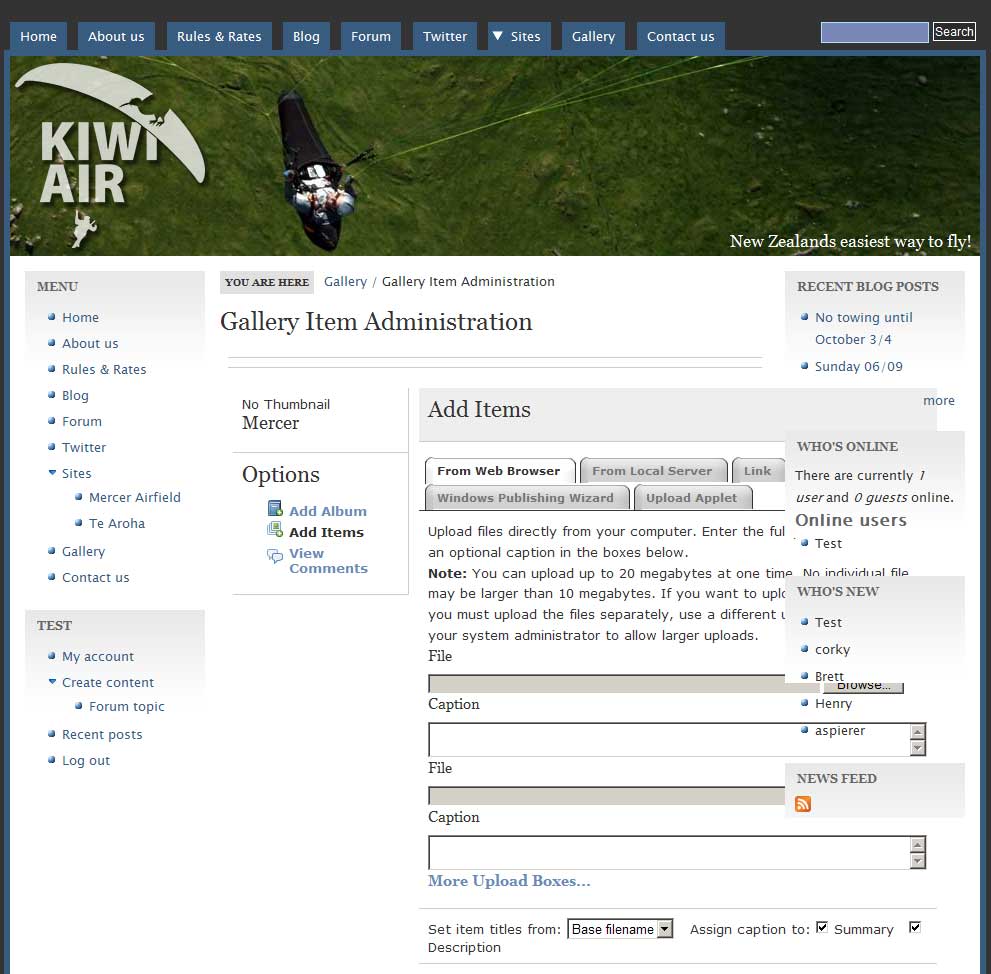
I've been searching the internet on how to fix the issue shown in this picture: http://drupal.org/files/SiteExample.jpg

As you can see the "Add Items" page of Gallery2 runs through the right sidebar of Drupal. It looks to be because of the left sidebar of Gallery2, which is an absolute width and the "Add Items" seems to fill 100% of the drupal themes content width (but with an added 175px for the Gallery2's left sidebar this will overflow over 100%).
I hope you can give me some pointers as to where to look. I'm not a complete n00b, but not an expert on CSS and PHP either.
Thanks!
| Comment | File | Size | Author |
|---|---|---|---|
| SiteExample.jpg | 93.17 KB | mverhagen |


Comments
Comment #1
mverhagen commentedCorrect link is apparently this: http://drupal.org/files/issues/SiteExample.jpg
Comment #2
lvthunder commentedFirst in the config of the the gallery module on the general tab under the sidebar settings check the boxes to move the sidebar to the Drupal Gallery Navigation block. Look and see how that works for you.
Comment #3
mverhagen commented