

Closed (fixed)
Project:
Apache Solr Autocomplete
Version:
6.x-1.x-dev
Component:
Code
Priority:
Normal
Category:
Feature request
Assigned:
Unassigned
Reporter:
Created:
10 Sep 2009 at 10:24 UTC
Updated:
26 Oct 2016 at 12:45 UTC
Jump to comment: Most recent, Most recent file


Comments
Comment #1
janusman commentedI'm just using Drupal's "native" autocomplete functionality using the Form API, so I guess it's a matter of finding out how to make *any* #type = "autocomplete" field in Form API autosubmit upon clicking.
That, or building a new autocomplete widget using JS that does what you need. Perhaps I'll look into it if it becomes a usability problem... leaving open for now.
Comment #2
tituomin commentedThat's right -- this is actually a feature of Drupal's autocomplete. Because autocomplete can be used in forms with several fields, it's not desirable to submit the whole form after changing one field.
However, if you only use autocomplete for one single-field search form, you can override one JavaScript function to achieve submitting:
edit: there was an error in the original Javascript code. This version has been tested and works.
(The original function can be found at misc/autocomplete.js, line 155.) Maybe you could also make this happen only on forms with some specific id/class.) This code will submit the search form even if autocomplete was used for other forms on the page.
Comment #3
robertdouglass commentedI can't see this becoming a feature of this module. Thanks tituomin for the helpful example for those who need to modify things to their needs.
Comment #4
sjoert commented(sorry for the duplicate @ http://drupal.org/node/830064 )
I'm using the code from #2, works like a charm. Thanks tituomin!
Comment #5
ianchan commentedThis is a great script and works well when the user clicks an autocomplete suggestion. However, if the user wants to type keywords and hit enter without selecting an autocomplete suggestion, they have to press enter twice. How would I modify the script to hit enter just once to activate the search?
Comment #6
dpalmer commented^^ I second what ianchan said.
Comment #7
tsphethean commentedMe too... at the moment it just appears that the search is broken
Comment #8
milesw commentedThis may be a minor issue technically, but it's a major usability issue and just makes your site seem broken. While I don't have a good solution to offer, I don't think it should be dismissed as something that can be worked around with some custom Javascript.
EDIT: I see that this is all core autocomplete stuff and it probably won't be changed for Drupal 6.
Here's the modified version of #2 that I had to use. I wanted the search to execute on enter even if there was no autocomplete item selected.
I also commented out
alert(Drupal.ahahError(xmlhttp, db.uri));in autocomplete.js to avoid error popups since I never want users to get a popup just because the autocomplete didn't work.Comment #9
janusman commentedI've been convinced to look into this; I might need to look for a suitable GPL'd JS autocomplete library that handles this (and also the problem mentioned in #897408: Don't require user to press Enter twice when no suggestion is chosen).
Basically, we're un-sucking the Drupal Forms API #autocomplete widget =)
Comment #10
rjbrown99 commentedThe good news is that jQuery UI has an autocomplete widget:
http://jqueryui.com/demos/autocomplete
The bad news is the widget requires jQuery UI 1.8.x which is not currently supported by the Drupal module. In my experience jQuery UI 1.8 also has a number of API changes from 1.6/1.7 so the only easy way to get there from here is to start building a module dependency tree on jquery_update and jquery_ui, which may not be desirable.
The previous jQuery Autocomplete module, which does seem to work with jQuery 1.2.6 (as shipped with D6) is here:
http://bassistance.de/jquery-plugins/jquery-plugin-autocomplete
http://docs.jquery.com/Plugins/Autocomplete
Unfortunately that is also not developed and has a reference to using the jQuery UI version. It was, however, developed until fairly recently and there is a documented migration path to the jQuery UI version. Since Drupal 7 will include jQuery UI 1.8 this may be a good stopgap autocomplete feature for Drupal 6.
Migration looks pretty easy to the jQuery UI version that could be used with a Drupal 7 module:
http://www.learningjquery.com/2010/06/autocomplete-migration-guide
Comment #11
janusman commentedHere's a patch to get things rolling.
It's still incomplete... this works in my case but I've lost the result counts in the process, and I haven't really tested it.
Comment #12
janusman commentedOops, the base directory was wrong. Here's a patch to apply inside the apachesolr_autocomplete folder.
Comment #13
rjbrown99 commentedI have done zero troubleshooting, but at least in my case with Pressflow and the jquery_update module, I get the following in the firebug console. Just reporting it for now, don't have a lot of time to dig in tonight.
Comment #14
janusman commentedI tried using jQuery Update module 2.x (updating jQuery to 1.3.2) and found no problems (so far). More info would be welcome =)
This is the TODO list so far (feel free to add stuff):
* go back to using drupal_json() to return results to the autocomplete JS
* do away with the in-JS string matching/highlight algorithm, use the existing server-side code (the new jQuery UI autocomplete widget doesn't have this one's client-side string matching/highlight code)
* see some file in the jquery-autocomplete/lib/ folder are needed; for instance jquery.bgiframe.min.js for IE compatibility.
* testing on different browsers, different jQuery versions, with/w.out jQuery UI... (what else?)
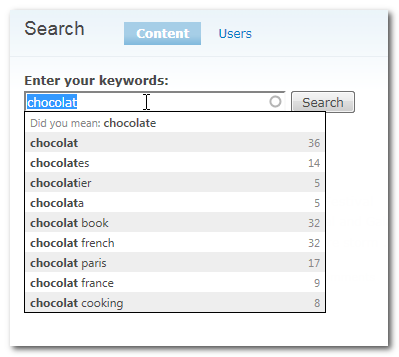
Comment #15
janusman commentedNew patch...
Tested it under jQuery 1.2.6 and 1.3.2 (jQuery Update module 2.x), under IE8, Firefox 4 beta 6, Chrome under Windows.
Seems to work fine.
Haven't tested it under Pressflow, any takers? =)
This is how it looks:
Comment #16
wmostrey commentedCross-referencing Kevin's patch at #897408: Don't require user to press Enter twice when no suggestion is chosen which is a lot simpler. I feel that that is the way to go with this issue as well.
Comment #17
milesw commented@janusman
The patch in #15 works great. That's *exactly* how search suggestions/autocomplete should work if you ask me. It also feels cleaner and faster than the core version.
Using jQuery 1.2.6 I tested in...
Windows:
- Safari 3.1.2
- Firefox 3.0.12
- Internet Explorer 7.0
- Internet Exporer 6.0
OSX:
- Firefox 3.6
- Safari 5.0.1
- Chrome 6.0
Amazingly, IE7 and IE6 actually worked. First though, I had to ditch the trailing comma in apachesolr_autocomplete.js just after the function for
formatItem. Apparently IE doesn't like those ending commas.@wmostrey
I tried that patch also, and while it fixes the issue it was posted for, it doesn't seem to affect the original issue here where a user is clicking on an item.
Comment #18
janusman commented@milesw++: Thanks for the rather thorough testing!! Glad to hear it works on IE 6/7 (!!)
Thanks for detecting that extra comma too. =)
@wmostrey: My concern about that patch in #2 at #897408: Don't require user to press Enter twice when no suggestion is chosen would be that other autocomplete widgets on the page would also change behavior. (I think?)
For instance, if the user is on a node edit page, and it has a taxonomy tags form element(s) (and the Search block is also shown on the page).
So I don't want the module to override global behavior of the same form element *types* on the page, but rather specific elements on the page. I'll try testing it anyway (and YES it *is* simpler and if it works, then it'd be the way to go =))
Comment #19
janusman commentedMarking as needs work from the comma problem found by @milesw (and will test the patch suggested by @wmostrey)
Comment #20
milesw commented@janusman
Are you thinking you'll use the deprecated plugin for 6.x and eventually the jQuery UI version for a 7.x release?
Comment #21
janusman commented@milesw: Yes =)
Comment #22
janusman commentedNew patch for review.
Comment #23
milesw commentedWorks nicely for me, however the patch does fail on apachesolr_autocomplete.css. Same happened with the patch from #15, but I assumed I needed to patch against dev. I just tried with both 6.x-1.0 and dev and it failed with both.
Comment #24
izkreny commentedSubscribing and one question: patch #22 is against dev version or stable (probably dev because issue is labeled with 6.x-1.x-dev version)?
Tnx.
Comment #25
janusman commentedSupposedly, DEV. =)
Will look into it to see if I botched something.
Comment #26
izkreny commentedYeeey, this is really awesome!!! ;)
My colleagues will be happy because of enhancements. :)
Tested it on Windows 7 in Google Chrome 6.x, Mozilla Firefox 3.6.9 and IE 8 - everything is working A-OK!
I only needed to add some code to (my Garland sub)theme css to remove annoying list background image:
JFTR: This feature also solved other problem.
UPDATE:
I forgot to mention one issue that come up while patching, I suppose it's not so important(?):
Comment #27
milesw commented@mariomaric
That was the issue I had also, and that's probably why you had to modify your theme. The patch includes an update to the CSS that hides those background images.
Comment #28
spuky commentedTested #22
is working for me... had the same issues with the css part of the patch beeing rejected but added that manualy...
Comment #29
janusman commentedThanks everyone for the testing. Yes, there is something wrong with the patch, and will fix it soon.
I am thinking that, regardless of this appearing to work completely, I will put in an admin option to choose whether to use the custom JS widget or the default Drupal autocomplete widget. I think the default will be the custom one, though. =)
Will roll a new patch soon.
Thanks again!
Comment #30
janusman commentedThis is a new patch. It makes the new widget the default and includes support for falling back to the Drupal core autocomplete widget (by going to admin/settings/apachesolr/settings, opening the "Advanced configuration" fieldset and clicking the desired radio button under Autocomplete widget to use:
This applies to the current DEV version. Feedback welcome =)
Comment #31
izkreny commentedHi!
Again problem (with CSS) while applying patch (@
/sites/all/modules/apachesolr_autocomplete):So you need to inject css code manually..
Other than issue above, everything (including new admin UI option) is working OK @ Win7:
* Google Chrome 6.x
* Mozilla Firefox 3.6.10
* IE 8
Comment #32
janusman commentedSorry about that CSS file problem. I think it was due to the files in CVS having CRLF instead of unix line endings.
Committed the patch from #30 to DEV.
Thanks everybody!
Comment #33
dpalmer commentedDOS files ftl!
Comment #34
janusman commentedHah, forgot to set as fixed =)
Comment #35
d0t101101 commentedThis is truly awesome, thanks to everyone that contributed to make this happen!
.
Comment #36
rahul_sankrit commented#2 is working for me..tituomin Thanks.