I've hit a strange problem with IE7 (actually IE8 in "compatibility mode") and QuickTabs when displaying a Drupal themed table within the QuickTab. I'm running Drupal 6.13.
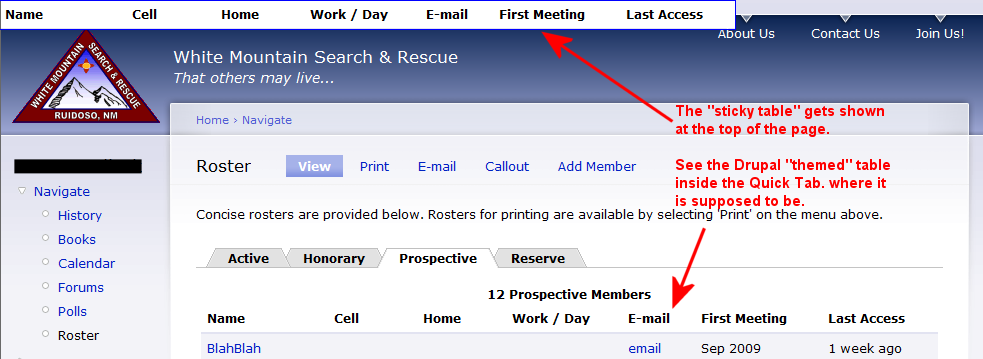
What happens: as I start to click the various QuickTabs (each with a themed Drupal table), eventually IE will show the table header at the very top of the browser window. See the attached picture.
I'm not sure if this is a Drupal problem, or Jquery problem, or QuickTabs problem, but it seems to be related to embedding a "themed table" inside a QuickTab where Drupal is using the "sticky-header" stuff. I commented out the code in the Drupal function below (includes/theme.inc) and the problem seems to have disappeared.
I do not see this problem in IE8, FireFox, or Opera, or even IE6 (ha!).
The problem appears regardless of which QuickTab "style" is in use. The key is to have a themed Drupal table as part of the QuickTab content.
function theme_table($header, $rows, $attributes = array(), $caption = NULL) {
  // Add sticky headers, if applicable.
  if (count($header)) {
/* tbd justin
    drupal_add_js('misc/tableheader.js');
    // Add 'sticky-enabled' class to the table to identify it for JS.
    // This is needed to target tables constructed by this function.
    $attributes['class'] = empty($attributes['class']) ? 'sticky-enabled' : ($attributes['class'] .' sticky-enabled');
*/
  }
Any ideas on a formal fix? Maybe this has nothing at all to do with QuickTabs (which is an awesome module).
Regards


Comments
Comment #1
jmmec commentedBy the way, I don't quite understand the implementation in the Drupal "theme_table" function that I referenced above.
I guess I'm supposed to be able to disable "sticky-headers" by doing something like:
However, the theme_table code in 6.13 will set $attributes class to the following which is apparently supposed to disable the sticky-headers. However, the problem I mentioned in my first post remains!
Since I have other tables (that don't use QuickTabs) where I want the sticky-header theme, then I am temporarily hacking the Drupal "theme_table" function from this:
To this:
And then passing the "sticky-disabled" array() into the theme_table function. This seems to solve the problem in IE7.
Maybe this will help someone else. :)
Regards
Comment #2
jmmec commentedLast comment - I found the following issue and posted a question:
http://drupal.org/node/415024
Comment #3
pasqualleI think you are using something (some module or theme) which does not work correctly.
I do not have this problem in IE7.
try to reproduce the problem with clean install, and find out what (which module or setting) is causing the problem..
Comment #4
kscheirer@jmmec
Are you saying you've applied a patch to your version of Drupal 6.13? If not, the
sticky-disabledclass won't do anything - that was just an idea.After discussion, we ended up adding a parameter to the end of
theme_table()that let's you prevent the tableheader.js from being applied. However, this went into HEAD, so Drupal 7 will have it, but not 6. You can see the difference here: http://api.drupal.org/api/function/theme_table/6 vs http://api.drupal.org/api/function/theme_table/7It should be fairly easy to apply this patch to Drupal 6 as well though, if you're comfortable doing that. Take a look at http://drupal.org/node/336475#comment-1493252, and you can see its just 2 lines of code that need a small change.
Comment #5
jmmec commentedHi,
I haven't applied any patches to 6.13. I didn't investigate past the "theme_table" function to see what it was doing when my module tells it "sticky-disabled". However, based on your answer, I now realize that it doesn't have any effect, which explains why I still saw the problem once I changed my module to pass the "sticky-disabled" attribute into the "theme_table" function.
My current solution in 6.13 is to modify "theme_table" as noted in my previous post. This solves my problem with QuickTabs and themed tables.
I plan to eventually try to reproduce this on a clean install, but haven't had a chance yet. I can't imagine that my module is somehow creating this problem, but ya never know.
Regards
Comment #6
netw3rker commented