Hi. First, thanks a massive bunch for the wonderful module & all the work. Love. It.
I've been researching & tweaking around this problem for a couple days and I'm finally posting this issue. It's my first, so hopefully I don't irritate anyone too much. I've read dozens of threads & pages about this general issue from over the years and nothing I've tried works. So, enough of the preamble...here goes:
I'm running a dozen domains (not subdomains) on a site with Domain Access and generally everything has worked well. I have most of the DA core modules enabled, with several 3rd-party modules installed/enabled. Of note, Domain Source is enabled, while Domain Strict & User are NOT enabled.
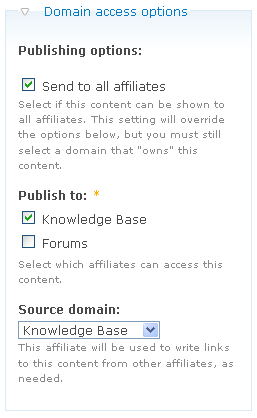
Desired functionality is to have a node appear in multiple pages/views/menus potentially, while having a specific "source" location, so anywhere a link to this node is clicked, you're whisked away to the source domain for that node. (Yeah, yeah... standard usage of Source, I know.) I currently have all nodes set to publish to "all affiliates" since I want to be able to set up menus/lists of node titles or teasers that appear on other domains. If I understand right, if I turn off "all", I won't be able to list anything on a non-source (or non-published) domain... correct?
So, I had set this all up back around the RC8 time and it was all working very nicely! Out of some 6,500+ nodes, maybe 20% of them had been moved around using the (great) Domain Content features. Again, they all have "all affiliates" turned on, along with at least one domain checked and the corresponding source domain for that node. This is the dreaded "it was working great!" proclamation. I was very happy that all nodes were set to the default source domain, and as I was sorting through them, they were linking to their newly-configured source domains... all was great and dandy. Then comes the more-dreaded "now it's not working!" part of this...
Currently, I'm back to a system that works as though Source was not turned on at all. Bugger. All nodes displaying everywhere/anywhere link to pathauto-inspired path at the current browsing domain in all cases: using either my custom theme or Garland; using anonymous user (with Chrome's "Incognito" mode to test mostly, but also on various browsers); etc... I have not found a combination that works.
I've gone through a ton of posts, so just to clear away any immediate cruft, these are all true and I hope might help steer something to help:
- settings.php is edited properly for initial DA install
- URL Alter is installed/enabled now (wasn't before with RC8)
- Since RC8, I'm using Global Redirect & Path Redirect modules, but don't think they should affect anything
- "Search engine optimization" is set to "Rewrite all URLs to point to a single source"
- "Default source domain:" is set to a desired domain, which is not the "Primary domain" (domain 2, fwiw)
- "Node link patterns" are set with these:
node/%n
node/%n/edit
comment/reply/%n
node/add/book/parent/%n
book/export/html/%n
node/%n/outline
- Links in custom theme bits have been written in various ways, but these two have been tested extensively and neither works ATM:
print url('node/'. $node->nid);
print url($path);
Other than these points, things that have changed recently include a bit of code in the .htaccess file that strips off "www." subdomains from inbound requests, but that shouldn't have any effect on links built/displayed inside Drupal. I'm noting this here just because it's not a "default" setup. (PHP 5.2.10 & Apache 2.2, btw)
Well.. I'll stop with this tome and hope that I can get some feedback. Thanks for your patience. This has baffled and frustrated me for a long time now and I must do some different work for now. I've chosen to do without this feature for now just so I can get more work done... but I really would like to have Source working as designed. It's a slick feature.
THANK YOU! I really appreciate the time & patience with my long-winded post. :P
Cheers,
Paul


Comments
Comment #1
agentrickardI cannot replicate. Does the debugging output tell you anything useful?
An answer:
If I understand right, if I turn off "all", I won't be able to list anything on a non-source (or non-published) domain... correct?. Correct.A few other notes:
-- Global Redirect & Path Redirect may in fact be causing issues.
-- You don't need the URL Alter module unless you are using multiple versions of custom_url_rewrite_*. Are you? If so, what modules implement that hook?
Comment #2
hoza commentedTo be totally honest, the only reason I installed URL Alter was due to this note on the project page:
I have FeedBurner enabled, but never have gotten it set up further than that. It's been there for a long while -- since before I converted from a multi-site setup to using Domain Access. I just saw this comment and thought "I guess I had better install this one" and installed it. I plan on doing some Facebook stuff at some point too, so off I went.
RE: debugging info -- No, there hasn't been anything obvious that popped up. The debug info looks like Source is working correctly, in that the nodes show the proper "Assigned domains" and "Source domain" listed. For instance, here's a debug listing posted with one of my nodes: (This is listed at a domain other than the listed "assigned" domain, so it would be viewed from another affiliate from the source.)
This is correct and previously, the link that brought me to this node would have gone to Flash Game Post, but is instead pointing to the current domain -- in this case, PointlessGames.com.
RE: Redirect modules
I had previously tried tweaking & disabling Global Redirect, but didn't notice a difference. I was a little nervous about turning off Path Redirect since I didn't know how any changes that happened might be affecting the permissions in case something got rebuilt, etc. Also, I get a lot of activity from Google, Bing, et. al, and I don't like the notion of having my redirects turned off. I'll give it a shot disabling these two and going from there, if you think it's a thing to try.
More analysis...
As a next set of steps, I'll do another round of tests trying to strip down any custom theming or views and get back to a raw list of links to the site's content. Hopefully I can do something like use url()-built links to see if I can get anything to show up properly. However, I really do have a lot of varying link-types on display -- but I'll delve deeper & more carefully.
I'm hesitant to look like I'm spamming, but here's how my sites break down, in case this could help you see something I'm doing that's messing things up:
- The "Random Game Finder" is a View block. The linking method for those titles & thumbnails is the standard Views "Link this field to its node" setting for each field. The vast bulk of those nodes listed are set to "flashgamepost.com" as the source, which is domain #2.
- Of note here would be the "Adventure" page, which shows a more "standard" Drupal list of teasers for a taxonomy. I'm using Contemplate for the (currently lame) theming here, and I've added a "test link" text link that is currently using the aforementioned url() link syntax from the original post here. (The thumbnail uses the first method and the "test link n" uses the second, currently.)
- Also note that the story nodes down the page should be going to other domains as follows:
"More Major Mods..." = Assigned to "all" and Bragfile; Source = Bragfile; rewrite not working.
"Site Updates Abound" = Assigned to "all" & "Flash Game Post"; Source = "Flash Game Post"; rewrite not working.
etc...
I realize I'm flogging you with info & I hope it's not too much junk to go through, but I sincerely hope that painting a bigger picture might show that there are many different ways links are being displayed and I'm not seeing proper behavior from any of them currently.
As I mentioned, I'll get back in there and try to mess more with the "redirect" stuff if you think it's something to try. I just needed a break from this problem... writing all this out and having someone to ping this off of is also very therapeutic. (Where do I donate for the the therapist's time??... Hmm... do you have a "donate" page for Domain Access?? I'll gladly drop coins into that fountain!)
Thank you immensely for a bit more attention.
Paul
Comment #3
agentrickardHeh. I don't have a donate page, but I do have a public Amazon list (which needs updating, I bet) --> http://ken.therickards.com/
Wrapping links in url() or l() should do the trick. I suspect you are having an issue with custom_url_rewrite_outbound(). You might try throwing some degbugging statements into
function domain_url_alter_outboundin settings_custom_url.inc. I suspect that the url_alter functions from other modules may be interfering.You could also be having a simple problem with $base_url. You cannopt set that manually in settings.php.
Comment #4
hoza commentedI definitely have not changed anything with $base_url in settings.php... in fact, I've probably checked that a dozen times by now (just did it again) just in case, since I've read that statement so many times. It's commented out... definitely. Absolutely.
I'll look more into the settings_custom_url.inc stuff. I had perused it and tried following along in case I recognized a conflict with other things. I didn't come up with anything before, but I like your idea of the debug statements. (Honestly, I'll have to look up some tips at how to do debug statements in the context of Drupal. If you have any quick tips, I'd love to hear them. Otherwise, it's obviously outside this scope.)
Anyway, I'll find my way through more of this soon. I think I need to leave it alone for now and just get some other work done. I have been considering taking the bulk of these nodes and removing the "publish to all" flag to make them unique to specific domains. This will be a lot of work, but it's likely the best thing to do for these specific nodes and forces me to do some better categorizing and other stuff.
When I get done with a block of work, I'll come back at this and see what I can come up with. I'll be sure to report findings back here.
Thank you.
Comment #5
agentrickardThe place to look is in implementations of hook_url_alter_outbound() which may be stepping on each other.
Comment #6
hoza commentedOK, news a-plenty on this problem:
I've gotten things working again (yay!), so here follows the tale of discovery in the hopes that someone more knowledgeable might uncover what's going on. I'll try to be brief, but I'm not too good at that. :P
As I said earlier, I was only using the URL Alter module because of the comments on that modules project page. I was therefore unsure which of my modules might happen to be using hook_url_alter_outbound(). I did a grep looking for that function in the modules directory that gave me that answer. For other folks' reference, my grep statement looked like this: (run this from the Drupal installation's modules directory - sites/all/modules/ in my case)
grep -r "hook_url_alter_outbound()" *This searches all files in the subdirectories for the string "hook_url_alter_outbound()" and in my case, it came up with three modules using that function: URL Alter, Domain Access (via the file ./domain/domain_conf/domain_conf.inc) and Feedburner (aha!)
Through many iterations, however, I've discovered that enabling EITHER of those other two modules will break the URL rewriting in Domain Source! I systematically enabled/disabled all combinations of these two modules and have found that in my case, enabling either Feedburner (with URL Alter off) or URL Alter (with Feedburner off) will cause Source rewriting to fail (and of course enabling both of them breaks things too.) Again, "broken" = all links shown for the domain nodes link to the current domain's path alias, regardless of source. (As a side note, Path Redirect and Global Redirect are both still ENABLED, so appear to not cause any trouble.)
Zoinks.
So I'm fairly clueless about this, as I've not done more research/learning about all three of these modules' rewriting methods, but I'm hoping this will trigger some ideas for others.
Wheee!! :)
Comment #7
agentrickardThere isn't a whole lot we can do here. The URL Alter module tries to mediate this conflict. The only other solution is to edit the url_rewrite_outbound function for one or both modules. Then you have to be careful when making module updates.
In general, the url rewrite, IMO, should not try to rewrite absolute URLs. And I am pretty sure that DA will not.
You _might_ try altering the module weight, too. In the {system} table, set the Feedburner module weight to -1. This will force it to fire before Domain Access, and may remove some of the issues. (Then again, it may just cause DA to skip its rewrite function.)
You will probably need custom code here.
Comment #8
hoza commentedThanks for the notes.
I thought I was on to something when I found out that enabling the URL Alter module at all (regardless of Feedburner) was triggering the problem with DA URLs. I appreciate your idea of messing with the weight, but that seems to be a null issue if enabling URL Alter bonks the system for me right off the bat. I noticed a fix to URL Alter recently where they lowered the weight to -1000: http://drupal.org/cvs?commit=242544 to help stave off weight-related issues with that module getting executed.
Well, I'm going to set this thing down for now (unless something compelling comes up), since I have a working system as of today. I hate to do that, since I'm obviously not "fixed" really, but since I don't currently need either Feedburner or URL Alter (that I know about), I have a stable system. I have too much other work to do that's been getting put off, so I need to just dive into that stuff for now, before returning to this issue at a later date. Maybe someone else will have similar problems and this conversation will help them push further toward a solution. I apologize for dropping this right now, but it's taken up a huge amount of mind-share for a while.
Thank you VERY much for all the feedback, help & general companionship with my troubles! Now, on to the Amazon issue that still needs resolved. ;-)
(I'll be sure to wander back here and post any more findings when I come back at this issue some other day.)
Comment #9
agentrickardSo you are saying that the URL Alter module by itself breaks URL rewrites? It shouldn't, and I don't recall it doing so for me during testing....
Comment #10
hoza commentedYes, that's what is happening. URL Alter module by itself -- with Feedburner off -- negates the URL rewriting in Domain Access.
Just to be sure, I just tried it again... because I'm paranoid that way:
- Feedburner 6.x-1.0-beta4 off & URL Alter 6.x-1.1 off = rewriting works great
- Turn URL Alter on, flush caches = rewriting no longer works
Sorry if I wasn't clear about that earlier.
Comment #11
agentrickardDo you have any custom code configured for the URL Alter module?
I'm looking at this function:
Comment #12
agentrickardI still cannot replicate this error report. I have things working fine with URL Alter 6.x.1.1, no matter what its module weight is set to.
Comment #13
hoza commentedNo, I did no configuration for URL Alter. All files are as-is from the initial install (Aug. 30 file dates), and the PHP code fields for custom_url_rewrite_in/outbound() are empty in URL Alter's admin page.
I also checked and I did no modifications to the DA settings_custom_url.inc file. (I had checked that file due to an issue I found during research talking about overlooked references in the function definition at one time. I can look up that issue if needed, but it was fixed by you a while back.)
I can't find or think of any other places I might have any customizations. I really don't know what I'm doing with these particular things, so I kept my grimy hands out mostly... aside from reading through code.
Comment #14
hoza commentedI understand. Thank you for checking in further -- it obviously must be something I've got configured wrong or maybe another module I'm overlooking.
Crud.
Sorry for the runaround. I'll run through things again and see if I can come up with anything else.
Comment #15
agentrickardFiling as a potential bug, but deferring status.
Comment #16
duozerskOK, here goes my use-case.
I have two domains - kb.acronis.com (the first, primary one) and forum.acronis.com.
KB content is configured for the kb.acronis.com as a source domain, Forum topics have forum.acronis.com as a source domain. All content is published to all affiliates.
Things were working just great with Domain Access 6.x-2.0-rc9 and URL Alter 6.x-1.1. The KB content was always linking to kb.acronis.com and forum topics were served from the forum.acronis.com (means anywhere where Drupal placed a link to the content - it had correct source domain). And trying to open the KB content having the forum.acronis.com domain instead of the kb.acronis.com always failed (page not found or incorrect link behavior) - which is a correct behavior.
Then I went ahead and upgraded to the Domain Access 6.x-2.0 and URL Alter 6.x-1.2. Now what is happening is when listing the content with links on:
- kb.acronis.com - the links are correct, KB content has kb.acronis.com domain and Forum topics have forum.acronis.com
- forum.acronis.com - all links have forum.acronis.com
You can see it here: Search for "true image" on kb.acronis.com VS Search for "true image" on forum.acronis.com
And if you are trying to access the Forum topic by changing the domain in the link to the kb.acronis.com - it will fail VS KB content being served from both domains.
As I see this may be a different situation, but really close to the one discussed here. Let me know if I need to file it as a separate issue.
Thank you for any input.
Comment #17
duozerskGoing further,
Even after disabling the URL Alter (after reading this issue I decided to try this out as I don't use any other modules utilizing the custom_url_rewrite functions) the situation is the same.
Thanks
Comment #18
duozerskAny help with this one please? I see that there was a major change/rewrite in the Domain Source module when going from 6.x-2.0-rc9 to the release 6.x-2.0, but couldn't figure it out.
Thanks
Comment #19
agentrickardNot enough information. The rewrites seem to work, but I don't know what domains the nodes are assigned to.
1) What are the settings for http://forum.acronis.com/content/1534 ?
2) What modules are you using?
Comment #20
duozerskThanks for the reply. Generally, all the content of type Article has Source Domain as kb.acronis.com and all the content of type Forum topic has Source Domain as forum.acronis.com.
1) See the screen shot. Actually, if you will just search for the "1534" from the kb.acronis.com - then the link to the content is correct; if you search for it from forum.acronis.com - then it has forum.acronis.com domain in the link which is incorrect.
2) Huge list... basically, when updating from Domain Access rc9 to the 6.x-2.0 no new modules were added. See the attached file with all the active modules listed. To my knowledge there is nothing that should cause the conflict, would appreciate you taking a look.
Thank you.
Comment #21
agentrickardHow are you generating the path 'content/NID'? A path alias? Same question for 'forum/NID'.
You may also be having a Domain Access Advanced issue, and I don't support that module. It might also be a SOLR issue, though the new version worked fine for me.
Comment #22
duozerskThe aliases are done via pathauto.
Domain Access Advanced - does it have anything to do with url rewrites? Or should I ask in this module issue queue?
SOLR uses the standard search page template from the core search module and the $url variable from this template is generated the same way for both the domains... just thinking loud... and it delivers the different results, but the SOLR index is the same for both domains and it returns the same data to the search preprocess functions to generate and provide variables to the search page template. What could be the next step in addressing this from this perspective? Where does it fail?
Appreciate the time you spend into this issue.
Comment #23
agentrickardDA Advanced should be discussed over there.
SOLR does some odd things with URLs, but (as I said) my tests seemed to work fine. Be sure that links are being run through l() or url(). And be sure that SOLR records the node path. not the node alias. If SOLR stores the alias, then that would explain the problem, since DA needs to be able to identify node links. It does so by pattern --> see the 'Node link patterns' setting, which is why I asked about 'content/NID'.
You might try registering 'content/%n' and 'forum/%n' as Node link patterns with DA.
Comment #24
duozerskOK, will spend some more time looking into this.
I might end up setting up the instance from the backup of last week prior to updating the modules and then update them one-by-one to see where it breaks.
Thanks
Comment #25
agentrickardComment #26
hoza commentedHello Ken,
I've just decided to post in here again to update about a new iteration of this same general problem where Domain Source urls are not getting rewritten. In this case, I've just converted another of my "site networks" from separate Drupal installs to use the Domain Access module.
I'm seeing the same behaviour as my posts above noted, namely #10, where I ended up getting the Source links all working by disabling both the URL Alter and Feedburner modules. Everything is updated to the current stuff, including Domain Access 2.3, Feedburner 1.x-dev (Oct. 2009) and URL Alter 1.2.
I didn't want to change the status of this issue, but I think "closed" isn't accurate since I'm still seeing the problem -- I put it back to the status it was when I last left the issue "postponed (need info)". All I wanted to do was document that a completely different Drupal 6 install (on the same physical server), with all current module versions would have a working Domain Source URL rewriting functionality ONLY if I disable Feedburner module. (I initially didn't have URL Alter installed at all, so Feedburner was my only problem at the start. However, I've since confirmed that URL Alter will also cause the same problems as last time I was going through this stuff on my last site network.)
Now that I have this new site running properly with Source links on my affiliate content, I really have to leave this issue alone. I'm not using Feedburner now (on either site), but I hope to dig into that sometime soon.
As a note, I've wanted to dig into the implementations of these two functions in these various modules, as I wonder if they're the key to figuring out why I'm having troubles:
hook_url_alter_outbound();
hook_url_outbound_alter();
Again, this is both a notice to the community that a problem may well still exist (unless of course, it's just a problem with my configuration/server/brain, etc.) as well as a note to instigate a potential stepping stone to confirm any possible solutions.
... I really hope I'm not using this forum inappropriately by posting this, but hopefully I'll get some time to dig deeper and get more educated about how these things work so I can help resolve this thread.
As usual, thank you VERY much for your continued development. Domain Access remains an integral part of my sites and I can't wait to see how Drupal 7 dev. pans out. :)
-Paul
Comment #27
agentrickardI suspect we may need to move this issue to the URL Alter queue. Since that module is supposed to fix these conflicts.
I simply do not experience this problem using DA 6.x.2.3 and URL Alter 6.x.1.2.
IFF you are entering custom code into URL Alter's settings, that could also cause a problem.
Comment #28
duozerskHello, sorry for not updating it earlier.
After moving to DA 6.x-2.3 my issue partly disappeared - mainly, the URLs in the Search Results and in the Similar Content block (also provided by SOLR) are now fine and point to the source domain. I believe it is because of a fix in #730736: Conceptually flummoxed re Domain Source.
The second part is still present:
1) If the source domain is the default one - the content can be open from the source domain in the URL and from the second domain.
2) If the source domain is the second one - the content can be open only from the second domain in the URL; if you try it with the default domain in the URL - you will get Access Denied message "You are not authorized to access this page.".
I believe the 1st is incorrect; the 2nd one should probably be the "Page not found". Please advise. I still send the content to all affiliates and set the "Publish to" and "Source domain" to point to the same domain as it is shown on the screen shot in #20.
AndyB
Comment #29
agentrickardIf content is sent to 'all affiliates' it should never return Access Denied. That has nothing to do with Domain Source.
Comment #30
paulstav commentedI'm curious if there's any way to create the functionality that duozersk is asking for.
I'm assuming it's the same thing as I want, but I'll explain myself a little better since I think that this should be common functionality of Domain Access..
Let's say I have finance.domain.com, and wealth.domain.com. I want nodes to be published in both domains in the sense that if I want the teaser of one domain to show up on the homepage and primary links of the other domain, this is possible, because the content is shared across domains. Now, the problem with this set up is that currently, if it is published across all affiliates, the node will be accessible via finance.domain.com AND wealth.domain.com, which causes duplicates (bad for SEO).
I've been fishing through threads and the settings of DA, and I thought I solved the problem when I found "Rewrite all URLs to point to a single source
If rewrite is turned on, all node links will point to a single instance of the node. This option reduces the chance that search engines will recognize duplicate content."
This does not work at all. It's true that in the menu, the links with finance.domain.com as the source will always have that as their link, but no matter what, I can still access that same node at wealth.domain.com. I would expect the functionality to be that if I'm trying to access the node from a domain that is not the source, it would redirect me to the node at it's proper domain, and not make it seem like duplicate content.
Do I have something installed or set up wrong, or is this how Domain Access works? I'm pretty sure I'm doing something wrong because it would seem to defeat the purpose of sharing content if that content is duplicated across all the domains.
How do I get the domains to share the content without letting my users access the node across various domains? Thanks for any help on this matter.
Comment #31
paulstav commentedFor anyone else interested, I found a solution that's pretty close here: http://drupal.org/node/704568
Would still like to know if there's a better way, but that patch did the trick for me for now.
Would also like to comment that URL rewrites stopped working for me as well when I enabled URL Alter. Not sure about Feedburner, I don't use that.
Comment #32
agentrickardSince search engines only spider link paths, saying "This does not work at all." is patently false. Rewriting the link path is perfectly sufficient, and no one has ever (to my knowledge) suffered SEO penalties for using the module.
Redirecting users is not always the appropriate response, so the module you link to is fine if you disagree with the current implementation.
Note that in Drupal 7, all nodes shown otuside of their canonical domain automatically get a canonical tag in the header.
Comment #33
agentrickardI'd still like more information about WHY link rewrites fail. No one can explain, and I cannot duplicate. And if it were a real bug, then hundreds of complaints would be filed. Not 2.
Comment #34
obstikle commentedI'm having the same problems described at the top here with feedburner or url_alter causing domain source URL rewrites to fail, on a site where I've been using feedburner and domain for over a year. The problems started around the time of upgrading to domain-6.x-2.0-rc9.
I also haven't been able to replicate this problem on a clean install.
After doing some investigating, it's fairly obvious why feedburner and domain don't work together, since both modules try to implement custom_url_rewrite_outbound(). The question is, why doesn't url_alter fix this?
After trying
print_r(module_implements("url_outbound_alter", FALSE, FALSE));to see what modules are using hook_url_outbound_alter(), I get the following when url_alter is disabled:After enabling url_alter I get:
It would appear that for some reason, when url_alter is enabled, the registration of hook_url_outbound_alter() in domain module fails. I would guess then that
domain_url_outbound_alter()never gets called because url_alter doesn't 'know' about it. Usingmodule_implements("url_outbound_alter", FALSE, TRUE);"to force the stored list of hook implementations to be regenerated" fixes this, but as soon as I set the $refresh status back to FALSE, domain_url_outbound_alter() fails to register again.Why this happens I do not know. As I say, I haven't been able to replicate this on a new install either.
Comment #35
mattwmc commentedSame exact problem here.
Had URL Alter and Feedburner mods installed and the url was not correct on different domain.
URL Alter by itself conflicts and stops the correct path.
Feeburner by itself also causes the conflict. So for me its either one (not just both).
Disabling both those mods makes things work. I don't use them as it is and like the above poster said installed Url Alter because it said you might as well. Glad its working!
Domain Access 6.x-2.4
Url alter 6.x-1.2
Feedburner 6.x-1.0-beta4
Using Celju theme (template modified)
Comment #36
agentrickardDA 6.x.2.5 and Url Alter work fine together, AFAIK. Upgrade.
Comment #37
agentrickardPlease see the patch in #820062: SEO rewrites don't work on front page when blogapi and url_alter modules are enabled which should correct this issue.
Please comment on that issue, not here.