

 The 2026 Drupal Business Survey is open. Your response will help shape the future of the Drupal business ecosystem.
The package comparison table, used on site migration and now the clone screen is not working out.
Originally the table used to have platforms as columns, and packages as rows. As of 0.4 alpha 1 the table has been pivoted.
In the previous release this table would only horizontally scroll when there were more than about 3 platforms on the system, but with the latest change it will always scroll.
Instead of trying to revert this (in my opinion) regression , we need to re-think the interface to make it work for the amount of data we need to display with it.
| Comment | File | Size | Author |
|---|---|---|---|
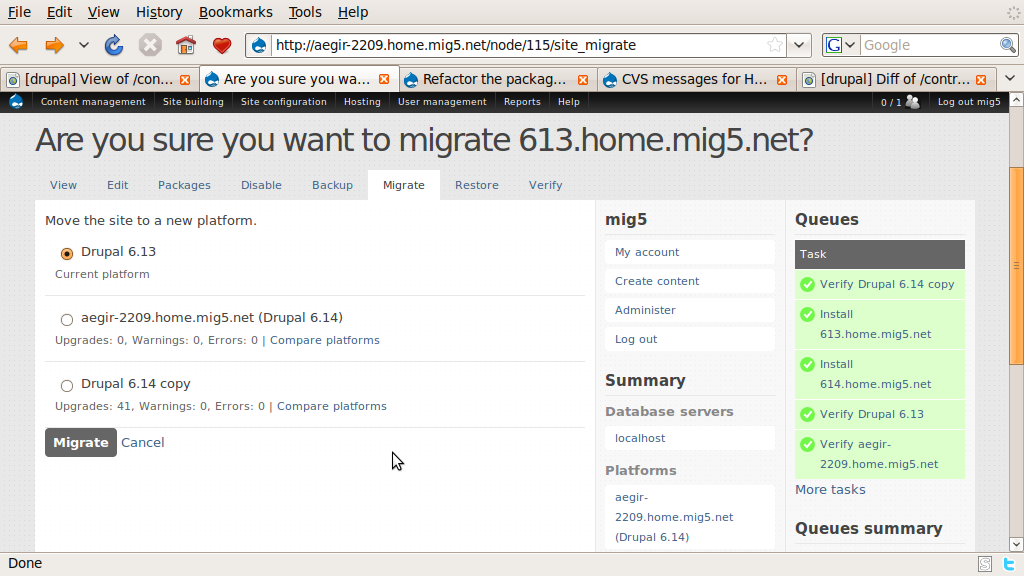
| #7 | 613_migrate.png | 117.93 KB | mig5 |
| #7 | 614_migrate.png | 107.53 KB | mig5 |
| #5 | Picture 41.png | 59.87 KB | adrian |
| #5 | Picture 40.png | 45.31 KB | adrian |
| #5 | hosting_refactor_migrate_form.patch | 16.81 KB | adrian |





Comments
Comment #1
adrian commentedConsidering the amount of data that needs to be processed for this, we need to simplify the initial display of data.
So i feel that the initial compare should just be a list of eligible platforms, with a link (either a real page or an ajax call of some sort) to display the comparison between just the current and target platforms.
Comment #2
adrian commentedi think i can also improve the performance of this screen by offloading more to the database layer.
during evaluation i intend to create 2 temporary tables, one with the denormalized form of the current packages the other with the denormaized form of the target platform.
Creating the temporary tables should be pretty inexpensive and it allows us to more easily detect differences between the package sets with a simple join between the two temporary tables rather than having to iterate through every package on every platform.
The only problem comes in with the 'version' string, which needs to be normalized better to create an efficient query.
I think that is something that should perhaps be offloaded to the verify task, so that instead of trying to compare two strings we are comparing the values of the different components.
Comment #3
adrian commentedlooking at it a bit more, im considering processing the version strings into a single integer that can be compared.
this integer would be relatively large, but it would still be easier to compare than a string or several different columns.
it could work provided none of the version numbers go over 99 (or perhaps it should be 3 digits?)
6.x-2.1-alpha3 turns into 6|00|02|01|01|03
6.12 is 6|12|00|00|04|00
HEAD is (of course) 0
it makes it easy to detect that 7.x-3.0-alpha4 (70003000104) is newer than 6.x-2.0-beta1 (60002000201)
The query would then just be finding the items in the current temporary table that have a lower version or schema version than the target platform.
Comment #4
adrian commentedGot the code almost done. it's pretty damn fast now, but i should still add some indexes
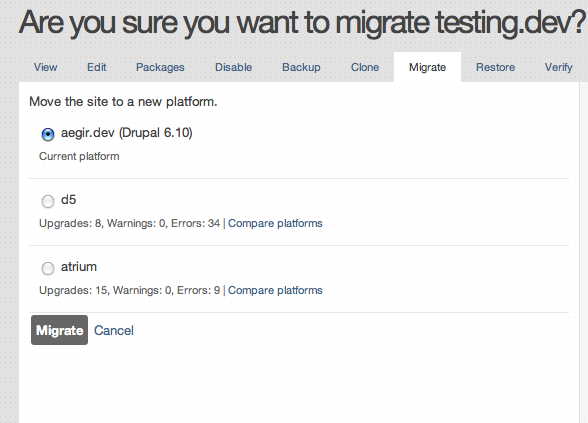
here's the new interface, i'm still adding in the package comparison table.
Comment #5
adrian commentedThis is almost ready, apart from some small user interface issues, the form is a lot simpler now.
i'm thinking perhaps we should add a dependency to jquery ui for this, as the compare packages screen should really be a modal dialog that is opened up. (http://jqueryui.com/demos/dialog/modal-message.html)
also the accordion widget would work very will with the site creation form. (http://jqueryui.com/demos/accordion/)
Comment #6
adrian commentedi forgot to mention that you need to run update.php, as this adds a new column
Comment #7
Anonymous (not verified) commentedThis is all working well on a fresh install. Only a couple small things:
1) WIth a site provisioned on 6.13, and two 6.14 platforms (one that the main aegir site is on, and another just a fresh 6.14 downloaded), the migrate form shows the '41 upgrades' involved if the site was to migrate to 'Drupal 6.14 copy' but shows 0 upgrades (and 0 errors) for the Drupal 6.14 platform that the main aegir site resides in.
I would think both 6.14 platforms should show the 41 upgrades, but for some reason the main aegir platform is different somehow. See 613_migrate.png attached
2) I have a drupal 6 site installed on the 'main' Drupal 6.14 platform that the main aegir site is also on. On its Migrate tab, it should offer the *other* Drupal 6 platform as a viable platform to migrate to, but instead 'there are no platforms that match the dependencies for this site'. Now obviously this 6.14 platform has some extra modules (hosting, admin_menu etc) and hostmaster profile, but this site doesn't make use of them, so it should be able to be migrated to the other 6.14 platform. See 614_migrate.png attached
Comment #8
adrian commentedThe no upgrades available issue is likely related to : http://drupal.org/node/584188
if you revert the patch, you will see that the old form won't let you migrate either.
Comment #9
adrian commentedI committed this.
any additional issues with this form (and there are probably several) should get new issues created for them.
Comment #10
omega8cc commentedIt works, and now the interface for migration looks nice, thanks!
~Grace
Comment #11
adrian commentedIt could use some more testing, to make sure everything is working correctly.
It also needs some spit and polish on the interface level.
any minor (or major) issues you can find will help.
Comment #12
Anonymous (not verified) commentedIt all seems to be working fine. Note that I committed a fix earlier today that prevented a site from being migrated to the current platform. The only radio box that can be selected now is that of a platform that is a valid target, so the validation is a bit saner now.
I just committed a little change that adds a 'Back to site' link at the bottom of the package comparison table to take the user back to the site node.