

 The 2026 Drupal Business Survey is open. Your response will help shape the future of the Drupal business ecosystem.
Hi, I have recently installed cacherouter along with memcache to replace Drupal's database caching as I had identified this as one of our performance bottlenecks. However, I seem to be having as issue clearing the cache. I tried clearing the cache using the 'Flush all caches' option from the administration menu, as I always have done. However, it didn't seem to clear the cache and anonymous users were still seeing cached content. The only way I could clear it was to manually flush mamcache's cache (by using the memcache.php script that came with memcache).
I was under the impression that cacherouter literally replaces the original drupal caching mechinism, and therefore I would be able to clear it in the same way I always had done. Was I wrong? Is there any way to clear the memcache through Drupal?
| Comment | File | Size | Author |
|---|---|---|---|
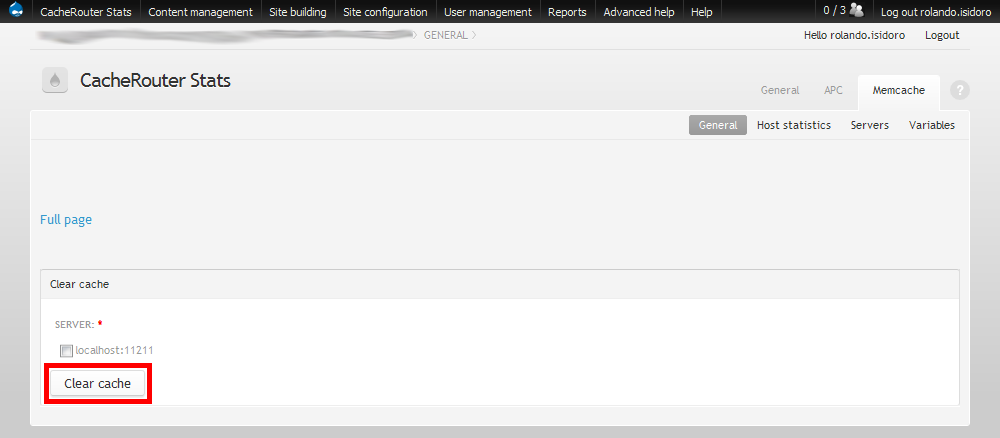
| #2 | Admin menu Cache Router Stats entry | 6.22 KB | rolando.isidoro |
| #2 | Cache Router clear Memcache | 27.81 KB | rolando.isidoro |


Comments
Comment #1
vacilando commentedSubscribing
Comment #2
rolando.isidoro commentedHey Tom,
I've installed Admin Menu and Cache Router Statistics modules on some Drupal websites which provides me a new entry where I can access several Cache Router features, including one for clearing the cache from the several installed cache engines.
Check the attached images and get back to me if you still have any problems.
Nevertheless I think that these caches should be cleaned when we use Drupal's "Flush all caches" option. In my opinion the two mechanisms should be integrated. What are your thoughts about it?
Rolando Isidoro
Comment #3
sdelbosc commented'Flush all caches' feature should flush memcache data set by cacherouter module.
However, we have identified an issue in cacherouter which prevents from clearing some data. Have a look at this issue and check if you use cacherouter in the same way.