

 Come together with the global Drupal community in Rotterdam, 28 Sept – 1 Oct 2026. Sessions, contribution, connection, and Early Bird savings until 8 June.
Hello,
I am able to succesfully add my Twitter account (and see Twitter posts) using the Twitter module but for some reason, the Twitter module is not making the account that I have imported available to this module.
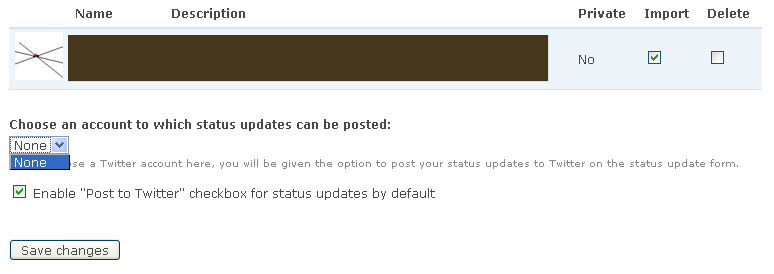
Under where it says: Choose an account to which status updates can be posted...
All it says is None...and there is no choice to add the account that I have imported. As a result, there is no option for my users to broadcast their status update to Twitter.
Any idea of what might be causing this?
Thanks
| Comment | File | Size | Author |
|---|---|---|---|
| #12 | fbss.png | 16.86 KB | icecreamyou |
| #1 | TwitterFacebookModule.jpg | 55.75 KB | mrwhizkid |


Comments
Comment #1
mrwhizkid commentedI upgraded to the stable version (rc2) and I am still having the same trouble. Users can post to Twitter if they submit a node but there is no Twitter button next to the status updates. I have the Twitter button set 'on' by default and it is also set on in my User Profile.
Please see the attached screenshot of the Twitter settings in the User Profile. I have blacked out a few things for privacy sake...
Comment #2
icecreamyou commentedYou might have upgraded incorrectly -- try following the instructions here and that may solve your problem.
If not, I need more information. What version of the Twitter module are you using? What relevant permissions do the users have that you tried this with? Note that you can't use the Twitter account assigned as the "global" account to tweet from a user's individual profile. Do you get any errors in the log? What version of PHP are you using? What type and version of SQL?
Comment #3
mrwhizkid commentedHi,
I had these problems before I upgraded back when I was using the Beta 3 version for 2x.
I am running:
1. The latest version of Twitter module (downloaded it yesterday)
2. PHP 5
3. MySQL client version: 4.1.22
I don't have a global Twitter account. I just want my users to be able to set up their own accounts. I did just that and I am able to post nodes to Twitter but there is nothing about 'Post to Twitter' showing up next to the FB status even though I have it enabled.
Also..no errors in the log related to Twitter or FB.
Comment #4
icecreamyou commentedThat's the point. A botched upgrade would mean your system is still trying to use methods from Beta 3. Please follow the instructions here and report back.
Comment #5
mrwhizkid commentedHi again. I apologize because I don't think I've written clearly enough about what has happened.
1. I had already installed FBSS Beta 3 a few months ago and this week I decided to try using it with the Twitter module. I was able to get the Twitter module up and running but for some reason or another, the 'Post to Twitter' button wouldn't show up next to the status update field even though I have it activated.
I also noticed that although I could easily import accounts into the Twitter module, none of them would show up in dropdown menu under where it says...'Choose an account to which status updates can be posted' in the User Profile.
2. I upgraded to FBSS RC2 (the latest dev. version) and followed all of the instructions including running update.php, reverting views, etc. I still have the same problem.
As far as the permissions are concerned..here are how I have them setup for the user that I am trying this with...
FBSS
--------------------
edit all statuses
edit own status
use open API
view all statuses
Twitter
-------------------
add twitter accounts
use global twitter account
I am not trying to use a global account. Just an individual account where users add their own accounts and can update their Twitter accounts when they update their FBSS status.
Thanks again for your help. I really appreciate it.
Comment #6
icecreamyou commentedHmm... have you checked the "Allow users to post their statuses to Twitter" box on the FBSS Advanced Settings page?
Edit: that's probably what it is. The setting is supposed to be enabled by default, but I think it gets disabled by default due to a variable name change if you're upgrading from a beta version. I've added descriptive text (in CVS) to help in the future.
Comment #7
mrwhizkid commentedHi again,
After installing the new version, I noticed that there are 3 different areas where this function needs to be enabled.
1. FBSS general settings where you can choose whether the option to post to twitter is enabled by default, etc.
2. The Advanced settings where you have to give the Twitter module permission to access the FBSS in the first place.
3. In the Edit User Profile part of Twitter where it says
"Enable "Post to Twitter" checkbox for status updates by default"
All of these options are enabled.
Again, I think it has something to do with the fact that in the Twitter settings under User Profile, the dropdown menu where I should be able to choose an account that I have imported is empty. Please see my attachment from comment #2. As you will see, I do have a Twitter account succesfully imported into Twitter and I am able to post to that account using nodes.
For some reason, it's that dropdown box with 'none' in it that won't allow me to choose an account to post my status updates to.
I have tried multiple Twitter accounts...
Comment #8
icecreamyou commentedLet's do some debugging then.
Go to node/add/page or similar, set the input type to PHP, put this code in the "body" field, and click the Preview button. What do you see? You should see a select box with a choice of all the Twitter accounts you have entered in the relevant profile. If you see something different, follow the instructions in the code comments to see if you get anything surprising.
Comment #9
mrwhizkid commentedHi,
Wow. I do see the relevant Twitter accounts for the user that I enter using the UID when I use this code. So what does this mean? Should it not be also showing up for individual users when they import a Twitter account? Do I need to tweak the code somewhere so that it automatically uses the UID of the currently logged in user?
Comment #10
icecreamyou commentedIf your upgrade was as accurate as you say it was, then this result baffles me. I still suggest that you re-upgrade FBSS using the latest dev. (There are a few changes to the UI for Twitter integration between RC2 and the dev build, so you should check back over that when you're done.)
The code in the module is more complicated than what I asked you to run for debugging purposes. It gets the user correctly unless you've modified Drupal core.
Comment #11
mrwhizkid commentedHello,I upgraded to the latest dev and now the Twitter options (including the advanced menu) have completely disappeared from the admin part of the module. Was the DEV stripped of the Twitter functionality?
Comment #12
icecreamyou commentedNo. The attached image shows what you should see.
There's absolutely no reason you should see anything else unless you upgraded incorrectly. (Please don't skip any of the steps in the instructions, even if you think they're not relevant!) If it's an option, you might try uninstalling FBSS altogether before installing it again per the instructions. Also, it may be worthwhile to test using different user accounts afterwards.
Comment #13
mrwhizkid commentedActually, there is a good reason why the Twitter option in the advanced section is missing. It is also missing in the file
modules/facebook_status/facebook_status.admin.inc
It must have been taken out by accident?
Comment #14
icecreamyou commentedNo, it wasn't taken out. Just in case CVS messed up, I just tested it with a fresh dev copy, and all is as I expect.
Clearly, something is being lost in the communication between us, so I'm going to spell it out as clearly as I can.
Open FTP or Shell to your site.
Download the latest dev build of the module.
Decompress the file you just downloaded. You should now have a folder called
facebook_statuswith 35 files in it.In FTP or shell, navigate to the modules folder for your Drupal installation (/modules or /sites/all/modules).
In FTP or shell, completely delete the entire facebook_status folder.
In FTP or shell, upload the new facebook_status folder which you just downloaded.
When the upload is finished, immediately go to yoursite.com/update.php and run the updates, even if it tells you there are none to run.
Check your settings again.
This will solve your missing token problem too.
Comment #15
icecreamyou commentedMarking as fixed, because even if it isn't, I probably don't have much else to contribute to this issue. Feel free to reopen if you have followed my instructions exactly and you can demonstrate that your issue is reproducible under normal circumstances.