

Postponed (maintainer needs more info)
Project:
Image
Version:
6.x-1.0-beta3
Component:
image_attach
Priority:
Critical
Category:
Bug report
Assigned:
Unassigned
Reporter:
Created:
29 Sep 2009 at 13:10 UTC
Updated:
6 Nov 2009 at 14:47 UTC
Jump to comment: Most recent file

Comments
Comment #1
bauhaus commentedSee the problem. Saving translation replace in image_attach table nid field content to newly saved. Should add another I think.
Any clue?
Thanks
Robert
Comment #2
bauhaus commentedOK,
got it. It's not perfect, but...
after creating and saving translation, reopen it then use attach_image. Press "attach" button. DON'T SAVE IT AGAIN AT THE BOTTOM OF FORM.
Image should be added properly.
In case somebody need it.
Robert
Comment #3
bauhaus commentedComment #4
joachim commentedI've tested this on a dev site.
This works fine with attaching existing images, and I uploaded a new image to my french translation node and that works too.
Can you explain step by step how to reproduce the problem, and give more information about the workaround?
Comment #5
bauhaus commentedMy pleasure,
I just migrated my site, so it can be something other then image module but...
I added node - 1562 & 1563. Original is in Polish, translation in German. I'm using image module naturally, adding images via image_attach component.
Creation of node 1562 went without any problems. Then I created translation node 1563 - as usual. Entered text, attached image (pressed button "attach", thumbnail was OK, same as in original node). Then saved whole node using "save" button at bottom of the form. Normally it should save all node right? So, it did but saving using "save" button on node 1563 delete from table image_attach image (1564) node reference to 1562. Node are connected via i18n translation obviously.
And when I opened again node 1562, now without attached image, and save it - then there is no image on node 1563... I tried it with other nodes, previously created as well as created new translation pair. Exactly same behavior. Is something checking other nodes relations to image and removing from image_attach table if duplicate image id found? Looks like this type of logic behind this. Again - it happens when save button on edit form is pressed, not when image attach part is used.
No errors or warning in httpd error log or messages log. Centos 5.3, PHP 5.2.9., 32bit. Other Drupal stuff working properly.
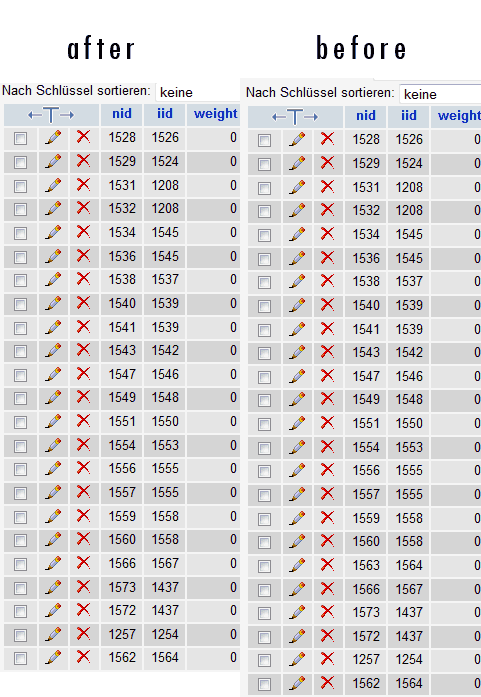
Here I attached screenshot of image_attach table. Saving delete one row with reference to "other" node connected via translation i18n.
After - is after using "save" button at bottom. Before - is when I saved whole node, then added image using image_attach, and not used "save" button. Luckily image is saved in table image_attach just after attaching image. So workaround is to not save a node after attaching image to it. Sounds stupid, I know.
1562 - original node
1563 - translation
1564 - image, later attached to node
Drupal core is current as well as all other modules installed on my site. I think - but I'm not positive - this issue is related to update of image module from 6.x-1.0-alpha5 to beta3. But I'm not a user, I'm admin of this website. There is a possibility I just received new info about earlier problem.
Kind regards
Robert
Comment #6
joachim commentedStill not sure I get it, as in your After screenshot, I see 1564 attached to both 62 and 63. Isn't that the correct data?
Here are my steps:
1. Create content -> story
2. Enter title, select language English.
3. Use the Browse button to pick an image, give a title to the image
4. Click Attach image
5. Click Save.
6. click Translate
7. Choose add a French translation
8. j'ajoute un titre en français ;)
9. under Image attach, I see in the list of images the image from step 3. select it in the list
10. click save.
Result: both nodes have the correct image attached.
Note that I don't have i18n module installed -- only the core translation modules.
Comment #7
bauhaus commentedHi again,
Still not sure I get it, as in your After screenshot, I see 1564 attached to both 62 and 63. Isn't that the correct data?
>> exactly, that's correct data. Had to use this workaround technique to have this.
Here are my steps:
1. Create content -> story
2. Enter title, select language English.
3. Use the Browse button to pick an image, give a title to the image
4. Click Attach image
5. Click Save.
6. click Translate
7. Choose add a French translation
8. j'ajoute un titre en français ;)
9. under Image attach, I see in the list of images the image from step 3. select it in the list
10. click save.
>> after this save I got image on first - in your example it's English - node cleared. Checked this again minute ago. "Save" button clears it. Any idea how to debug this?
Result: both nodes have the correct image attached.
Note that I don't have i18n module installed -- only the core translation modules.
>> I did already some MySQL debugging. And I found DELETE FROM image_attach WHERE nid = 1572. Because I'm using now another story (content type) nid is different. I think it's where my pic is lost. Any idea why? Debug output below. There is additional image field in this content type "story" from CCK. But it's unused and don't think it interacts in any way. nid = 1437 is pic node I'm trying to add.
A bientot ;)
Robert
41 Query DELETE FROM image_attach WHERE nid = 1572
41 Query INSERT INTO image_attach (nid, iid, weight) VALUES (1572, 1437, 0)
Comment #8
joachim commentedThere's two places the DELETE could come from:
a. image_attach_image_add_submit(), which should only happen when you click 'Attach'. And on the second translation node, you're not clicking attach, only Save, since you're picking an existing image node rather than uploading.
b. image_attach_nodeapi(), in case 'update'.
I would try debugging round both of those to make sure which one is called, and why the form has the wrong nid.
You're not using your browser's back button are you?
Comment #9
bauhaus commentedHi again,
attached please find some more mysql debugging.
I can confirm reported problem. I think problem occurs only when saving form. Using 'attach' button works fine, both nid have corresponding iid OK.
Again I see DELETE from image_attach on related node (related via i18n module, problem exists only in nodes connected as translations) in mysql log.
In this case I created node 1587, saved. Created translation - 1588. Attached picture. All perfectly working. And - pressed Save button at bottom and image_attach record where nid = 1587 was deleted. After adding image to node 1587 - image on node 1588 gets deleted. Exactly as mentioned earlier.
Totally have no idea what can be wrong. Yet ;)
One more thing - naturally I'm not using browser back button.
Thank you for posting
2 Query SELECT changed FROM node WHERE nid = 1588
2 Query SELECT * FROM users u WHERE LOWER(name) = LOWER('admin')
2 Query SELECT r.rid, r.name FROM role r INNER JOIN users_roles ur ON ur.rid = r.rid WHERE ur.uid = 1
2 Query SELECT f.name, f.type, v.value FROM profile_fields f INNER JOIN profile_values v ON f.fid = v.fid WHERE uid = 1
2 Query SELECT lid FROM location_instance WHERE uid = 1
2 Query SELECT * FROM location WHERE lid = 8
2 Query SELECT aa.aid, a.type FROM trigger_assignments aa LEFT JOIN actions a ON aa.aid = a.aid WHERE aa.hook = 'nodeapi' AND aa.op = 'presave' ORDER BY weight
2 Query UPDATE node SET vid = 1590, type = 'story', language = 'de', title = 'testmpDE', uid = 1, status = 1, created = 1254864631, changed = 1254865500, comment = 0, promote = 0, sticky = 0, tnid = 1
587 WHERE nid = 1588
2 Query UPDATE node_revisions SET nid = 1588, uid = 1, title = 'testmpDE', body = 'testPL', teaser = 'testPL', timestamp = 1254865500, format = 2 WHERE vid = 1590
2 Query UPDATE url_alias SET src = 'node/1588', dst = 'testmpde.htm', language = 'de' WHERE pid = 3145
2 Query UPDATE search_dataset SET reindex = 1254865500 WHERE sid = 1588 AND type = 'node'
2 Query DELETE FROM term_node WHERE vid = 1590
2 Query UPDATE node SET tnid = 1587, translate = 0 WHERE nid = 1588
2 Query SELECT aa.aid, a.type FROM trigger_assignments aa LEFT JOIN actions a ON aa.aid = a.aid WHERE aa.hook = 'nodeapi' AND aa.op = 'update' ORDER BY weight
2 Query SELECT COUNT(*) FROM content_type_story WHERE vid = 1590
2 Query UPDATE content_type_story SET vid = 1590, nid = 1588, field_image_nid = NULL WHERE vid = 1590
2 Query DELETE FROM cache_content WHERE cid = 'content:1588:1590'
2 Query DELETE FROM gmap_taxonomy_node WHERE vid = 1590
2 Query SELECT marker, tid FROM gmap_taxonomy_term WHERE tid = 0
2 Query SELECT marker, tid FROM gmap_taxonomy_term WHERE tid = 0
2 Query DELETE FROM image_attach WHERE nid = 1588
2 Query SELECT lid FROM location_instance WHERE nid = 1588 AND vid = 1590
2 Query DELETE FROM location_instance WHERE nid = 1588 AND vid = 1590
2 Query SELECT name, mail FROM users WHERE uid = 1
2 Query SELECT mlid FROM menu_links WHERE link_path = 'node/1588'
2 Query SELECT t.vid FROM term_node r INNER JOIN term_data t ON r.tid = t.tid INNER JOIN vocabulary v ON t.vid = v.vid WHERE r.nid = 1588 ORDER BY v.weight, t.weight, t.name LIMIT 0, 1
2 Query SELECT t.vid FROM term_node r INNER JOIN term_data t ON r.tid = t.tid INNER JOIN vocabulary v ON t.vid = v.vid WHERE r.nid = 1588 ORDER BY v.weight, t.weight, t.name LIMIT 0, 1
2 Query SELECT t.vid FROM term_node r INNER JOIN term_data t ON r.tid = t.tid INNER JOIN vocabulary v ON t.vid = v.vid WHERE r.nid = 1588 ORDER BY v.weight, t.weight, t.name LIMIT 0, 1
2 Query SELECT t.vid FROM term_node r INNER JOIN term_data t ON r.tid = t.tid INNER JOIN vocabulary v ON t.vid = v.vid WHERE r.nid = 1588 ORDER BY v.weight, t.weight, t.name LIMIT 0, 1
2 Query SELECT t.vid FROM term_node r INNER JOIN term_data t ON r.tid = t.tid INNER JOIN vocabulary v ON t.vid = v.vid WHERE r.nid = 1588 ORDER BY v.weight, t.weight, t.name LIMIT 0, 1
2 Query SELECT t.vid FROM term_node r INNER JOIN term_data t ON r.tid = t.tid INNER JOIN vocabulary v ON t.vid = v.vid WHERE r.nid = 1588 ORDER BY v.weight, t.weight, t.name LIMIT 0, 1
2 Query SELECT t.vid FROM term_node r INNER JOIN term_data t ON r.tid = t.tid INNER JOIN vocabulary v ON t.vid = v.vid WHERE r.nid = 1588 ORDER BY v.weight, t.weight, t.name LIMIT 0, 1
2 Query SELECT t.vid FROM term_node r INNER JOIN term_data t ON r.tid = t.tid INNER JOIN vocabulary v ON t.vid = v.vid WHERE r.nid = 1588 ORDER BY v.weight, t.weight, t.name LIMIT 0, 1
2 Query SELECT t.vid FROM term_node r INNER JOIN term_data t ON r.tid = t.tid INNER JOIN vocabulary v ON t.vid = v.vid WHERE r.nid = 1588 ORDER BY v.weight, t.weight, t.name LIMIT 0, 1
2 Query SELECT t.vid FROM term_node r INNER JOIN term_data t ON r.tid = t.tid INNER JOIN vocabulary v ON t.vid = v.vid WHERE r.nid = 1588 ORDER BY v.weight, t.weight, t.name LIMIT 0, 1
2 Query SELECT t.vid FROM term_node r INNER JOIN term_data t ON r.tid = t.tid INNER JOIN vocabulary v ON t.vid = v.vid WHERE r.nid = 1588 ORDER BY v.weight, t.weight, t.name LIMIT 0, 1
2 Query SELECT COUNT(pid) FROM url_alias
2 Query SELECT src FROM url_alias WHERE dst = 'frontpage' AND language IN('pl', '') ORDER BY language DESC
2 Query SELECT t.vid FROM term_node r INNER JOIN term_data t ON r.tid = t.tid INNER JOIN vocabulary v ON t.vid = v.vid WHERE r.nid = 1588 ORDER BY v.weight, t.weight, t.name LIMIT 0, 1
2 Query SELECT t.tid, t.name FROM term_data t INNER JOIN term_node r ON r.tid = t.tid WHERE t.vid = 0 AND r.nid = 1588 ORDER BY weight LIMIT 0, 1
2 Query SELECT n.nid, n.type, n.language, n.uid, n.status, n.created, n.changed, n.comment, n.promote, n.moderate, n.sticky, n.tnid, n.translate, r.vid, r.uid AS revision_uid, r.title, r.body, r.tease
r, r.log, r.timestamp AS revision_timestamp, r.format, u.name, u.picture, u.data FROM node n INNER JOIN users u ON u.uid = n.uid INNER JOIN node_revisions r ON r.vid = n.vid WHERE n.nid = 1587
2 Query SELECT last_comment_timestamp, last_comment_name, comment_count FROM node_comment_statistics WHERE nid = 1587
2 Query SELECT dst FROM url_alias WHERE src = 'node/1587' AND language IN('pl', '') ORDER BY language DESC
2 Query SELECT t.* FROM term_node r INNER JOIN term_data t ON r.tid = t.tid INNER JOIN vocabulary v ON t.vid = v.vid WHERE r.vid = 1589 ORDER BY v.weight, t.weight, t.name
2 Query SELECT * FROM files f INNER JOIN upload r ON f.fid = r.fid WHERE r.vid = 1589 ORDER BY r.weight, f.fid
2 Query SELECT data, created, headers, expire, serialized FROM cache_content WHERE cid = 'content:1587:1589'
2 Query SELECT iid FROM image_attach WHERE nid = 1587 ORDER BY weight
2 Query SELECT lid FROM location_instance WHERE vid = 1589
2 Query UPDATE node SET vid = 1589, type = 'story', language = 'pl', title = 'testmpPL', uid = 1, status = 1, created = 1254864499, changed = 1254865500, comment = 2, promote = 0, moderate = 0, sticky
= 0, tnid = 1587, translate = 0 WHERE nid = 1587
2 Query UPDATE node_revisions SET nid = 1587, uid = 1, title = 'testmpPL', body = 'testPL', teaser = 'testPL', timestamp = 1254865500, format = 1 WHERE vid = 1589
2 Query UPDATE url_alias SET src = 'node/1587', dst = 'testmppl.htm-0', language = 'pl' WHERE dst = 'testmppl.htm-0'
2 Query UPDATE search_dataset SET reindex = 1254865500 WHERE sid = 1587 AND type = 'node'
2 Query DELETE FROM term_node WHERE vid = 1589
2 Query SELECT COUNT(*) FROM content_type_story WHERE vid = 1589
2 Query UPDATE content_type_story SET vid = 1589, nid = 1587, field_image_nid = NULL WHERE vid = 1589
2 Query DELETE FROM cache_content WHERE cid = 'content:1587:1589'
2 Query DELETE FROM gmap_taxonomy_node WHERE vid = 1589
2 Query SELECT marker, tid FROM gmap_taxonomy_term WHERE tid = 0
2 Query SELECT marker, tid FROM gmap_taxonomy_term WHERE tid = 0
2 Query DELETE FROM image_attach WHERE nid = 1587
2 Query SELECT name, mail FROM users WHERE uid = 1
2 Query SELECT mlid FROM menu_links WHERE link_path = 'node/1587'
Comment #10
joachim commentedRight, but we need to know which part of the code calls that query.
Can you stick debug statements in the code, in those two functions I mentioned, to see which one is being performing the DELETE?
Comment #11
zarquon commentedSame problem here. And ... The "save" button seems to be the bad boy.
Works like described. When I only hit the "Attach" button I have the same attached Image in two (translated) nodes. Good to have a workaround. A real solution would be better, of course.