Closed (fixed)
Project:
Insert View
Version:
6.x-1.x-dev
Component:
Miscellaneous
Priority:
Normal
Category:
Support request
Assigned:
Unassigned
Reporter:
Created:
8 Oct 2009 at 18:05 UTC
Updated:
13 Jul 2011 at 18:37 UTC


Usual apologies, I'm new to Drupal and web design in general.
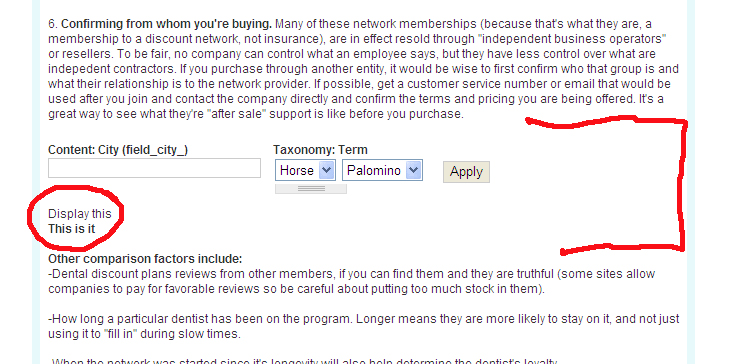
First both the Insert View and Insert Block modules work wonderfully, thanks for the effort. In my site's theme, both of these modules insert only the information from the view or block, as is noted in the documentation. However, I would like to set off the information with a rule, background or something. I could go into modifying the CSS, however, I'm wondering if this would have any effect since the insertions are not carrying along the normal/original block or view formatting. I've tried using HTML borders, backgrounds, etc. with the following block insertion code, but it just puts the border/ background before the inserted block/view:
[view:drop_down=views-tab-page_1]
Can you give me some guidance on how to do this? Also, when I include a view, the footer information displays, but not the header. I've enclosed a sample of my page with the footer test information circled in red and the inserted view noted in a red callout as well where I'd like a border or background. Of course, I can just put rules before and after the inserted View, but would like to carry along the site's theme with the same attributes as the original blocks and views.
Thanks.
| Comment | File | Size | Author |
|---|---|---|---|
| View-Insert-No-Formatting.gif | 81.36 KB | rickherman |

Comments
Comment #1
pasquallecan you show screenshots about this problem? As in general the inserted view should look same as the "normal" view..
tip1: On view edit page check that the "Display even if view has no result" setting is the same for header and footer..
you can do that only with css. Try adding to your theme's style.css for example:
you can easily learn CSS just by reading the css files. and if you are unsure which selectors are available you should try Firebug. Or give the direct link to your site, and anyone with a basic Firebug knowledge will be able to tell you what do you need to change in the css..
Comment #2
BazzeFTW commentedI'm also having the same issue, the inserted view is not formated after my edited tpl-file for the view, it uses the default one. How to fix this?
Comment #3
pasqualle@BazzeFTW:
1. does the view use the correct tpl file if used without insert_view?
2. how many active themes do you have? is the insert_view used on a page which has the default theme?
3. is it an ajax view? or do you use any ajax functionality to display the view or the content where this view is inserted?
Comment #4
BazzeFTW commented1. Yes, it is using the correct tpl file.
2. Aha! I have Garland as administration theme, so maybe if I put it in the Garland folder?
3. No :)
I'll test puting it in the garland folder, if that is it, is it possible to change it?
Comment #5
BazzeFTW commentedNo, it didn't help... :(
Comment #6
pasquallealright, I do not know any other reason why your tpl file is not picked up. you should probably post some screenshots now. the view without insert view, the view with insert view, the name and the file location of the template file..
ok. another question. what is the name of the view template file, and what is your insert_view filter syntax to display the view? maybe, your template file is for a specific view display, but you did not specify it in insert_view filter..
Comment #7
BazzeFTW commentedOkay, I'm using the Viewfield module. Though if I would insert manually I'll type [view:newsletter=Förstasidan=56] (I've tried not using the Viewfield module and it still doesn't theme). And one of my tpl files: views-view-fields--newsletter--page-1.tpl.php. I've copied the filenames directly from the theme information in the view.
The problem is not a dislocated tpl file or faulty named one, of that I am completely sure. That's why it so frustrating! What do you want me to take screenshots on, I don't really know what is worth seeing.
Comment #8
pasquallethe display name is wrong, should be:
[view:newsletter=page_1=56]Comment #9
BazzeFTW commentedHmm.. okay. Changed to that, still no formating :/ I really don't know what to post so it's easier for you to help me, just tell me what you need, sorry...
Comment #10
pasquallecan you rename the
views-view-fields--newsletter--page-1.tpl.phpto
views-view-fields--newsletter.tpl.phpand clear the theme cache. Because I am still not convinced that you are seeing the correct view display with insert_view..
Comment #11
BazzeFTW commentedOh crap... It is working now. But it seems like the simplenews module is destroying the themeing of the inserted view.
Comment #12
pasqualleprobably the css classes are the same in the view and the simplenews module.
quick solution might be to rename the view (export, change the name, import back) rename the template, clear theme registry, and use the new view with insert_view.
Comment #13
pasqualle