

 Come together with the global Drupal community in Rotterdam, 28 Sept – 1 Oct 2026. Sessions, contribution, connection, and Early Bird savings until 8 June.
I'm not sure what is normal and what's not re display of Real Name on User Profile displayed at domain/user/# I'm using Content Profile rather than core's profile. I created a field for first name and one for last name. I used pattern in Real Name to order those fields: first name last name. The real name and order display fine on admin/user/user list of users. But when I click the View tab at domain/user/5, I see under the word "profile" the name listed like this:
Jan
Boll
rather than: Jan Boll
Was Real Name suppose to display this as Jan Boll?
| Comment | File | Size | Author |
|---|---|---|---|
| #2 | profile.jpg | 349.76 KB | Sunshiney |
| #2 | profile2 copy.jpg | 310.02 KB | Sunshiney |
| #2 | profile3 copy.jpg | 284.48 KB | Sunshiney |
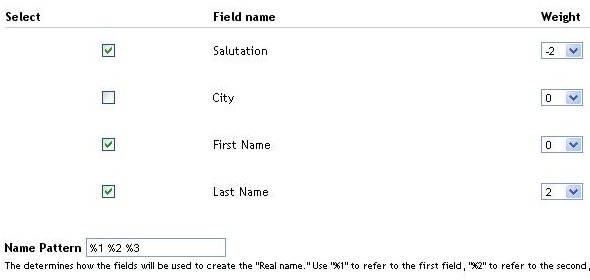
| #1 | rn_fields.jpg | 21.25 KB | nancydru |


Comments
Comment #1
nancydruAssuming you don't have a line feed in the pattern, it should be on one line. The attached is how I have mine set up.
Comment #2
Sunshiney commentedOh dear. One of those moments. Durn. Your instructions in Drupal documentation were quite clear, so no problems with the % patterns. I did double-check just to make sure. I did find a little single space and I deleted that just to be sure, but no change occurred. I cleared all caches using admin menu "batch clearing." Refreshed. Closed brower. Reopened. Checked in both IE6 and Firefox. Nada. I also used the dev tool in IE to look at the code and it seems that two divs are being created, one around first name and another around last name.
I've attached some screen shots. Do ignore the formatting break "stuff" in the profile at the end...I know what's going on there. Right now, my focus is only on getting first name/last name to be on one line. I've searched the forum to no avail. Searched here for issues before posting. And, now, I'm stuck. I'm at dead-end as to where to check next.
If you were me, what would you check next?
Comment #3
nwsunni commentedI took a rest from this for a few days but am revisiting it today. It remains a problem. However, I now am noticing that when I list users in admin that some of them have no space between the first name last name and some do have the proper spacing. I'll see if I can find some commonalities as well as reinstall real name. If you have any insights, I'd appreciate having some of your knowledge!
Comment #4
nwsunni commentedI changed the title in each profile node to use the tokens from cck field first name last name rather than the real name token. I checked each profile to make sure that the input method was the same; it was. I cleared cache, just as I had done several times three days ago. I changed the weight of the fields the real name pattern so that they are now the same (-9). I checked, once again, to see if the names had any extra spacing after them. I had typed each in manually before so a line break insertion was not possible, imho.
I am still trying to figure out how to fix.
Comment #5
nwsunni commentedComment #6
nwsunni commentedHi -- I have real name displaying fine wherever it's needed. However, I still cannot get the real name to display on one single line in the user's profile (http://domain/user/15) by just using name pattern. The real name does display but it's stacked. That does reflect how the fields are presented on the display fields page as well as the managing fields page in the content type. I am "using the content_profile module to provide fields.The profile type is the source of data."
I have spent about 16 hours on this to no avail. so I guess I really need some help. Have reinstalled username, updated published nodes, cleared cache, run cron, rebuilt name, read and read. To no avail.
I'm wondering if you did any theming or modification of user profile node or content profile/content type to get real name to display on one single line on the user profile?
BTW, I am using:
*real name dev version (today's)
*auto node title 6x 1.2
*token 6x 1.12
*cck
*Override username theme is selected
*Maximum allowed username length is 20
*Show realname in nodes is selected
*Name pattern %1 %2
* First name is now -9 and Last name is -8
*Bypass forms not touched
Comment #7
magnus commentedYou have to change in your theme that you want to output the themed username. Or make a view that outputs it.
Comment #8
j0nathan commentedsubscribing
Comment #9
hass commented