

Closed (fixed)
Project:
Drupal core
Version:
7.x-dev
Component:
update.module
Priority:
Normal
Category:
Task
Assigned:
Issue tags:
Reporter:
Created:
12 Oct 2009 at 17:44 UTC
Updated:
3 Jan 2014 at 00:29 UTC
Jump to comment: Most recent, Most recent file




Comments
Comment #1
dwwTagging for UX folks...
Comment #2
dwwI know people will want screenshots of this, but I have to run to a concert right now. However, here's a first-draft of the patch.
Comment #3
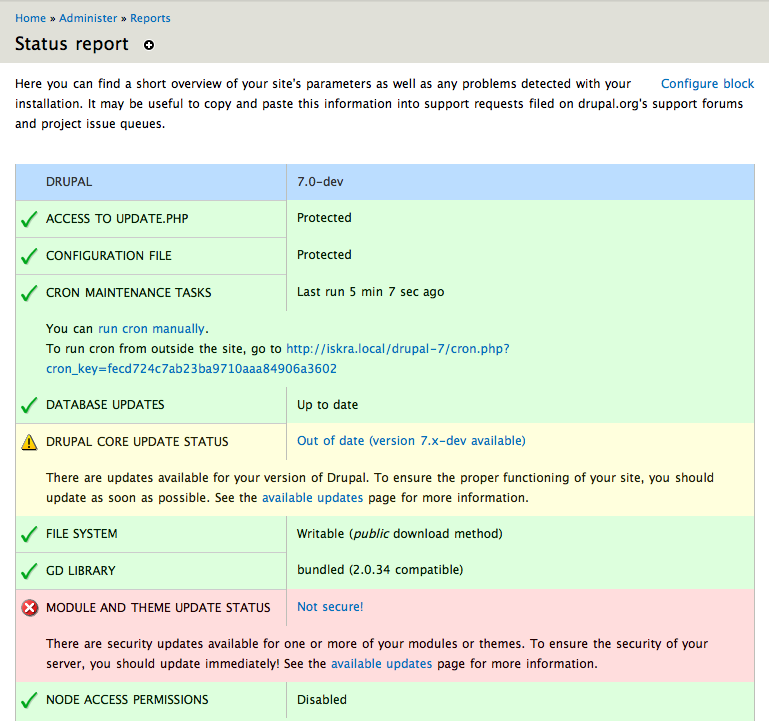
dwwHere are a bunch of screenshots of patch #2 in action. For each page, there is a copy with the Update manager automatic updates enabled, and a version with the killswitch set to disable the automatic upgrade feature. All screenshots are from a test site with core out of date and missing a contrib security update (which is the worst case in terms of how verbose the messages are).
1st is the /admin "Administer" landing page
2nd is the /admin/reports/status "Status report" page
3rd is the admin/config/modules "Configuration and modules" page
In all cases, if the auto-updates are enabled, all the links in the various messages take you to /admin/reports/updates/update where you can directly upgrade your site. If the killswitch is disabling the feature, they link to the /admin/reports/updates report page, just like how Update status works in D6.
The one exception is the help text on admin/config/modules which talks about Update manager:
Both of the links in there bring you to /admin/reports/updates. I think this text needs some help. First of all, it should know if Update manager is enabled or not and be smarter about what it says, instead of using this "if enabled" stuff. Secondly, if the update.module is disabled, it shouldn't print 404 links to non-existent report pages. Thirdly, if the auto-update feature is enabled, the help text could also link to that page and mention it exists (although directly below it are links to those features via the action items, so maybe it's not needed).
Comment #4
dwwOk, this fixes system.module's help text at admin/config/modules about Update manager to be context-sensitive. There are 3 cases:
1) module is enabled and the killswitch is off (full functionality available)
2) module is enabled but the killswitch is on (no automatic updates possible)
3) module is disabled entirely
Probably a bit wordy, and I'm still not sure we need all the links about updating and installing in case #1 since we have the action links right below...
Comment #5
dwwComment #6
dries commentedThis looks good. Committed to CVS HEAD. Thanks.
Comment #7
dwwGreat, thanks!
Comment #9
Bojhan commentedI don't get all the other screenshots, but to me the bug is obvious - there can be up to 4 indicators something is wrong with your site. And there is no clear direction where one would find updates or be able to install something other than the messages and the action link.
As previously described, we don't think that action links are the propper model for this. Instead tabs on the module page should be used :
Updates
Install
Given that "Install" might cause some conceptual problems (you can't actually install, you need something first url/file), I'd say our safe bet is at least putting in the Updates tab. By that removing the initial "Update existing modules" action. With this we give a clear signal where one could go, to make use of plugin_manager its abilities to update your site.
Comment #10
dwwPatch to move "Update" to a tab on all 3 locations: admin/modules, admin/appearance, and admin/reports/updates. Screenshots of "...update-as-action..." for all 3 pages with current HEAD, and "...update-as-tab..." for all 3 pages with the patch attached.
I'll do another patch and set of "after" screenshots for also moving "Install" to be a tab at each location for comparison, but I wanted to get this up based on Bojhan's concerns at the end of #9...
Comment #11
dwwAnd here's a patch and set of screenshots with both "Update" and "Install" as tabs on all 3 pages...
Comment #12
dwwTo clarify: regardless of this patch, all these menu items all point to the same two page callbacks. There are 3 ways to find the "update your missing stuff" and "install new stuff" pages. There are still only 2 pages (install and update) and those pages are identical at all 3 locations. That's unchanged here. All that's changed is really exactly what you see in the screenshots -- how you find these same 2 pages...
Comment #13
Bojhan commentedThis looks alright, we might want to work a bit on the tab titles and order. I am trying to extract what pattern we have there. Referring to #11, however I do wish to discuss this with yoroy for a bit - as install are conceptually actions (although the interface behind(functionality primary), is not sufficient enough to confirm that mental model)
Comment #14
yoroy commentedReviewed this in IRC with bojhan and dww. Bojhans concern with making 'install' an action is that this takes you to a screen that you have to prepare for (know a URL for a module or theme to install). This could break the 'let me do stuff right now' promise we make with this action links.
BUT,
Having 'install' as a tab looks like an even bigger mis-match to me. 'Update' is fine as a tab, it takes you to a page with information to *review* (not directly act on). 'Install' strongly suggests 'lets go *do* stuff', so for me this should be an action link (even if it may stop me in my tracks a bit by asking a difficult question I didn't know I had to prepare for).
Which makes #10 the preferred solution for now.
Comment #15
dwwOk, both Bojhan (in his original suggestion in #9) and yoroy in #14 are in favor of "Update" as a tab, "Install" as an action. That's what http://drupal.org/files/issues/602490-10.update-as-tab.patch from #10 does, which passes the bot (obviously, it's a trivial patch). Calling that RTBC. Thanks for the reviews, folks!
Comment #16
webchickThis is somewhat odd, in that I view install/update as a pair, so the fact that one is a tab and the other is a link is rather weird. However, I understand the rationale.
Committed #10 to HEAD. Thanks!