

 Come together with the global Drupal community in Rotterdam, 28 Sept – 1 Oct 2026. Sessions, contribution, connection, and Early Bird savings until 8 June.
I'm sure I'm missin' something obvious here.....
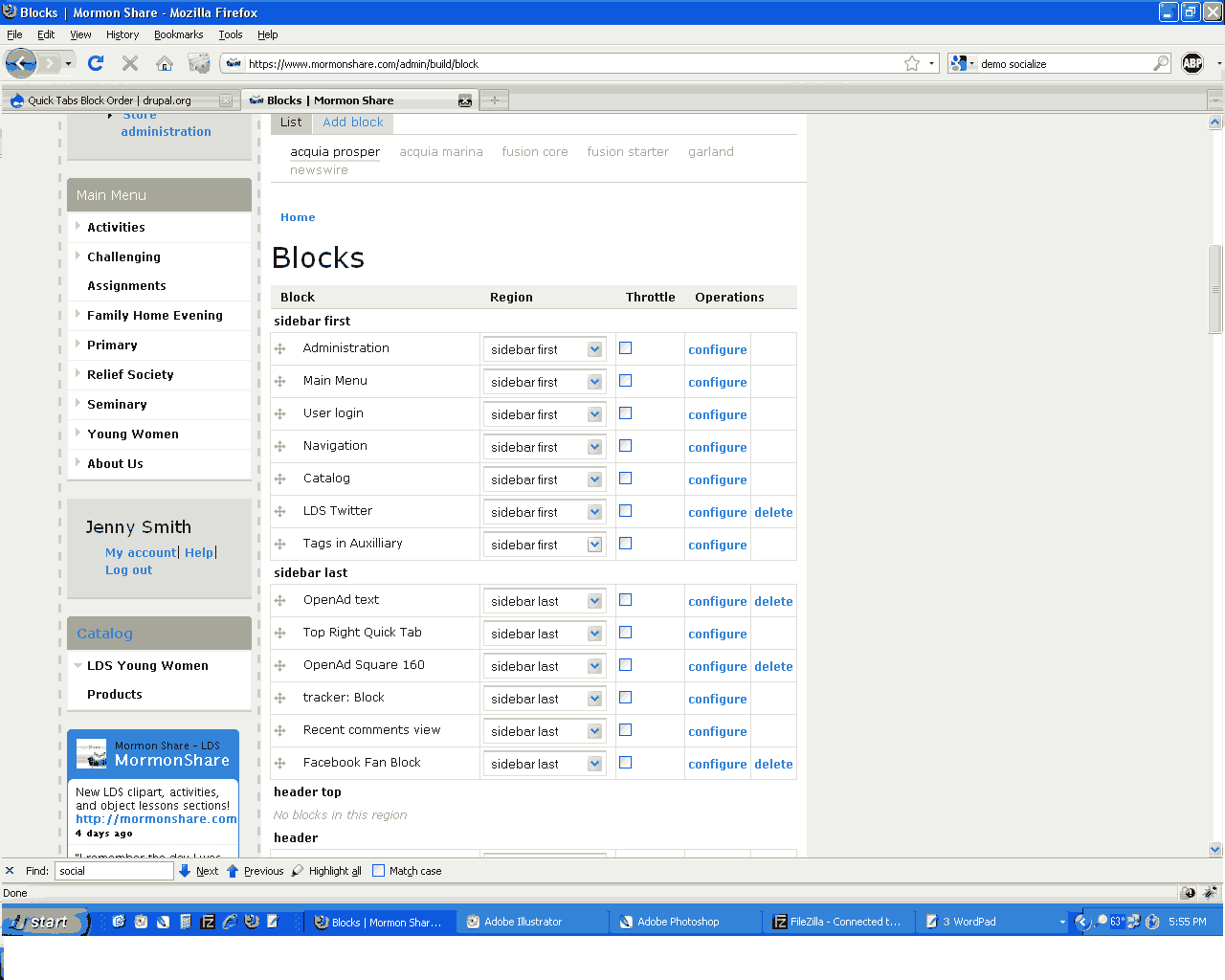
I have created a Quick Tab that I'd like to make appear at the top of the far right column in my theme. No matter how I order it in the admin/build/block page, the QT block always appears at the bottom of the list of blocks. The QT block is listed as the number 2 item, just under the right text ad at the top right in the blocks list. I have the same problem when I move it to the left hand column, too.
Here's an example:
http://www.mormonshare.com/search-lds-clipart.php
(I am using an adapted form of the acquia_prosper theme, if that helps.)
I think I'm using beta1. DH installed the module for me.
Can anyone help me move that tab to it's right and proper place?
| Comment | File | Size | Author |
|---|---|---|---|
| #26 | fusion_generic_block_order.patch | 875 bytes | sociotech |
| #22 | fusion_quicktabs_block_order.patch | 839 bytes | sociotech |
| #3 | blocks.png | 12.32 KB | pasqualle |
| #2 | block-issue-screen-capture.gif | 44.43 KB | JennySmith |


Comments
Comment #1
pasqualleThe block is listed as the last block in the page source. Are you sure you are modifying the block order in the right theme?
From the page source it seems like the current theme is fusion.
Comment #2
JennySmith commentedFusion is just the parent theme of prosper. I double checked the fusion stuff, jic, and there are no blocks active for either fusion or fusion starter in that region. Attached is the capture of the block's location. It's named Top Right Quick Tab.
Comment #3
pasquallethe attached screenshot is from your page source. It shows that the quicktab block is rendered as the last item.
Do you have page caching enabled? Try to clear the cache.
Comment #4
JennySmith commentedCleared the cache about every 5 minutes yesterday. No luck.
Comment #5
mikehostetler commentedWe ran into this issue as well. We found a workaround in specifying the contents of each tab to come from a view, instead of a block. Asking the contents of the tab to come from a block messed with things for some reason.
Comment #6
pasqualleAs I see the 2.0 version is used on the site, so I have changed the version number..
I am not sure why would a block inside quicktab change the quicktab block weight, but I can not exclude this possibility. Will have to test it.
Comment #7
JennySmith commentedThanks for the tip, Mike. The QT location moved to the right spot when I changed the tab from displaying a block to display a view instead. Node tabs also seem to work correctly.
I wonder if this could be some kind of a CSS-related issue. On the QT block theme I'm using (Sky), blocks do not display correctly. They display without the background color, as if they are not enclosed within the div.
Comment #8
JennySmith commentedDid a little more testing.
The problem only displays itself if the block returns information to print.
The problem presents regardless of the tab order.
I'm off to an appointment now, but I think there may be a problem with
<div id="quicktabs_container_*" class="quicktabs_main quicktabs-style-sky">Comment #9
JennySmith commentedWondering if you were able to figure out anything about this, Pasqualle.... I've checked divs. There doesn't seem to be any divs missing, but there is definitely a problem with the way divs wrap around blocks. I can't say if that's causing the ordering problem or not.
On my website, I have put up 2 quicktabs. One displays two views (comments and new stuff), the other has a view and a block (products and author information). When an author isn't assigned to a node, author information isn't returning any data and the QT is in the correct position. You can see there should be a white background if there was any author information to show:
http://www.mormonshare.com/contact
However, on this page, where there is an entry for author, the QT moves to be the last item in the region. You can also see that the white background that should be behind the content is also missing. I think this indicates a problem with a div somewhere:
http://www.mormonshare.com/lds-clipart-terms-of-use.php
I don't know if this is of any help in debugging the problem. Like I said, I've tried to count the divs and I can't find a problem.
Comment #10
gooddesignusa commentedI'm also using Acquia Prosper and noticed the same exact issue. I'm using Advanced Taxonomy Blocks with Jquerymenu and using quick tabs to put 2 advance taxonomy blocks inside tabs. So i can't really use a "view" instead of a block :(
Looks like this issue is a couple months old. Hopefully someone figures this out.
Regarding what JennySmith said I think its just a simple float that doesn't get cleared.
.block has a float of left so i just added this to my local.css file
.quicktabs_tabpage .block{float:none}
oh and changing the theme to something else fixes the weight ordering of the quick tabs block. So its this theme. Shutting off the Skinr module didn't help either.
Comment #11
michelleI just got pointed to this issue from IRC. I have the exact same problem. I have a QT block made up of 3 views (not blocks) and it stubbornly refuses to move in the block order. My theme is a custom subtheme of Fusion. Fusion seems to be the common element here, so I suggest moving it to that queue but I'm a latecomer to this issue and don't want to be the one to move it unless others agree.
Michelle
Comment #12
BiosElement commentedProblem still Exists. I'm going to move it over to the Fusion project and hopefully they'll get a chance to look at it. It seems fusion is the problem here.
Comment #13
sociotech commentedI'm taking a look at this issue, but am so far unable to replicate the troubles with block order when using a quicktabs block with blocks for the tab content. Fusion does do some block preprocessing, but nothing that should affect block weight/order. So I need some more information to help track down what is happening. I'm assuming that everyone is using the latest versions of Fusion Core, Acquia Prosper, and Quicktabs.
- Are any Skinr styles being applied to the quicktabs block or the blocks within it?
- Does it only occur in the sidebar, or does it occur in other regions as well?
- Does it occur in Fusion Starter as well as Acquia Prosper?
- Have any custom block-related functions been added to template.php?
- Can someone message me with a site that I can examine that does this? (I'm not currently seeing quicktabs on JennySmith's site)
Also JennySmith, gooddesignusa is correct, the issue with the background not displaying should be fixed by adding this to your local.css file:
I'll be adding this to Acquia Prosper's css file for the next release.
Comment #14
gooddesignusa commented- Are any Skinr styles being applied to the quicktabs block or the blocks within it?
-- The quicktab block I have set up is 2 blocks that list some taxonomy. The taxonomy blocks have a skinr style of "Gray rounded title background, list styling" The quicktab block has no skinr style. I shut off the skinr styles for the 2 taxonomy blocks that quicktab uses but that didn't fix the issue.
- Does it only occur in the sidebar, or does it occur in other regions as well?
-- I will check later. Right now its set to the sidebar on the left.
- Does it occur in Fusion Starter as well as Acquia Prosper?
-- I tried switching to the fusion core or fusion starter theme. Issue was still there.
- Have any custom block-related functions been added to template.php?
-- No custom block functions have been added.
- Can someone message me with a site that I can examine that does this? (I'm not currently seeing quicktabs on JennySmith's site)
-- I will msg you with a dev site I'm currently working on.
Thanks a lot for looking into this issue.
Comment #15
sociotech commentedI've figured out what is causing the problem, but I'm not sure how to fix it. The problem is the block_list() function used in Fusion Core. It seems to drop the position of a Quick Tabs block to last position when it's called on the block's parent region.
I've filed an issue in the Quick Tabs queue (#709782: Calling block_list() drops Quick Tabs block to last position) and hopefully this can be fixed in Quick Tabs, because I don't know of a way to avoid using the block_list() function in Fusion Core.
Comment #16
sociotech commentedIn order to fix the background in Quick Tabs not showing, I added the following code to the most recent release of Fusion Core (RC1), not in Acquia Prosper as mention above in comment #13:
Comment #17
pasqualle.block is float-ed in Fusion? that does not seems good to me..
Comment #18
stephthegeek commentedPasqualle, why does that not seem good to you? This is the foundation of Fusion's layout, where blocks are floated in the grid and controllable through Skinr.
Comment #19
pasquallenormally the sidebars (regions) are floated and blocks are relative, otherwise you need a new div to make the position relative inside the block..
but the problem is with fusion_core_preprocess_block() (in template.php)
there could be blocks inside QT which are assigned to a non-existent 'quicktabs_tabpage' region. I guess that may create some mess in the calculation..
so before
there should be a region check, something like:
Comment #20
sociotech commentedPasqualle,
As it is now, the only thing fusion_core_preprocess_block() does to the blocks in a Quick Tabs block is to give them a grid width class of grid16-0 (which is undefined and harmless) and add extra block edit links for each of the blocks (which could be considered a feature if you wanted to edit the individual blocks).
When checking for whether the block is in one of Fusion's regions (as opposed to a Quick Tab "region"), we can remove the grid16-0 class and the extra block edit links, but it has no effect on the order of the Quick Tab block in the region. It is still last regardless of what position you set.
Is this what you were referring to? Were you able to fix the block positioning error with this approach?
Thanks.
Comment #21
pasqualleI did not check, but as I see this could easily ruin the positioning, as blocks inside qt are counted as normal, and incrementing $total_blocks, which is being used in some kind of region size calculation.
I only saw many error messages (php notices), which I fixed with the above isset() check..
Comment #22
sociotech commentedPasqualle,
Well thanks very much for that suggestion. It put me on the right track to a fix to avoid this problem for Fusion-based themes!
Attached is a patch against the latest version (rc1) of Fusion Core's template.php file that exempts Quick Tabs blocks from any preprocessing, including the block_list() function. It doesn't fix the fundamental issue in Quick Tabs (#709782: Calling block_list() drops Quick Tabs block to last position), but at least it works around it for Fusion users.
I dislike module-specific hacks in the Fusion codebase, so I'm going to work on a more generic solution that doesn't just target Quick Tabs. But I figured folks needed some relief from this issue in the meantime.
Let me know if this patch takes care of the issue.
Thanks.
Comment #23
michelleAwesome, sociotech! I'm with you that module specific hacks aren't the best but this at least lets it work until a better solution is found.
Thanks,
Michelle
Comment #24
pasqualleusing
which has the same result, would not be a module specific hack
Comment #25
sociotech commentedPasqualle,
Did you try that code? It shouldn't be able to work because it depends on $region being set, but needs to execute before the code that sets $region. That's because it's the code that sets $region that contains the block_list() functions.
If your code works, perhaps I'm not understanding where you inserted it.
Here's the more generic option I was working on. If you or anyone else has a chance to try it and let me know if there are any issues with it, that would be helpful:
Thanks!
Comment #26
sociotech commentedHere's a patch version of the above code.
Comment #27
sociotech commentedThe generic version of the fix (in comment #25) will be in the next release.
Comment #28
stephthegeek commentedIn dev release
Comment #29
michelleThanks!
Michelle
Comment #31
taisei516 commentedThanks!, Michelle!!
I have solved this problem thanks to you, thank you
Comment #32
michelleNot me. sociotech fixed it. :)
Michelle
Comment #33
tylerfrans commentedAny solution for non-fusion themes? I am using a custom theme and whenever I switch the a subtheme, the block order gets messed up but if it's set to the main theme the block order is correct.
Edit: I was misled, turned out to be a block order issue not quicktabs issue.