Active
Project:
RootCandy
Version:
6.x-1.3
Component:
Code
Priority:
Critical
Category:
Support request
Assigned:
Reporter:
Created:
16 Oct 2009 at 17:07 UTC
Updated:
14 Feb 2013 at 12:11 UTC
Jump to comment: Most recent file


Hello, is there any way to configure rootcandy so the rootcandy admin menu shows up for admin roles too? only super admin can see the dashboard and admin menu options but not admin users. I'm using rootcandy as the admin theme for all the admin and content manager users but the admin users can not see the admin menu, they can not add/delete menues, pages, etc. because the menu is not visible. Thanks.
| Comment | File | Size | Author |
|---|---|---|---|
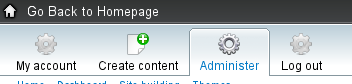
| #3 | admin_role_nav.png | 8.69 KB | sign |

Comments
Comment #1
sign commentedyou can assign your own menu in theme settings -> http://drupal.org/node/325933 (check menu source by role)
so basicaly: you create a menu for specific role, add what you want them to have there and then in rootcandy theme settings assign that menu to that role.
hope thats what you are looking for
Comment #2
luthien commentedThat is exactly the problem I'm having, the menu was not displayed in the same place as superadmin menu navigation. Below is my scenario:
1) I have an admin role with the same permissions as the super admin: edit, create, etc...
2) I assigned the "Navigation" menu to the admin role from inside the rootcandy theme configuration (menu source by role)
3) I specified the following using the sections module so rootcandy displays for admin users
admin
admin/*
node/add
node/*/edit
user/*
user/login
4) If I login as admin, no Navigation menu is displayed. My guess is the menu should be displayed in the same place as the dashboard menu for super admin. Is that possible? if I assign the menu to the left sidebar for example it displays fine. How can I display the admin menu the superadmin has for admin users too?
Thanks
Comment #3
sign commentedIf you select a default Navigation menu to be displayed as a main navigation (and that user has all the permissions needed), you should be able to see this: http://drupal.org/files/admin_role_nav.png
is that what you see?
Comment #4
luthien commentedNo, I don't see that menu. Below are my settings:
1) In admin/build/menu/settings
Default menu for content: Navigation (this one is the admin menu)
Source for the primary links: primary links (site's main menu navigation, first and second level nav.)
Source for the secondary links: secondary links (site's main menu navigation, 3rd and above levels) - I'm using the menu block module.
2) In build/themes/settings for rootcandy theme I have the following at the moment:
Menu by role and weights
anonymous user : none
authenticated user: none
admin user: default navigation (I tried with Navigation menu but it did not worked)
content manager: none
Super user (uid 1) menu: default navigation
3) In order to display the admin menu, I assigned the menu to a block position because the desired behavior you mentioned above was not working.
Please let me know what is wrong with my settings and what do I need to do to make it work. I'm able to see the user account menu with rootcandy style but not the top "dashboard" menu with the options to "my account", "add content", etc... like your image.
Thanks
Comment #5
sign commentedSort the roles in theme settings so the "admin user" will be on top
Comment #6
luthien commentedHello #5, your suggestion fixed the problem. Thanks!
Comment #7
sign commentedComment #8
sign commentedits good practice to keep issues open and fixed so others can see it in open issues for some time, will be closed after 14 days automaticaly
thanks
Comment #10
harsh111 commentedadmin menu drop down list is it possible to have.......