

 Come together with the global Drupal community in Rotterdam, 28 Sept – 1 Oct 2026. Sessions, contribution, connection, and Early Bird savings until 8 June.
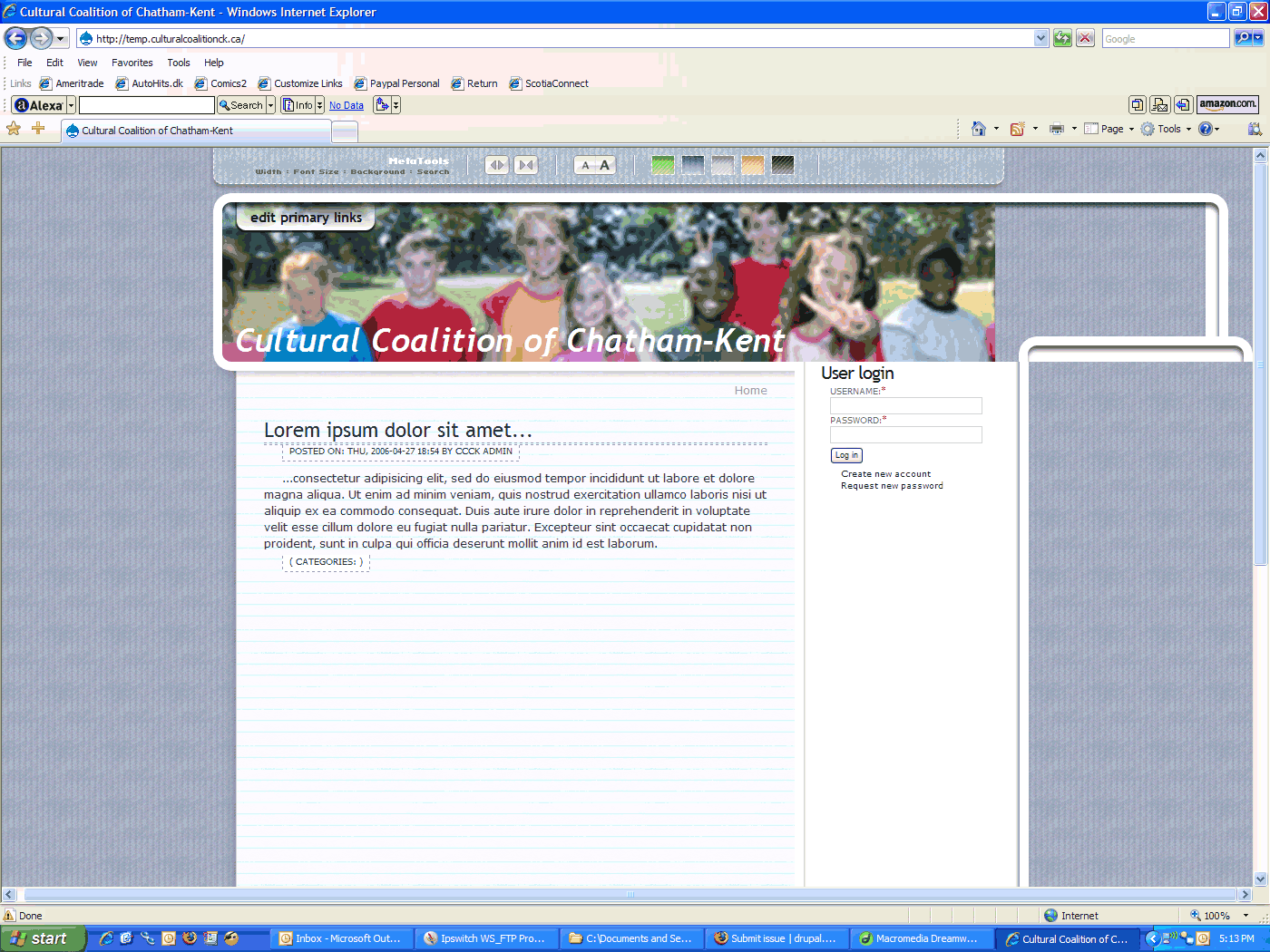
I know IE 7 beta 2 is - ahem - a work in progress. But in testing this theme today I discovered it breaks in this latest IE incarnation, and I thought I'd mention it in case the issue persists. It's fine in IE6, and I can't figure out what is causing the problem. I've attached a screenshot for your reference.
| Comment | File | Size | Author |
|---|---|---|---|
| #16 | ss1.jpg | 80.57 KB | wdrx02 |
| #12 | ccck.gif | 291.96 KB | ckclarke |
| #10 | nicemenus.JPG | 26.68 KB | Amadeus123 |
| #7 | metaskills.gif | 267.43 KB | ckclarke |
| #5 | ie7b2-meta.png | 668.04 KB | sepeck |


Comments
Comment #1
Ken Collins commentedWhoa... I cannot reproduce that on my end. I made some changes for IE 6 a while back ago to fix the masthead and I throughly tested it on Beta 2. Can you shoot me a live link?
Comment #2
Ken Collins commentedComment #3
ckclarke commentedHere:
http://www.culturalcoalitionck.ca/
Comment #4
Amadeus123 commentedHere is a screenshot from ie 7 beta 2. This is an identical issue. Looks great on all other browsers. Figures!!! Stats show 89% still use IE 5/6 so I gotta make my site compatible to IE.
Comment #5
sepeck commentedview from ie7 different system
Comment #6
Ken Collins commentedCan you look at my site with IE 7 and send me a screen shot? I wont have access to my dev pc for a few days. If my site and the drupal theme demo site looks fine, then it must be something with your version. Did you alter the theme? Did you make sure to get the latest version?
Comment #7
ckclarke commentedHere's the screen shot.
I've not done anything to the theme on my site, apart from install it.
Comment #8
ckclarke commentedSorry, didn't mean to change the issue title.
Comment #9
Ken Collins commentedI was just looking at my site in IE7 public beta 2 and it looks great. Is there a newever version of the beta that I need?
Comment #10
Amadeus123 commentedThat is the version I have and the right side-bar still breaks up. Please let me know even if there is a temporary CSS fix that could be done to avoid the "breakup".
Comment #11
Ken Collins commentedOK, that was easy once I got to it. We now have the theme working perfectly in the latest IE 7.05346.5 beta 2 and I must say it is looking good. All of the fixes from the previous beta were removed and fixed and now it was just a small issue with width:100% in a few divs that needed to be width:auto for IE. All in all I'm pretty impressed (yea right) and I can even report that the lighbox JS gallery is working great too!
Comment #12
ckclarke commentedI'm not sure if anyone else is getting this, but I'm showing problems on the other side now. Here's a screen shot; live link is http://www.culturalcoalitionck.ca/. I tried getting a look/ shot of Metaskills.net, but it wasn't working at 11:38 p.m. EST. Could have been a temporary outage.
Comment #13
Ken Collins commentedI saw that bug during development and fixing and it should have not made it into the repository. I checked your site with the latest IE 7 and it looks fine. I cannot see that issue popping up, nor on mine. Can you see mine now?
The only thing I can think of is that the anme of the site in the masthead is too long, you could try reducing the font size which should be a moot point because I do not see the issue in your screen shot on your site.
Comment #14
wdrx02 commentedI have it showing out of proportion (breaked up on the blocks) in IE 6 and my friend is saying it is showing off in his IE7 Beta.
When I reset it seems ok but when I adminster the blocks, it screws it up again.
Firefox always works but IE all NO GO.
Comment #15
Ken Collins commentedCould you be more descriptive on exactly what the visual problem is (usually a screenshot helps). Also can you tell me what exact version of the theme your working with? Checking the ID tags in pagestructure.css and pagestyle.css can usually indicate if you are working with the latest version which I was pretty sure fixed this.
Comment #16
wdrx02 commentedThe ID or code in the page structure is:
Id: pagestructure.css,v 1.3 2006/05/26 03:18:00 kencollins
and I included an attachment to show you what I mean.
The bottom is off by being ovelapped and sometimes just a big blank space before it hits the footer.
The font is not what it should be on the content area and the top is also cut off where the user name is located where the meta tools are.
Comment #17
Ken Collins commentedAhhh, now that helps alot. This is not a bug but "by design" in the way the theme works. Basically because absolute position DIVs do not clear. See this post in the customization documentation for the theme. You will need to adjust the min-height for your 3 DIVs so that they encompass your content in the right colum. If you want to understand more about the problems with clearning AP DIVs, just google it.
http://www.metaskills.net/meta-theme-for-drupal/options-and-customizatio...
Comment #18
Ken Collins commentedThat URL was mangled, let's see if this works.
Meta Theme Customization - Content Area Height
Comment #19
wdrx02 commentedTried it for roughly an hour and still no luck.
It seems to happen when users login but when your not logged in. It shows up fine, thus of course lead to believe like you said... too much content on the left/right panel. I decreased the amount but same thing, only happens when logged in. The user name would be on the header/logo, the bottom of the notebook page would have an empty block and all this can be seen greatly in IE. In FF, its perfectly fine, also the font in IE when this happens. The content's font is just like a regular plain text rather then the set graphic like.
Comment #20
ckclarke commentedJust FYI the new Meta and changing the site name font size, as you suggested, makes it behave in iE7 now. Thanks for your help.
Comment #21
(not verified) commented