
 The 2026 Drupal Business Survey is open. Your response will help shape the future of the Drupal business ecosystem.
Compact Forms
You are browsing documentation for an older version of Drupal, which is not supported any longer, and the information may not be correct. See current documentation for Contributed modules
About Compact Forms
Compact Forms presents text fields for selected forms in a more compact fashion
using jQuery.
The form item/element fields are overlaid with their respective labels. When
the user focuses a field the label fades away nicely, and if the field is left
empty the label fades back in again.
See before:

See after, the label is positioned inside the field:

You cannot see the fade effect in this still image. When user focuses on the item, the text disappears. If they leave the field blank, the label text fades back.
Step by step
1. Identify the form ID.
First create your form and view it in your browser. Check the id for the form you want Compact Forms to affect. See an example, in this case the id is 'node-form'.

Tip: use Firebug in Firefox to Inspect element and see source and information of a selected item, such as a form.
2. Configure Compact Forms
In the 6.x version visit:
Administer › Site configuration › Compact forms
Located at your site at http://example.com/admin/settings/compact_forms
In the 7.x version visit:
Home » Administer » Configuration and modules » Content authoring
Located at your site at http://example.com/admin/config/content/compact_forms
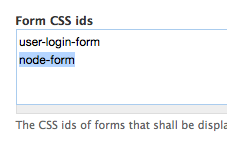
You see the default form id is for the user login.
Add your chosen form id.
In this case it is node-form. This will affect all node forms.
Click save.
Finished!
This is how Compact Forms will make your form look with default settings. You can improve the display with CSS.

Help improve this page
You can:
- Log in, click Edit, and edit this page
- Log in, click Discuss, update the Page status value, and suggest an improvement
- Log in and create a Documentation issue with your suggestion
