

 Come together with the global Drupal community in Rotterdam, 28 Sept – 1 Oct 2026. Sessions, contribution, connection, and Early Bird savings until 8 June.
Even with User pictures in posts/comments disabled under the theme configuaration, the nodes give you a blank space next to the title where a photo would go. This is likely due to a bug in the class for the div...
It assigns a class of "with-photo" or "without-photo" probably based on whether the user has a photo uploaded or not and not based on the configuration.
Can be fixed by going to sky/preprocess/preprocess-node.inc and deleting line 39 outright, which is not ideal, but a quick patch for now until I know the variable that determines whether a user picture is shown or not.
| Comment | File | Size | Author |
|---|---|---|---|
| #5 | ImageSlippingDown.png | 25.83 KB | g000fy |
| #5 | ImageFine_Event.png | 22.29 KB | g000fy |


Comments
Comment #1
drupal_newb commentedOk, deleting that line outright screws the width of the boxes. Changed "with-photo" --> "without-photo".
Comment #2
jacineSorry about this. I was checking the wrong variable by accident. I just committed a fix to HEAD. http://drupal.org/cvs?commit=312536
Comment #4
Weka commentedThank you for an excellent theme.
I am experiencing the spacing below the title problem with content types that have the "Display post information on" option in /admin/build/themes/settings disabled.
Both "User pictures in posts" and "User pictures in comments" options are disabled.
I think the culprit is the empty <div class="meta"> </div> tag.
Here is the HTML output from a Page Content Type.
Tested with Sky 6.x-3.10 and Drupal 6.15
Comment #5
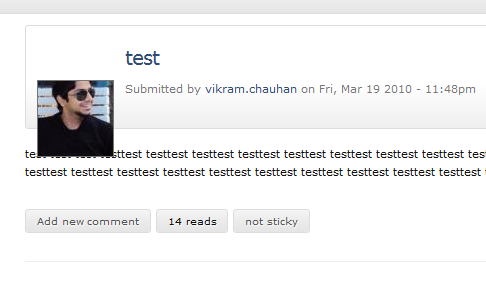
g000fy commentedWeka, did you resolve your issue? I'm facing an issue but not sure if it is same as yours. In my case, the user avatar is slipping down in the post information box (See screenshot). This is happening with any normal node content type which hasn't been overridden through a custom page with the exception of an "Event" type. For this type, the rendering is absolutely fine.
Comment #6
g000fy commentedOkay, I found from another thread that this is a different issue. Any idea about my issue by any chance?
Comment #7
g000fy commentedAlright, I found that this is due to CSS element h2. If I make it inline (display: inline) instead of block, the placement is absolutely fine.
Sky's style.css
Comment #8
g000fy commentedAlso, I'd to make position of picture "relative" from "absolute"
Comment #11
jacineI'm not able to produce the problem pictured in #5 at all.