Panels Page displays wrong Node list when Taxonomy: Term ID argument is used

Thomasr976 - October 22, 2009 - 14:47
Project:Panels
Version:6.x-3.2
Component:Panel pages
Category:support request
Priority:normal
Assigned:Unassigned
Status:fixed
Description

I am trying to implement a recommendation by Merlinofchaos [see http://drupal.org/node/575282 ] that uses a Taxonomy: Term ID as an argument in a View and then uses a panel page to select specific arguments to display in a Block.

I have set up the View (see attached merlinsidea) and in preview I can see that specific arguments are displayed properly when I insert an argument number.

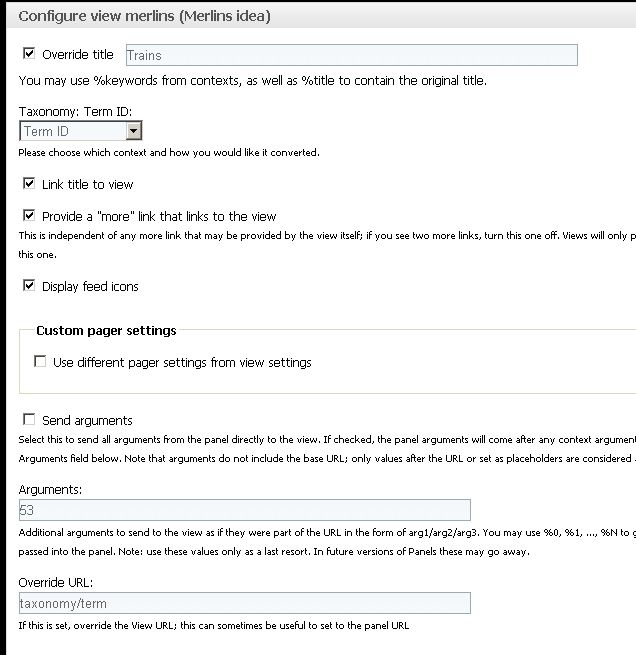
Then in panels page, i select that view and also input the argument number 53 associated with all nodes that are tagged as Trains. I've also attached my panel settings. The reulting panel page lists the incorrect nodes and none of the nodes associated with Trains are listed.

I've spent hours wondering why this is occurring. All of the nodes that are tagged "trains" are also tagged "travel'. Perhaps that is the problem

Would appreciate any guidance on where the problem is and now to fix.

AttachmentSize
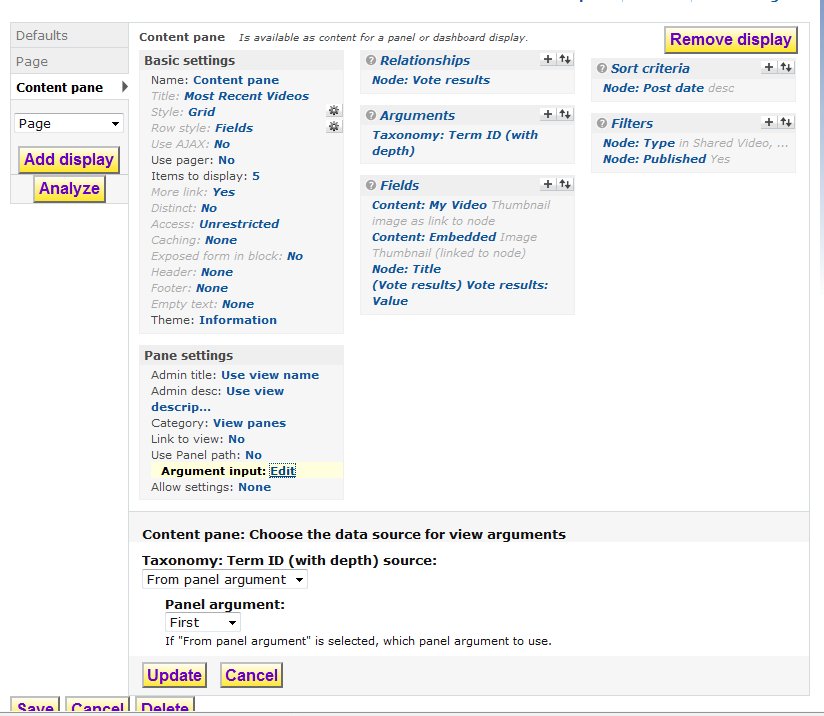
view-merlinsidea.JPG62.16 KB
train-view-selectedCapture.JPG74.74 KB

#1

stg11 - November 15, 2009 - 00:50

I have tried just about every combination I can think of to pass the taxonomy argument from the panel or pane to the view. I have tried contexts per http://drupal.org/node/575282 and also tried direct argument insertion per above. It was working fine in 5x. panels 2, with which I have a fair amount of experience, but it just does not seem to produce any results at all if I use the option "Hide view / Page not found (404)" for the view's taxonomy term option "Action to take if argument is not present: ". View itself produces expected results when passed term in url, so I know the view is set up fine.

I also tried a view content pane and was surprised to see that there are no settings options whatsoever. That seems broken or at least very obscure.

This is very frustrating, I hope someone can help us out.

#2

merlinofchaos - November 15, 2009 - 01:38

Thomas976: I am confused. In your panel settings you appear to be sending 2 arguments. The 'context' is sending the Term ID, and then you're also hardcoding 53 as an argument. That's very odd. I can't remember exactly what it will do in that case, though I think the 53 will get more or less ignored and the context should be the argument that gets given to the view.

When using content panes, available settings on the pane itself are controlled on the view. (The whole point of a content pane is to provide maximal configuration on the view and to limit configuration on the pane to only necessary items).

#3

merlinofchaos - November 15, 2009 - 01:48

Here is a demonstration of this working:

First the view:

<?php
$view
= new view;
$view->name = 'term_pane';
$view->description = 'A simple view that shows node titles associated with a term';
$view->tag = '';
$view->view_php = '';
$view->base_table = 'node';
$view->is_cacheable = FALSE;
$view->api_version = 2;
$view->disabled = FALSE; /* Edit this to true to make a default view disabled initially */
$handler = $view->new_display('default', 'Defaults', 'default');
$handler->override_option('fields', array(
 
'title' => array(
   
'label' => 'Title',
   
'alter' => array(
     
'alter_text' => 0,
     
'text' => '',
     
'make_link' => 0,
     
'path' => '',
     
'link_class' => '',
     
'alt' => '',
     
'prefix' => '',
     
'suffix' => '',
     
'target' => '',
     
'help' => '',
     
'trim' => 0,
     
'max_length' => '',
     
'word_boundary' => 1,
     
'ellipsis' => 1,
     
'strip_tags' => 0,
     
'html' => 0,
    ),
   
'empty' => '',
   
'hide_empty' => 0,
   
'empty_zero' => 0,
   
'link_to_node' => 0,
   
'exclude' => 0,
   
'id' => 'title',
   
'table' => 'node',
   
'field' => 'title',
   
'relationship' => 'none',
  ),
));
$handler->override_option('arguments', array(
 
'tid' => array(
   
'default_action' => 'not found',
   
'style_plugin' => 'default_summary',
   
'style_options' => array(),
   
'wildcard' => 'all',
   
'wildcard_substitution' => 'All',
   
'title' => '',
   
'breadcrumb' => '',
   
'default_argument_type' => 'fixed',
   
'default_argument' => '',
   
'validate_type' => 'none',
   
'validate_fail' => 'not found',
   
'break_phrase' => 0,
   
'add_table' => 0,
   
'require_value' => 0,
   
'reduce_duplicates' => 0,
   
'set_breadcrumb' => 0,
   
'id' => 'tid',
   
'table' => 'term_node',
   
'field' => 'tid',
   
'validate_user_argument_type' => 'uid',
   
'validate_user_roles' => array(
     
'2' => 0,
     
'3' => 0,
     
'4' => 0,
    ),
   
'relationship' => 'none',
   
'default_options_div_prefix' => '',
   
'default_argument_user' => 0,
   
'default_argument_fixed' => '',
   
'default_argument_php' => '',
   
'validate_argument_node_type' => array(
     
'blog' => 0,
     
'poll' => 0,
     
'panel' => 0,
     
'article' => 0,
     
'character' => 0,
     
'page' => 0,
     
'skill' => 0,
     
'story' => 0,
     
'type_a' => 0,
     
'type_b' => 0,
     
'type_c' => 0,
     
'uprofile' => 0,
    ),
   
'validate_argument_node_access' => 0,
   
'validate_argument_nid_type' => 'nid',
   
'validate_argument_vocabulary' => array(
     
'2' => 0,
     
'3' => 0,
     
'1' => 0,
    ),
   
'validate_argument_type' => 'tid',
   
'validate_argument_transform' => 0,
   
'validate_user_restrict_roles' => 0,
   
'validate_argument_php' => '',
  ),
));
$handler->override_option('access', array(
 
'type' => 'none',
));
$handler->override_option('cache', array(
 
'type' => 'none',
));
$handler = $view->new_display('panel_pane', 'Content pane', 'panel_pane_1');
$handler->override_option('pane_title', 'Test taxonomy term view');
$handler->override_option('pane_description', 'A test view to demonstrate taxonomy term context working.');
$handler->override_option('pane_category', array(
 
'name' => 'Taxonomy',
 
'weight' => '0',
));
$handler->override_option('allow', array(
 
'use_pager' => 0,
 
'items_per_page' => 0,
 
'offset' => 0,
 
'link_to_view' => 0,
 
'more_link' => 0,
 
'path_override' => 0,
 
'title_override' => 'title_override',
 
'exposed_form' => FALSE,
));
$handler->override_option('argument_input', array(
 
'tid' => array(
   
'type' => 'context',
   
'context' => 'term.tid',
   
'context_optional' => 0,
   
'panel' => '0',
   
'fixed' => '',
   
'label' => 'Taxonomy: Term ID',
  ),
));
$handler->override_option('link_to_view', 0);
$handler->override_option('inherit_panels_path', 0);
?>

And then the page that utilizes the view:

<?php
$page
= new stdClass;
$page->disabled = FALSE; /* Edit this to true to make a default page disabled initially */
$page->api_version = 1;
$page->name = 'test_term_page';
$page->task = 'page';
$page->admin_title = 'Test term page';
$page->admin_description = 'This is a test page with Panels & views to demonstrate how a taxonomy term gets passed from the panel page to a view as a context.';
$page->path = 'test/term/%term';
$page->access = array();
$page->menu = array();
$page->arguments = array(
 
'term' => array(
   
'id' => 1,
   
'identifier' => 'Term',
   
'name' => 'term',
   
'settings' => array(
     
'input_form' => 'tid',
     
'breadcrumb' => 1,
    ),
  ),
);
$page->conf = array();
$page->default_handlers = array();
$handler = new stdClass;
$handler->disabled = FALSE; /* Edit this to true to make a default handler disabled initially */
$handler->api_version = 1;
$handler->name = 'page_test_term_page_panel_context';
$handler->task = 'page';
$handler->subtask = 'test_term_page';
$handler->handler = 'panel_context';
$handler->weight = 0;
$handler->conf = array(
 
'title' => 'Panel',
 
'no_blocks' => FALSE,
 
'css_id' => '',
 
'css' => '',
 
'contexts' => array(),
 
'relationships' => array(),
);
$display = new panels_display;
$display->layout = 'flexible';
$display->layout_settings = array();
$display->panel_settings = array();
$display->cache = array();
$display->title = '';
$display->hide_title = TRUE;
$display->title_pane = 152;
$display->content = array();
$display->panels = array();
 
$pane = new stdClass;
 
$pane->pid = 'new-1';
 
$pane->panel = 'center';
 
$pane->type = 'views_panes';
 
$pane->subtype = 'term_pane-panel_pane_1';
 
$pane->shown = TRUE;
 
$pane->access = array();
 
$pane->configuration = array(
   
'context' => array(
     
'0' => 'argument_term_1',
    ),
   
'override_title' => 0,
   
'override_title_text' => '',
  );
 
$pane->cache = array();
 
$pane->style = array();
 
$pane->css = array();
 
$pane->extras = array();
 
$pane->position = 0;
 
$display->content['new-1'] = $pane;
 
$display->panels['center'][0] = 'new-1';
$handler->conf['display'] = $display;
$page->default_handlers[$handler->name] = $handler;
?>

#4

stg11 - November 16, 2009 - 01:17

I tried importing the view and panel per #3 above. The view functions fine. The panel page APPEARED to import OK but when I try to go to the content section of the panels ui it gives me this:

Fatal error: Call to a member function set_display() on a non-object in /home/sitestha/public_html/you4ia6/sites/all/modules/ctools/views_content/plugins/content_types/views_panes.inc on line 430
This is not happening on any panels I created or upgraded from Panels 2.

Were you expecting this to work as an import or only showing code as an example?

#5

stg11 - November 16, 2009 - 01:44

Here is my panel

$page = new stdClass;
$page->disabled = FALSE; /* Edit this to true to make a default page disabled initially */
$page->api_version = 1;
$page->name = 'blog_vortex';
$page->task = 'page';
$page->admin_title = 'Blog Vortex';
$page->admin_description = 'Blog Vortex will use panels tabs and views content panes';
$page->path = 'blogvortex';
$page->access = array();
$page->menu = array(
  'type' => 'none',
  'title' => '',
  'weight' => 0,
  'name' => 'navigation',
  'parent' => array(
    'type' => 'none',
    'title' => '',
    'weight' => 0,
    'name' => 'navigation',
  ),
);
$page->arguments = array();
$page->conf = array();
$page->default_handlers = array();
$handler = new stdClass;
$handler->disabled = FALSE; /* Edit this to true to make a default handler disabled initially */
$handler->api_version = 1;
$handler->name = 'page_blog_vortex_panel_context';
$handler->task = 'page';
$handler->subtask = 'blog_vortex';
$handler->handler = 'panel_context';
$handler->weight = 0;
$handler->conf = array(
  'title' => 'Panel',
  'no_blocks' => NULL,
  'css_id' => '',
  'css' => NULL,
  'contexts' => array(
    '0' => array(
      'name' => 'term',
      'id' => 1,
      'identifier' => 'Appreciate',
      'keyword' => 'appreciate',
      'context_settings' => array(
        'vid' => '13',
        'taxonomy' => array(
          '19' => '',
          '2' => '',
          '13' => '',
          '16' => '',
          '26' => '',
          '21' => '',
          '3' => '',
          '25' => '',
          '20' => '',
          '15' => '',
          '24' => '',
          '6' => '',
          '1' => '',
          '22' => '',
          '27' => '',
          '23' => '',
          '14' => '',
          '18' => '',
          '9' => '',
        ),
        'tid' => '50',
      ),
    ),
    '1' => array(
      'name' => 'term',
      'id' => 2,
      'identifier' => 'Acknowledge',
      'keyword' => 'acknowledge',
      'context_settings' => array(
        'vid' => '13',
        'taxonomy' => array(
          '19' => '',
          '2' => '',
          '13' => '',
          '16' => '',
          '26' => '',
          '21' => '',
          '3' => '',
          '25' => '',
          '20' => '',
          '15' => '',
          '24' => '',
          '6' => '',
          '1' => '',
          '22' => '',
          '27' => '',
          '23' => '',
          '14' => '',
          '18' => '',
          '9' => '',
        ),
        'tid' => '246',
      ),
    ),
  ),
  'relationships' => array(),
);
$display = new panels_display;
$display->layout = 'flexible';
$display->layout_settings = array(
  'width_type' => '%',
  'percent_width' => '100',
  'rows' => '3',
  'row_1' => array(
    'columns' => '1',
    'width_1' => '100',
    'names' => array(
      '0' => 'Top',
    ),
  ),
  'row_2' => array(
    'columns' => '3',
    'width_1' => '25',
    'width_2' => '50',
    'width_3' => '25',
    'names' => array(
      '0' => 'Left',
      '1' => 'Middle',
      '2' => 'Right',
    ),
  ),
  'row_3' => array(
    'columns' => '1',
    'width_1' => '100',
    'names' => array(
      '0' => 'Bottom',
    ),
  ),
  'sidebars' => array(
    'left' => 0,
    'left_width' => 200,
    'right' => 0,
    'right_width' => 200,
    'width_type' => 'px',
  ),
);
$display->panel_settings = array(
  'style' => 'default',
  'style_settings' => array(
    'row_3_1' => array(
      'filling_tabs' => 'disabled',
    ),
  ),
  'edit_style' => 'Edit style settings',
  'did' => '31',
  'row_1_1' => array(
    'style' => '0',
    'edit_style' => 'Edit style settings',
  ),
  'row_2_1' => array(
    'style' => '0',
    'edit_style' => 'Edit style settings',
  ),
  'row_2_2' => array(
    'style' => '0',
    'edit_style' => 'Edit style settings',
  ),
  'row_2_3' => array(
    'style' => '0',
    'edit_style' => 'Edit style settings',
  ),
  'row_3_1' => array(
    'style' => 'tabs',
    'edit_style' => 'Edit style settings',
  ),
);
$display->cache = array();
$display->title = 'Blog Vortex: %term:name';
$display->hide_title = FALSE;
$display->title_pane = 0;
$display->content = array();
$display->panels = array();
  $pane = new stdClass;
  $pane->pid = 'new-1';
  $pane->panel = 'row_3_1';
  $pane->type = 'views';
  $pane->subtype = 'blog_vortex';
  $pane->shown = TRUE;
  $pane->access = array();
  $pane->configuration = array(
    'override_pager_settings' => 0,
    'use_pager' => 1,
    'nodes_per_page' => '10',
    'pager_id' => '',
    'offset' => '0',
    'more_link' => 1,
    'feed_icons' => 0,
    'panel_args' => 0,
    'link_to_view' => 0,
    'args' => '50',
    'url' => '',
    'display' => 'default',
    'context' => array(
      '0' => '',
    ),
    'override_title' => 1,
    'override_title_text' => '%keywords',
  );
  $pane->cache = array();
  $pane->style = array();
  $pane->css = array();
  $pane->extras = array();
  $pane->position = 0;
  $display->content['new-1'] = $pane;
  $display->panels['row_3_1'][0] = 'new-1';
  $pane = new stdClass;
  $pane->pid = 'new-2';
  $pane->panel = 'row_3_1';
  $pane->type = 'views';
  $pane->subtype = 'blog_vortex';
  $pane->shown = TRUE;
  $pane->access = array();
  $pane->configuration = array(
    'override_pager_settings' => 0,
    'use_pager' => 1,
    'nodes_per_page' => '10',
    'pager_id' => '',
    'offset' => '0',
    'more_link' => 0,
    'feed_icons' => 0,
    'panel_args' => 0,
    'link_to_view' => 0,
    'args' => '',
    'url' => '',
    'display' => 'panel_pane_1',
    'context' => array(
      '0' => 'context_term_2.tid',
    ),
    'override_title' => 1,
    'override_title_text' => 'Acknowledge',
  );
  $pane->cache = array();
  $pane->style = array();
  $pane->css = array();
  $pane->extras = array();
  $pane->position = 1;
  $display->content['new-2'] = $pane;
  $display->panels['row_3_1'][1] = 'new-2';
$handler->conf['display'] = $display;
$page->default_handlers[$handler->name] = $handler;

Here is my view, which works beautifully on its own.
$view = new view;
$view->name = 'blog_vortex';
$view->description = 'Blog Vortex';
$view->tag = '';
$view->view_php = '';
$view->base_table = 'node';
$view->is_cacheable = FALSE;
$view->api_version = 2;
$view->disabled = FALSE; /* Edit this to true to make a default view disabled initially */
$handler = $view->new_display('default', 'Defaults', 'default');
$handler->override_option('sorts', array(
  'sticky' => array(
    'id' => 'sticky',
    'table' => 'node',
    'field' => 'sticky',
    'order' => 'ASC',
  ),
  'created' => array(
    'id' => 'created',
    'table' => 'node',
    'field' => 'created',
    'order' => 'DESC',
    'granularity' => 'second',
  ),
));
$handler->override_option('arguments', array(
  'tid' => array(
    'default_action' => 'ignore',
    'style_plugin' => 'default_summary',
    'style_options' => array(),
    'wildcard' => 'all',
    'wildcard_substitution' => 'All',
    'title' => 'Blog Vortex: %1',
    'breadcrumb' => '',
    'default_argument_type' => 'fixed',
    'default_argument' => '',
    'validate_type' => 'taxonomy_term',
    'validate_fail' => 'not found',
    'break_phrase' => 0,
    'add_table' => 0,
    'require_value' => 0,
    'reduce_duplicates' => 0,
    'set_breadcrumb' => 0,
    'id' => 'tid',
    'table' => 'term_node',
    'field' => 'tid',
    'validate_user_argument_type' => 'uid',
    'validate_user_roles' => array(
      '2' => 0,
      '3' => 0,
      '6' => 0,
      '5' => 0,
      '4' => 0,
    ),
    'me_redirect' => 0,
    'me_validate_user_argument_type' => 'uid',
    'me_validate_user_roles' => array(
      '2' => 0,
      '3' => 0,
      '6' => 0,
      '5' => 0,
      '4' => 0,
    ),
    'relationship' => 'none',
    'default_options_div_prefix' => '',
    'default_argument_user' => 0,
    'default_argument_fixed' => '',
    'default_argument_php' => '',
    'validate_argument_node_type' => array(
      'blog' => 0,
      'poll' => 0,
      'forum' => 0,
      'bio' => 0,
      'book' => 0,
      'chatroom' => 0,
      'coaching_group' => 0,
      'edu_game' => 0,
      'edu_text' => 0,
      'ed_video' => 0,
      'embedded_audio' => 0,
      'embedded_image' => 0,
      'embedded_video' => 0,
      'emotional_empowerment' => 0,
      'event' => 0,
      'event_certificate' => 0,
      'group' => 0,
      'help' => 0,
      'image' => 0,
      'media_playlist' => 0,
      'page' => 0,
      'simplenews' => 0,
      'story' => 0,
      'system_update' => 0,
      'testimonial' => 0,
      'tour' => 0,
      'trainer' => 0,
      'uprofile' => 0,
      'video' => 0,
    ),
    'validate_argument_node_access' => 0,
    'validate_argument_nid_type' => 'nid',
    'validate_argument_vocabulary' => array(
      '13' => 13,
      '19' => 0,
      '2' => 0,
      '16' => 0,
      '26' => 0,
      '21' => 0,
      '3' => 0,
      '25' => 0,
      '20' => 0,
      '15' => 0,
      '24' => 0,
      '6' => 0,
      '1' => 0,
      '22' => 0,
      '27' => 0,
      '23' => 0,
      '14' => 0,
      '18' => 0,
      '9' => 0,
    ),
    'validate_argument_type' => 'tid',
    'validate_argument_transform' => 0,
    'validate_user_restrict_roles' => 0,
    'validate_argument_is_member' => 0,
    'validate_argument_signup_status' => 'any',
    'validate_argument_signup_node_access' => 0,
    'validate_argument_php' => '',
    'me_validate_user_restrict_roles' => 0,
    'override' => array(
      'button' => 'Override',
    ),
  ),
));
$handler->override_option('filters', array(
  'type' => array(
    'id' => 'type',
    'table' => 'node',
    'field' => 'type',
    'value' => array(
      '0' => 'blog',
    ),
    'operator' => 'in',
  ),
  'status' => array(
    'operator' => '=',
    'value' => '1',
    'group' => '0',
    'exposed' => FALSE,
    'expose' => array(
      'operator' => FALSE,
      'label' => '',
    ),
    'id' => 'status',
    'table' => 'node',
    'field' => 'status',
    'relationship' => 'none',
  ),
));
$handler->override_option('access', array(
  'type' => 'none',
  'role' => array(),
  'perm' => '',
));
$handler->override_option('cache', array(
  'type' => 'none',
));
$handler->override_option('title', 'Co-Creation Central: The Blog Vortex');
$handler->override_option('header_format', '1');
$handler->override_option('footer_format', '1');
$handler->override_option('empty_format', '1');
$handler->override_option('use_pager', '1');
$handler->override_option('use_more', '1');
$handler->override_option('row_plugin', 'node');
$handler->override_option('row_options', array(
  'teaser' => TRUE,
  'links' => TRUE,
));
$handler = $view->new_display('page', 'Page', 'page_1');
$handler->override_option('path', 'blog-vortex');
$handler->override_option('menu', array(
  'type' => 'none',
  'title' => '',
  'description' => '',
  'weight' => 0,
  'name' => 'navigation',
));
$handler->override_option('tab_options', array(
  'type' => 'none',
  'title' => '',
  'description' => '',
  'weight' => 0,
));
$handler = $view->new_display('panel_pane', 'Content pane', 'panel_pane_1');
$handler->override_option('pane_title', '');
$handler->override_option('pane_description', '');
$handler->override_option('pane_category', array(
  'name' => 'View panes',
  'weight' => 0,
));
$handler->override_option('allow', array(
  'use_pager' => FALSE,
  'items_per_page' => FALSE,
  'offset' => FALSE,
  'link_to_view' => FALSE,
  'more_link' => FALSE,
  'path_override' => FALSE,
  'title_override' => FALSE,
  'exposed_form' => FALSE,
));
$handler->override_option('argument_input', array());
$handler->override_option('link_to_view', 0);
$handler->override_option('inherit_panels_path', 0);

notice in one case I connected the context with a view content pane, the other I "hard coded" the taxonomy term in the panel content extra argument option and used the default view. Blank results in both cases.

#6

merlinofchaos - November 16, 2009 - 02:07

Hmm. That's a known bug (fixed in -dev) that turns up when a view somehow doesn't exist. I'm not quite sure how that could happen if you import the view before the panel, though.

#7

Thomasr976 - November 16, 2009 - 08:10

merlinofchaos: hmmm. Maybe I have things in reverse. I thought I could use a single view whose context would send the Term ID and then in separate panes I could just call out the arguments as I needed them. That's what I thought you were doing in the panelsdemo website with nodeqeue but perhaps you were not.

If the above doesn't work, I guess I could create 10 different views (5 blocks and 5 pages) for the 5 topics. I did this at my site (see right column for health, beauty, diet, travel, etc.

Also I have not tried you code yet on my test site but will tomorrow. While I have a solution I really want to understand how to use context and arguments to achieve the same result.

Thanks for your help.

#8

merlinofchaos - November 17, 2009 - 00:59

Thomasr976 I think you have hte idea right, though your terminology is somewhat wrong.

You can use a single view that receives an argument from a context. In what you posted in the original issue, you were sending both the context *and* an argument, which I think is where your confusion comes from.

#9

Thomasr976 - November 17, 2009 - 05:06

merlinofchaos: That's a relief. I hard coded the argument "53" because I wanted to call the nodes for that topic. So if I only want to send the context how do i do that and specify topic? That's the missing piece of the puzzle for me. Been sick so I have not tried your code yet. Thanks for your help....understand you are very busy and appreciate your time.

#10

merlinofchaos - November 17, 2009 - 08:21

It seems like you'd need two arguments with the View if you want to have a context *and* a hardcoded topic. That's a little confusing. Should be more or less doable though.

#11

Thomasr976 - November 17, 2009 - 14:38

All along I really was trying to duplicate what you did in the panelsdemo website. There you used nodeqeue and in the Featured Story view that called an argument "(queue) Nodequeue: Subqueue reference." Then in the panel pane you called specific arguments like 5 for Entertainment and presto you had your articles under the various topics. I think I may try that solution on my test site and see if it works. I could always rearrange the panes, etc.

Thanks and looking forward to your book. Hope there are lots of examples.

#12

Thomasr976 - November 18, 2009 - 04:29

Merlinofchaos: I tried your code in #3 and the view and pane worked fine. No errors at all. Note I had updated to the latest recommended versions of both Views and Panels.

I get a dialogue box when I preview the panel. When I insert "11" I get a listing of my Health nodes (see attached). If I insert another %term I get another listing. So using the above how can I call a series of %terms in separate panes of the panel.

thanks in advance for your help.

#13

merlinofchaos - November 18, 2009 - 06:45
Status:active» fixed

So we can call this fixed or is there more needed?

#14

Thomasr976 - November 18, 2009 - 15:06

Almost fixed. Could you provide some guidance on how to implement the last part of #13.

I tried creating a new pane and selecting the View that you created. Then in the setting for that particular pane I tried to call a specific argument to get specific topics (e.g. Health, etc). However, that does not work. Can't understand what I am doing wrong. That's the last part of the puzzle. As always thanks for your help.

#15

Thomasr976 - November 18, 2009 - 15:06

Almost fixed. Could you provide some guidance on how to implement the last part of #13.

I tried creating a new pane and selecting the View that you created. Then in the setting for that particular pane I tried to call a specific argument to get specific topics (e.g. Health, etc). However, that does not work. Can't understand what I am doing wrong. That's the last part of the puzzle. As always thanks for your help.

#16

stg11 - November 19, 2009 - 03:03

I found out how to get mine working. In the view, on the Pane Settings, under Argument input, I selected input on pane config. Then I entered the argument (I'm using taxonomy term id).

On another panel page I used the "from panel argument option in the above setting and it also worked nicely without entering any options on the pane.

I also noticed when I didn't use the Panels Tabs style the nodes were displayed. There is something wrong with Panels Tabs for D6 I think.

#17

Thomasr976 - November 19, 2009 - 15:38

stg11: when you refer to the view, are you referring to the View that Merlinofchaos provided in #3 or are you really already in the panel and setting the pane. do you have a pic? thanks.

#18

stg11 - November 20, 2009 - 23:22

See attachments

When using the argument from the panel page, it's in the url so there is no pane settings. When you use input from pane configuration you enter the term id (or appropriate argument value) in the pane settings. I didn't use panel page contexts in these cases.

I hope this helps

AttachmentSize
view-content-pane-panel-arg.jpg 93.28 KB
panel-page-panel-arg.jpg 72.32 KB
view-content-input-on-pane-conf.jpg 89.4 KB
panel-pane-input-on-pane-conf.jpg 26 KB

#19

stg11 - November 20, 2009 - 23:29

Sorry, I DID have a context defined in the panel argument case.See attached. I didn't try deleting the context to see if it still works -- it may or may not. But I know it works the way it's shown in my attachments. I'm still learning the finer points of these things.

Edwin

AttachmentSize
panel-page-panel-arg-context.jpg 70.02 KB

#20

Thomasr976 - November 21, 2009 - 05:23

stg11: Many thanks for taking the time to help me through this. Ditto for Merlinofchaos. I'll take a look and try it out.

Thomas

#21

dalehgeist - November 24, 2009 - 20:44

I am running into a similar issue - and this is such a recent thread that I'm hoping one of you will spot the problem off the top of your head.

My basic goal: create a panel page for taxonomy terms from a specific vocabulary (in this case, "Sports" is the vocabulary). This page displays, among other term-related panes, one "featured" article (includes thumbnail & teaser) and the five most recent "non-featured" articles (headline only).

Here's what I did:

  1. I created a "taxonomy smartqueue" that operates on the Sports vocabulary and has a queue length of one. If I add an article to the "Featured Football Articles" queueu, it kicks out the previously-featured Football article
  2. I created a View that takes an argument of Taxonomy:term, and has a relationship to the above nodequeue, without requiring it (to allow "non-featured" nodes into the view)
  3. For the Featured article, I created a block display that filters by Nodequeue: In Queue, and selected "True", then added the appropriate fields, filters, etc.
  4. For the "non-featured" articles, I created a pane display [the reason I chose Pane and not Block is that I needed a custom "more" link, and Block was not passing it through to the Panels pane]; filtered by Nodequeue: In Queue, and selected "False", then added the appropriate fields, filters, etc.
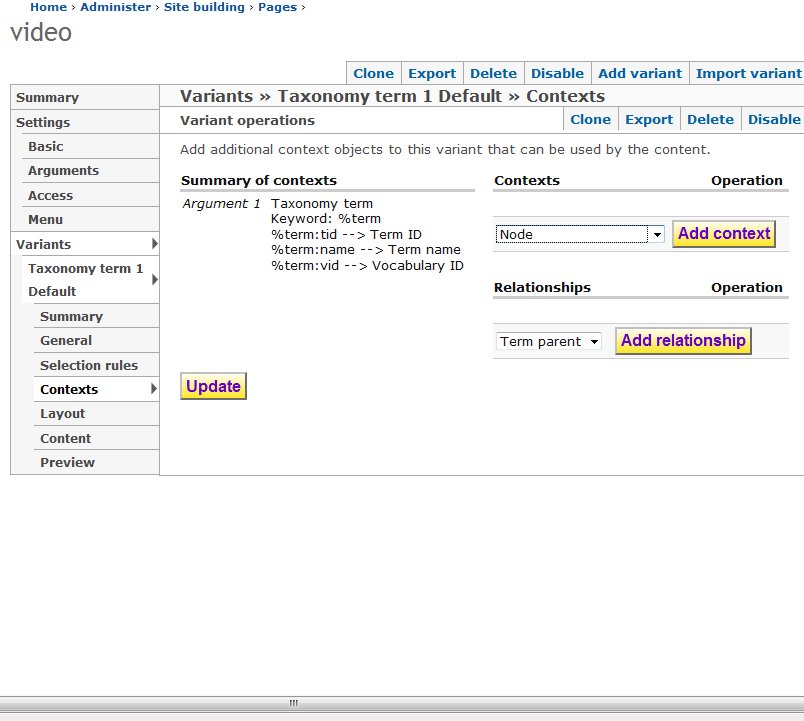
  5. Next I enabled the "Taxonomy term template" page that ships with Panels, and added a variant called "Sport Main Page." Under "Selection Rules" I added "Term being viewed vocabulary is 'Sports'." I retained the default contexts of "Argument 1, Term being viewed," and "Argument 2, Depth"
  6. I successfully added the "Featured Article" block to a content pane
  7. When I tried to add the "Non-Featured Articles" Views pane, it was not available in the "View panes" bucket. [It was available in Views, but again, the custom "more" link that I needed from the view did not come through, which is why I wanted to get it from "View panes"]. This remained true even after I went back to the View and tried a number of different argument inputs for the "Non-Featured Articles" pane

What am I missing here?

(I left out the full history of this issue, for simplicity's sake, but it's worth mentioning: the reason I know that the custom "more" link comes through when I use the pane is that the first time I tried this, it actually worked - EXCEPT the pane was not responding to the taxonomy context. It was at that point that I discovered and started playing with the "Argument input" field in the Views pane display, and it hasn't showed up in the Panels content "View panes" bucket since then - even when I reset the "Argument input" to "No argument.")

Any insight is gratefully appreciated.

#22

Thomasr976 - November 25, 2009 - 14:29

I want to thank Merlinofchaos and Stg11 for their help. However, the solution still illudes me. I will continue to work on it on my test site. If or better when i find the solution, I will commit to write it up as part of the documentation. There must be others who are struggling with this concept so I feel it is important to find a solution.

Merlinofchaos, if you are doing a book on panels and views, please cover this in great detail and feel free to use me as test subject on whether it is comprehensible. Until then have a Happy Thanksgiving.

Thomas


Drupal is a registered trademark of Dries Buytaert.