

Closed (outdated)
Project:
Drupal core
Version:
7.x-dev
Component:
install system
Priority:
Normal
Category:
Bug report
Assigned:
Unassigned
Reporter:
Created:
25 Oct 2009 at 01:03 UTC
Updated:
15 Jul 2012 at 04:12 UTC
Jump to comment: Most recent, Most recent file



Comments
Comment #1
jensimmons commentedOh, to be clear — this error was caused by something I wrote while making a patch. There's no need to fix the error that's talked about in the text.
The problem is the way the page LOOKS. The layout is broken, and presumably, will be broken every time any error is given.
Comment #2
jensimmons commentedIn order to reproduce this problem, modify an install file with a parse error. Like replace a comma in an array with a semicolon in default.install and then attempt and installation— that should throw an error for you.
Comment #3
jensimmons commentedAh, I think I mis-marked this as "active", when it should be "needs work".
Still learning how the culture of the issue cue works.
"active" = ignored? I think so.
And oh look. I now have the power to embed this image. :)
And the addiction begins....
Comment #4
bleen commentedI'm pretty sure (based on the screenshot) that you are experiencing this issue in D6, not d7 (Drupal 7 uses the new admin theme "SEVEN" during the install; not Garland)... That said, just to be sure I followed your reproduce instruction on D7 and the error appeared as intended: see attached.
To be clear, I havent tested this in D6 so I'm not sure if this is reproducible
Comment #5
jensimmons commentedNo this was in D7, for sure.
The problem occurred was *before* Seven was set to be the installer theme. And the problem is not the error message itself (that specific error was caused by the still-broken D7 patch I was writing) — the problem was the layout. This layout mess happened several times, even as the error messages were changing.
The question now really is:
Is there a problem (when using Seven) with the layout for the installer when any error message is thrown.
Perhaps not since the theme has changed. But perhaps there still is.
Comment #6
bleen commentedI understand that the problem is with the layout and not the error .. I did this:
The result of this was the error you can see in #4...
Please provide precise instructions on how to reproduce this error and I will look again. Until then I need to mark this as "wont fix" because it cannot be reproduced.
Also, I don't believe you can get as far in the install process as you got (passed "setup database") without seeing the SEVEN theme. I didn't even think you can get to the first page where you choose your profile without seeing the SEVEN theme. Hmmmm... maybe I'm wrong about this
Comment #7
David_Rothstein commentedI've seen this before and can reliably reproduce it by putting code like this in default_install():
I'm guessing the issue has to do with the type of exception that is being thrown for the error? Perhaps some types of exceptions trigger the correct error behavior, and others trigger the one with the messed-up layout.
See http://drupal.org/node/156119 for a description of issue statuses. This one should be "active" since there is no patch yet.
Comment #8
aspilicious commentedThis still relevant?
Comment #9
bleen commentedI have still not been able to reproduce this error. I don't see a function called "default_install()" anywhere, but i tried putting db_query('abc') in sever different places within install.php and within profiles/standard/standard.install. I certainly got errors, but the page layout was never compromised.
I'm going to mark back to "won't fix" until someone can post some precise steps to follow to reproduce this error.
Comment #10
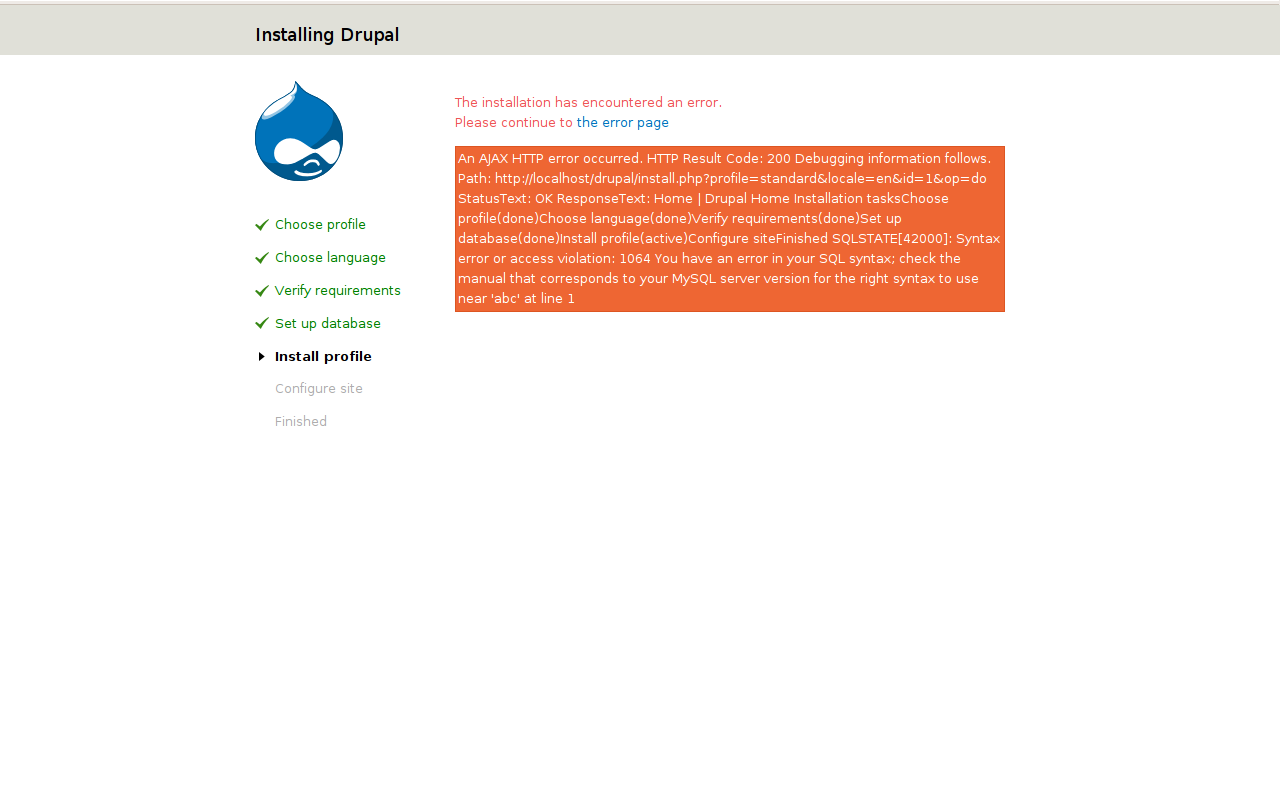
David_Rothstein commentedYes, default_install() is now standard_install() - and it seems the bug sort of still occurs, although not as bad as it used to. Using db_query('abc') as mentioned above (and just putting it as the first line in standard_install()) and then installing using the Standard profile, I don't see the crazy layout anymore, but the error message is still spitting out part of the HTML from the rest of the page (see attached screenshot, and note the list of installation tasks within the red message).
And it looks even weirder on a command-line installation, since that is now spitting out all the page's HTML vs just catching and printing the exception as plain text like it normally would.
Comment #11
bleen commentedI believe this issue has been fixed somewhere along the way...
I just checkout out a fresh copy of D7, stuck a parse error in the standard_install() function and I got an error displayed properly:
Comment #12
David_Rothstein commentedA parse error is different. But if I do an invalid database query like before, I still get a screenshot similar to #10.
I think it must be an issue with how the AJAX is interacting with exceptions thrown on the PHP side. (Parse errors might not go through Drupal's exception handler - that might be why they're different.)