Active
Project:
Embedded Media Field
Version:
6.x-1.21
Component:
Embedded Video Field
Priority:
Normal
Category:
Bug report
Assigned:
Unassigned
Reporter:
Created:
28 Oct 2009 at 21:42 UTC
Updated:
26 Jul 2011 at 21:43 UTC


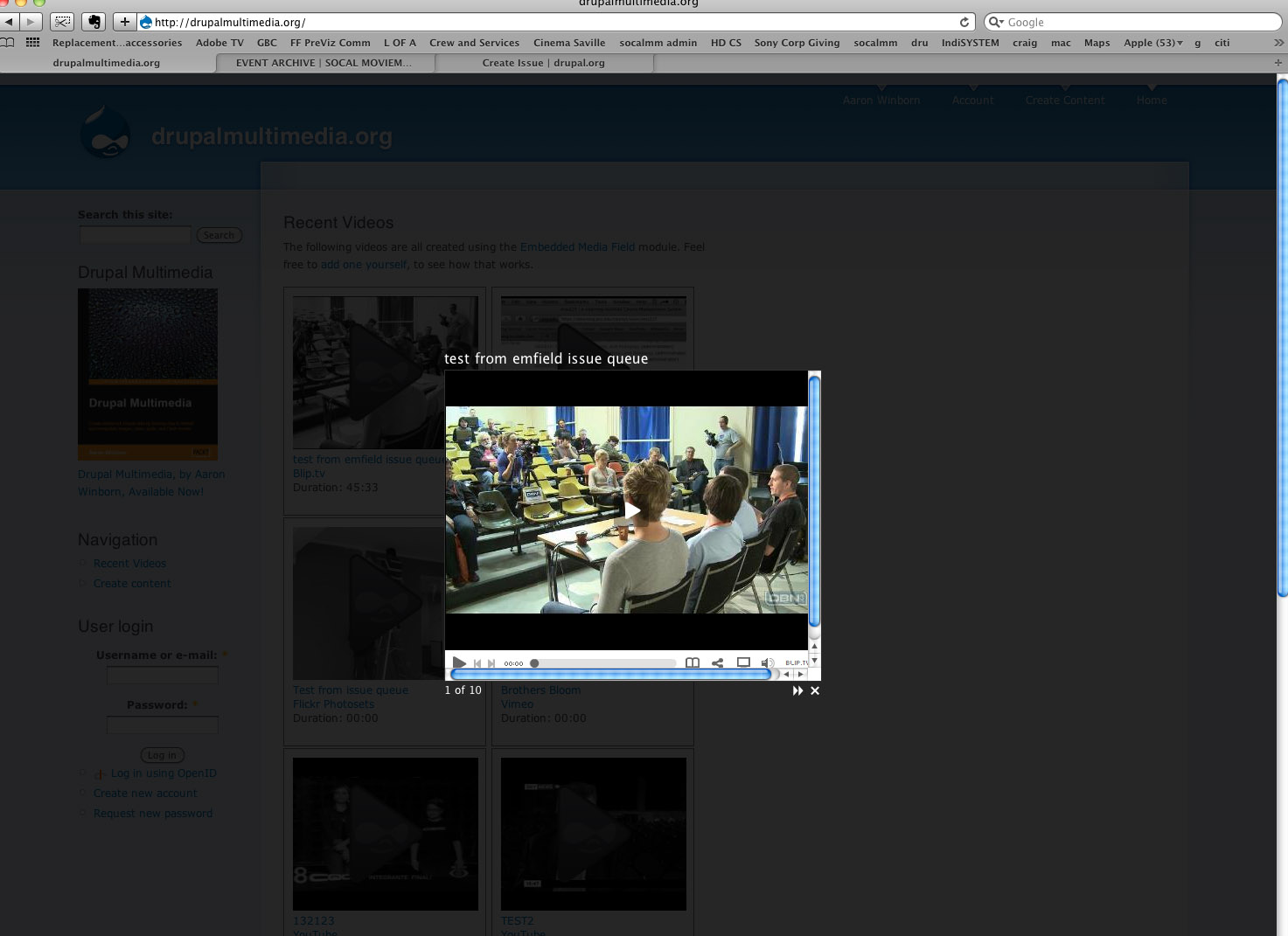
When I use Shadowbox for emvideo, I'm getting scrollbars to account for overlap. I went to your site, Aaron- http://Drupalmultimedia.com, and I noticed to you had the same setup, and the same issue. I know it wasn't always like this, so hopefully you'll be able to address this. I attached a screenshot, but I assume you're already aware of it. Thanks again for this amazing module. Looking forward to the media module.
| Comment | File | Size | Author |
|---|---|---|---|
| Screen shot 2009-10-28 at 2.38.44 PM.jpg | 152.38 KB | CinemaSaville |

Comments
Comment #1
CinemaSaville commentedOoops, that would be http://DrupalMultiMedia.org
Comment #2
CinemaSaville commentedOK, looks like you have set set "scrolling=no" in i-frame.js in the shadowbox players directory. It's set to auto by default. Hope that helps someone.
Comment #4
SVilas commentedI had the same problem with Shadowbox.
i don't have an i-frame.js file.
I solved this problem by adjusting the shadowbox.css in modules/aquila/gallery-assist-lightboxes/lightboxes/shadowbox/
and setting the overflow of the shadowbox_player to 'hidden'.
when doing this, there will be black space on the right and bottom of the shadowbox. this can be changed by going to the emfield module folder and changing the emvideo.theme.inc
in there, delete the +15 and -15 from the following code lines:
else if ($options['modal'] == 'shadowbox') {
$attributes['attributes']['rel'] = 'shadowbox['. $field['type_name'] .'];width='. ($width + 15) .';height='. ($height + 15);
// Shadowbox needs a .php extension so it knows to open as an iFrame.
$destination .= '/index.php';
}
hope this helps for anyone who has a similar problem
Comment #5
SVilas commentedalthough i thought the issue above was solved, it turns out that was only the case for Firefox.
when checking in Google Chrome, the scroll bars were still there.
I have now copied the code from shadowbox.js to the style.css of my main theme:
#sb-player.html{height:100%;overflow:hidden;}
the scroll bars are now gone in Chrome, but still persist in Safari (have not checked Internet Explorer, not sure if I should...)
does anyone know why Safari displays this differently? I can't think of any logical solution.
Comment #6
bramick commentedWhere is this setting? I having the same issue.
Comment #7
bramick commentedComment #8
truyenle commentedSame issue, and don't now how to fix it with the above posts.
Any update for this please.
Truyen
Comment #9
truyenle commentedI got it, the body under shadowbox does inherit the style of main body that has min-width that is bigger than the size I set => Override it using css in theme by setting the min-width to 0 or something less than the shadowbox size.
Thank
Truyenle
Comment #10
dgsiegel commentedi fixed this issue for colorbox in http://drupal.org/node/1050792#comment-4137386. it should be trivial to modify that patch for shadowbox. hope this helps!
Comment #11
giorgosksounds to me like a bug report
SVillas's workaround works here it is
in your theme's css put
change in emvideo.theme.inc
this
with this
alternative to the hacking of emvideo.theme.inc you can copy & paste the function
in your template.php as
including the change I mentioned above
Comment #12
jdiligence commentedI have same problem but the above doesn't seem to fix it for me. It is OKish in firefox (but has a little border strangness) but scrollbars appear in chrome and safari look bad. I don't know about IE as don't have windows.
Here is my example created with cck, views, shadowbox with Shadowbox:thumbnail->Full Media
http://monkeybrainsmedia.com/video
Please if anyone has managed to get this working please tell me how!!
I am using latest version of everything as just upgraded all in case that was the problem but still happens.