

 Come together with the global Drupal community in Rotterdam, 28 Sept – 1 Oct 2026. Sessions, contribution, connection, and Early Bird savings until 8 June.
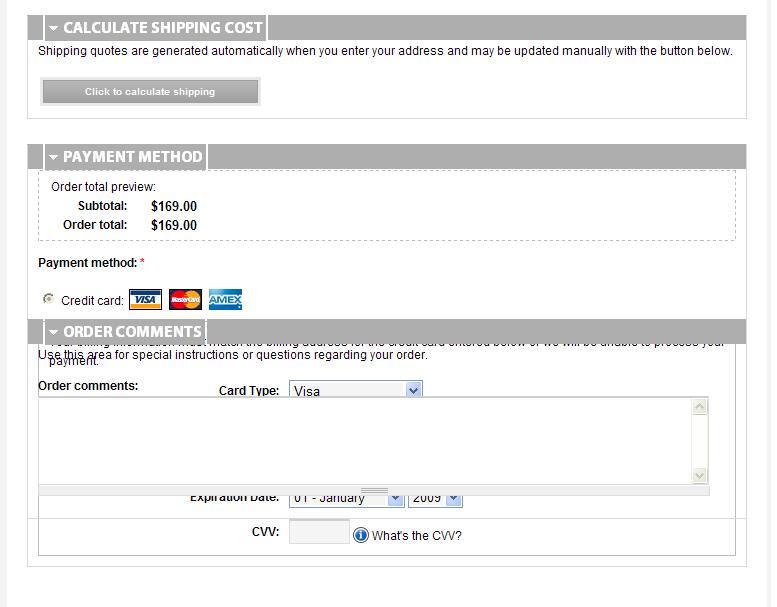
The comments pane in Internet Explorer overlaps the payment method pane. So far I have tested in IE 7 and IE 8 with the sames results.
| Comment | File | Size | Author |
|---|---|---|---|
| #3 | ie7-fixes.txt | 1.98 KB | jeremycaldwell |
| #2 | IE7.JPG | 47.17 KB | mrbnet |

Comments
Comment #1
jeremycaldwell commentedThis has been fixed in the latest release of the theme.
Comment #2
mrbnet commentedForgive me if I was unclear or didn't provide enough information the first time. This is my first time posing a bug and wasn't sure how to go about it. Today I upgraded to the new release of fusion and acquia prosper. It appears the same issue is still happening. Please see attached screen cap, hopefully that will be more helpful.
Thanks, Ryan
Comment #3
jeremycaldwell commentedThanks for the screenshot mrbnet, that really helps. Attached is an updated IE7 specific stylesheet that should fix the issues. Please give it a try and let me know if it works for you. Download the attached file and rename it to "ie7-fixes.css" and place it in your theme's /css folder.
Comment #4
mrbnet commentedThanks Eternalistic!
Uploaded the fix last night and it appears to be working in IE7. Does that file also get loaded for IE8 also? It panes appear as normal in IE8 now as well.
Comment #5
jeremycaldwell commentedGreat, glad it worked out for you. The stylesheet fixed IE7 only so guess IE8 fixed itself for you :)
I'll include this updated bit of code in the next beta release. Thanks for testing it out too.
Comment #6
Chad_Dupuis commentedThis appears to have resurfaced for IE 7 on the latest beta 3. On the checkout page I can no longer see the credit card information field until I click on order comments and then it drops down correctly. I can send a screenshot if necessary but it should be easy to reproduce...
Comment #7
Chad_Dupuis commentedI put the payment methods pane at the bottom of the page and that appears to make it show up correctly everytime. Not a fix, exactly, but it works for now....
Comment #8
lindsayo commentedhttp://grab.by/1Ael
Using version 6.x-1.0-beta3, shown in IE8 running compatibility mode (so IE7).
http://grab.by/1AeA
Using version 6.x-1.0-beta3, shown in IE8.
Comment #9
sociotech commentedChad, lindsayo,
I've made some fixes to Acquia Prosper for the next release that should take care of these fieldset display issues in IE6, IE7, and IE8.
Thanks for your feedback.
Comment #10
sociotech commentedThis should now be fixed in the latest beta 4 release.
Comment #11
Engineerly commentedThank you sociotech!
This is verifed to work beautifully on my test site:
http://www.livingatoms.com/cart/checkout
I almost gave up on this theme since that scrunched checkout panel behavior was pretty buggy looking and as a customer I would almost never purchase something from an on-line store that didn't look and work smoothly. So thanks again to all of you for your support.
A comment for newbies (like me): I had to install the beta 4 release of Fusion Core as well and clear the cache.
A question for developers: Should I turn on both "Optimize CSS Files" AND "Avoid IE stylesheet limit" or just the "Optimize CSS Files" to make this work the best for IE users?
Comment #12
jeremycaldwell commentedEngineerly, you should turn on "Optimize CSS files" on the Performance page and leave the "Avoid IE stylesheet limit" disabled for your live site. The idea here is that the "Avoid IE stylesheet limit" is to be used during development as it doesn't aggregate all your CSS files into one, it adds @imports to your stylesheets so IE doesn't have an issue with loading more than 30+. It is a performance hit doing this but allows you to continue developing and making changes to your theme's CSS files without having to clear the cache on your Performance page so it reloads the CSS each time a change is made. So use "Avoid IE stylesheet limit" for development and then disable it and use the Performance page's "Optimize CSS files" for the live site.