

Closed (fixed)
Project:
Dynamic Dashboard for Storm (Project Management)
Version:
6.x-1.x-dev
Component:
Miscellaneous
Priority:
Normal
Category:
Bug report
Assigned:
Reporter:
Created:
5 Nov 2009 at 17:42 UTC
Updated:
21 Dec 2009 at 11:00 UTC
Jump to comment: Most recent file


Comments
Comment #1
jurgenhaasAre you trying this as User 1?
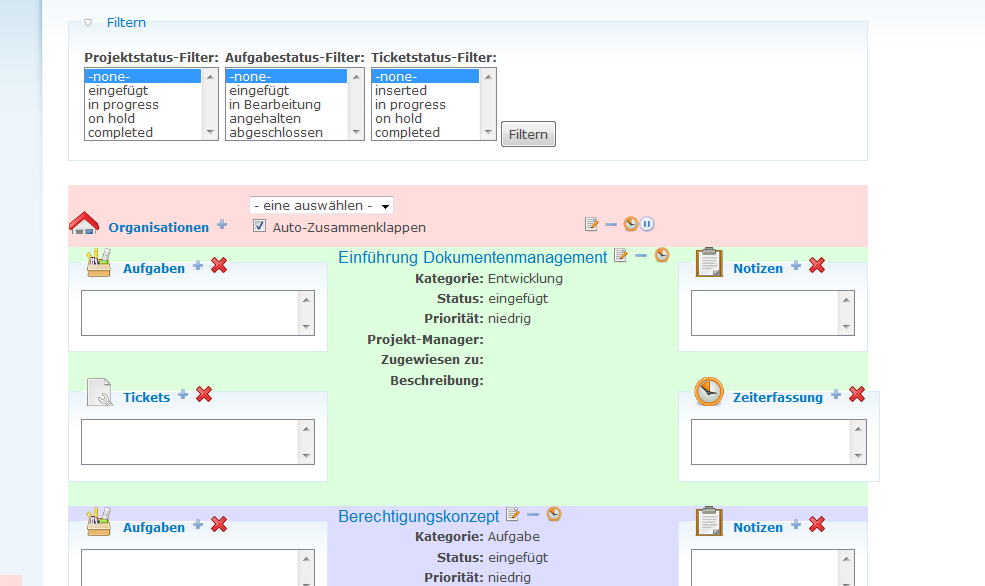
Have you checked the filter settings? Right above the pink organization select box.
Comment #2
jurgenhaasJust realized that something else is causing this effect: if there is an organization with no project, task or ticket associated with it, then the organization never gets displayed since we implemented the filtering system. While thinking about a possible resolution of this problem I come across several options and need the communities input to make a decision here.
Possible solutions:
1) Do nothing and ask users to use the regular Storm Dashboard to create at least one project, task or ticket to a newly createad organization. Not a very nice way of doing it, I guess.
2) Insert an checkbox in the filtering pane that allows to display all organizations regardless of the projects, tasks and tickets filter settings.
3) Automatically find all organizations with no applicable project, task or ticket. There are two downsites to this approach: first, it might slow down things a bit and second, you may want to hide organizations when all projects are completed but what, if there is a new project coming in to that organization. You then need again a way to display that organization to be able to create the new project.
So, with all that said it sounds like option 2) is the best approach - so far. Unless someone else comes up with a better idea.
All input is appreciated a lot.
Comment #3
FrankT commentedCurrently I'm away from my drupal installation but want to provide some information anyway: I had checked the filter settings, they looked OK to me.
I have an organization with definitely at least one project, but the organization is not displayed (I'm quite sure there is a task for that project, too, but I will check it tomorrow and post new information then).
You may change the category of this issue into a bug.
Comment #4
jurgenhaasIf you're not trying this as user 1 (which you should probably do just to be sure), please also check the permissions so that the users have permission to see "their" organizations and projects.
Comment #5
FrankT commentedI did everything as user 1. So permissions should not be an issue.
I checked my environment with the following result:
- I have 2 organizations
- I have 2 projects for onoe of the organizations
- I have several tasks for the two projects
- I have 1 ticket for one of the projects
- I do not see organizations anyway (I attached a hardcopy showing the two projects in the middle, but there is no organisation to be selected).
I added another project and another task for the second organisation but it did not help, too.
Comment #6
jurgenhaasI guess the naming of filter "-none-" is misleading, it currently leads to no selection whatsoever. Please select all stati in all the filter select boxes and then hit the "Filter" button and you should see everything. Please try this and report back to us.
Comment #7
jurgenhaasChanged status to fixed due to missing feedback and because it seems to be working elsewhere.
Comment #8
FrankT commentedSorry for the delay. I tried with all filter criteria selected, but no organisation is being displayed. See attached hardcopy.
Comment #9
jurgenhaasThat's almost impossible.
1) Is your user Webmaster the user 1 in Drupal?
2) Have you clicked on "Fliter" after selecting all the filters?
3) Have you already created any organizations?
4) Do your organizations have any projects/tasks/tickets?
5) Are you using the latest dev-release?
6) Are there any error messages in watchdog?
7) Are there any messages in your server log?
8) Any messages in the database log?
9) What version of the Storm module are you using?
10) What are the permissions settings look like?
Comment #10
FrankT commented1) Is your user Webmaster the user 1 in Drupal?
YES
2) Have you clicked on "Fliter" after selecting all the filters?
YES
3) Have you already created any organizations?
YES, 2 (I can click on the organizations link in front of the drop down, both are shown)
4) Do your organizations have any projects/tasks/tickets?
YES, every organization has at least one project, one task and one ticket (most of them more than one)
5) Are you using the latest dev-release?
YES (2009-11-15, meanwhile), meanwhile but it had no effect on this issue
6) Are there any error messages in watchdog?
7) Are there any messages in your server log?
8) Any messages in the database log?
NO (/admin/reports/dblog), if there are others please let me know. (I also didn't find a watchdog module). The only other issue I know about my installation is that cron has a problem with the 'update' task (but I see no storm parts of cron).
9) What version of the Storm module are you using?
V6.x-1.26
10) What are the permissions settings look like?
As I'm user 1 they should not matter. The user also has a role that has all strom permissions. I can also see everything in storm if not using the dashboard.
=======
Can it be that there is an issue with translated attributes (just an idea about what might be different in my installation, I'm not a programmer)?
Comment #11
jurgenhaasI don't think the translation matters. I have two ideas left:
a) You can try and use the latest dev-release from Storm
b) You can use the attached patch. It writes the SQL statements to collect the relevant organizations into watchdog and we can then analyze those statements to see if we find an error.
Comment #12
Magnity commenteda) shouldn't affect it at the moment as Storm -dev is pretty close to the snapshot 1.26 version.
Comment #13
FrankT commentedAfter applying the patch I got the following errors:
=============
* warning: include_once(./sites/all/modules/storm_dashboard/storm_dashboard.module) [function.include-once]: failed to open stream: Permission denied in C:\xampp\htdocs\includes\bootstrap.inc on line 617.
* warning: include_once() [function.include]: Failed opening './sites/all/modules/storm_dashboard/storm_dashboard.module' for inclusion (include_path='.;C:\xampp\php\pear\') in C:\xampp\htdocs\includes\bootstrap.inc on line 617.
* warning: call_user_func_array() [function.call-user-func-array]: First argument is expected to be a valid callback, 'storm_dashboard_dashboard' was given in C:\xampp\htdocs\includes\menu.inc on line 348.
* warning: include_once(./sites/all/modules/storm_dashboard/storm_dashboard.module) [function.include-once]: failed to open stream: Permission denied in C:\xampp\htdocs\includes\bootstrap.inc on line 617.
* warning: include_once() [function.include]: Failed opening './sites/all/modules/storm_dashboard/storm_dashboard.module' for inclusion (include_path='.;C:\xampp\php\pear\') in C:\xampp\htdocs\includes\bootstrap.inc on line 617.
=============
I also can't open the storm dashboard any more (there is just a white screen).
Comment #14
jurgenhaasThose errors mean, that your PHP can't read the file storm_dashboard.module anymore. Probably your patch process has locked the file. Maybe you need to restart your PC.
Comment #15
FrankT commentedAfter a reboot the errors
* warning: include_once(./sites/all/modules/storm_dashboard/storm_dashboard.module) [function.include-once]: failed to open stream: Permission denied in C:\xampp\htdocs\includes\bootstrap.inc on line 617.
* warning: include_once() [function.include]: Failed opening './sites/all/modules/storm_dashboard/storm_dashboard.module' for inclusion (include_path='.;C:\xampp\php\pear\') in C:\xampp\htdocs\includes\bootstrap.inc on line 617.
remain. Also, the storm dashboard displays a white screen (with no delay, so it is not a WSOD).
Comment #16
jurgenhaasWell, the error states that PHP has no permission to read the file storm_dashboard.module which means there is some sort of misconfiguration in your file system.
Comment #17
jurgenhaasComment #18
FrankT commentedIt looks like patching using cygwin changed the permissions. I fixed that but the error stays the same. Looking at dblog I see
.
I'm not an SQL specialist (to read this), if I you need to no the content of same database tables please let me know (I only need to know the tables an the expected content, nothing else). If there are other places of log files to look for, I would need to know, too.
I also updated to Storm 6.x-1.27 with no effect, too.
Comment #19
jurgenhaasHi FrankT, thanks for posting this. THe SQL statements look correct, so there must be something in the database tables, that's causing the fact that no organization is selected.
One thing first: What is the status of your organization nodes, are they set to published?
If the answer is no, that's the reason for them not being selected. Otherwise, I would have to look into your database tables and you should export the tables node, stormorganization, stormproject, stormtask and stormticket.
Comment #20
FrankT commentedBoth organizations are published. I've attached the exported tables, will send you the password via contact form.
Comment #21
jurgenhaasVery interesting. In your database, the node-ids (nid) and revision-ids (vid) of your nodes are different and that wasn't covered in the selection process. I have created a patch, please give it a try and let me know the outcome.
Comment #22
FrankT commentedI'm not to deep in the internals of drupal, but it sounds like Revisioning might cause this. The latest patch you provided solved the issue.
Thanks, also for your patience!
Comment #23
jurgenhaasExcellent, thanks for your feedback and patience. The latest dev release already contains that patch together with some exciting new features. Please give it a go.
Comment #24
FrankT commentedWell, your STORM dashboard makes working with STORM much better, so it's worth working on it.
Unfortunately the problem has arised again while switching to the latest dev of storm timetracking (I had the Nov-05 release and could not select an organization after clicking on the symbol left of 'currently not tracking time', at least I'm quite sure). After updating to the latest dev of STORM timetracking I can select an organization there, but no longer in the STORM dashboard (Dec-01) itself.
I added this here because both modules are 'yours' and I can't decide where the error is.
Comment #25
FrankT commentedSorry for any inconvenienve: I had resetted the filters to - no filter - causing no organization to appear. Selecting every status of the filters solved the 'problem'. I'm still confused, in my eyes 'no filter' should finally show every organization!?
Comment #26
jurgenhaasHi @FrankT, you'Re right. I wanted to get around to this issue long time ago and just forgot about it. I've just implemented this so that "No Filter" means the same as "Select All Stati" and you'll get what you expect.
I will be releasing 1.0 today which will then include this fix as well.
Comment #27
jurgenhaas