Closed (fixed)
Project:
Acquia Prosper
Version:
6.x-1.0-beta1
Component:
User interface
Priority:
Normal
Category:
Feature request
Assigned:
Unassigned
Reporter:
Created:
5 Nov 2009 at 17:59 UTC
Updated:
3 Dec 2009 at 19:20 UTC


What I'm trying to do is displaying terms divided in vocabularies in product page as described in the TNT guide "How to make an online store..." they say that there is an option in the theme settings page but I didn't find it. Is there any way to accomplish this result?
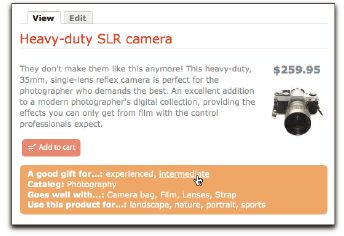
Under the images and description/attributes/add to cart section of the node-product page, I want something like “This would be a good gift for…”, “Use this product for…”, “Goes well with…” and all the terms associated with these vocabularies (as shown in the guide, image attached).
I've added this code to the node-product.tpl file
<?php if (count($taxonomy)): ?>
    <div class="taxonomy"><?php print t($voc) . $terms; ?></div>
  <?php endif; ?>
</div>
but all I got is a list of terms without any distinction based on vocabularies.
I'm not a coder so if there is anyone who can give me some advice, please help! I really need this feature as soon as a I can get it.
thanks in advance
| Comment | File | Size | Author |
|---|---|---|---|
| Capture.JPG | 24.74 KB | lupinix |

Comments
Comment #1
stephthegeek commentedTaxonomy was accidentally omitted from this tpl file, has been corrected in the beta2 release.
We opted to remove a lot of the elaborate theme settings from Fusion because a) less code to maintain means more time spent on other features/updates, b) all of these settings have existing modules providing similar functionality, which is where they really belong so they can be best maintained and provide even better functionality.
The guides have not yet been updated and won't until we upgrade more of the themes to Fusion-based.
For your particular question, there are two modules you probably want to take a look at to have more control over taxonomy display on node pages:
http://drupal.org/project/taxonomy_hide
http://drupal.org/project/term_display
Comment #2
lupinix commentedthanks!