Closed (works as designed)
Project:
TinyMCE
Version:
5.x-1.x-dev
Component:
User interface
Priority:
Normal
Category:
Bug report
Assigned:
Unassigned
Reporter:
Created:
8 May 2006 at 20:56 UTC
Updated:
26 Nov 2008 at 13:42 UTC


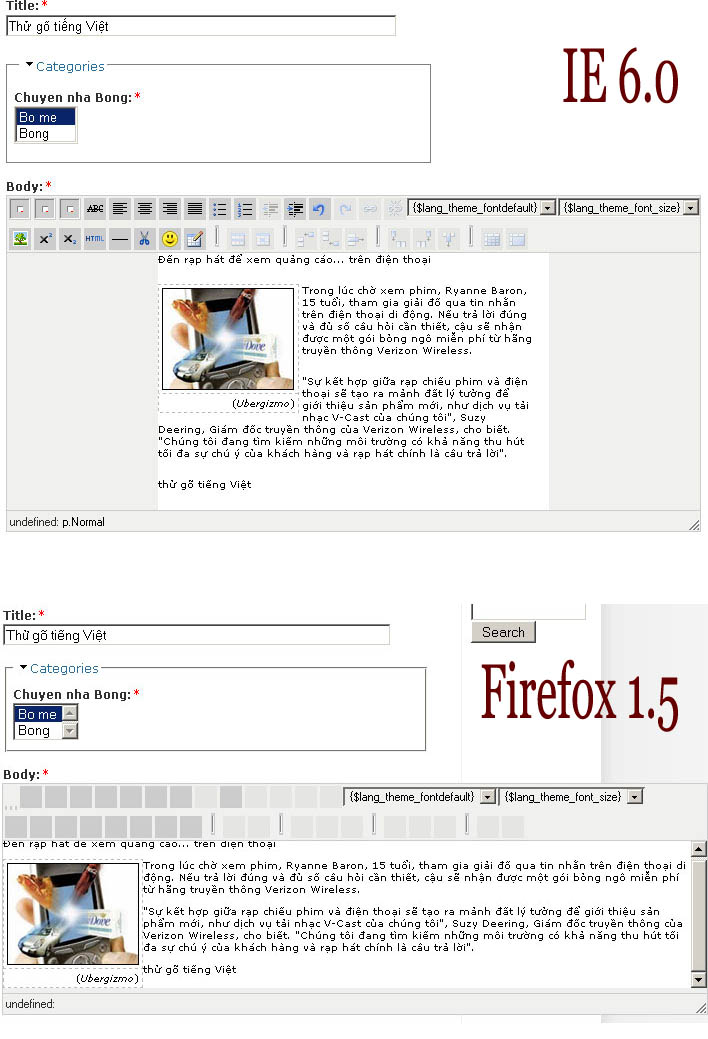
After following the steps in install.txt of tinyMCE module, I got the editor work. However, its buttons do not display correctly in both IE 6.0 and Firefox 1.5. In IE, some buttons are missing, while in Firefox, all buttons are incorrectly displayed (see figure). I received several error messages in admister page:
"modules/tinymce/tinymce/jscripts/tiny_mce/themes/advanced/images/{$lang_underline_img} not found."
"modules/tinymce/tinymce/jscripts/tiny_mce/themes/advanced/images/{$lang_italic_img} not found."
"modules/tinymce/tinymce/jscripts/tiny_mce/themes/advanced/images/{$lang_bold_img} not found."
I am using the Andreas01 theme for Drupal 4.7. If the default theme, bluemarine, is used, the editor appears to be the same in both IE and Firefox, i.e. some buttons displayed correctly, while the others (Bold, Italic and Underline) are still missing and I still received the above-mentioned error messages!
Please help me to find the problem. Is there any requirement for theme to use with TinyMCE module?
Thank you!
| Comment | File | Size | Author |
|---|---|---|---|
| tinyMCE.jpg | 171 KB | tqvn2004 |

Comments
Comment #1
kenwen commentedI've got the same error here - I upgraded from 4.6 to 4.7 and have this problem.
However, a few new sites (clean install from 4.7) don't
I've also noticed that a lot of the buttons/plugins dont work either, the insert image is the prominent one, emoticons is the other
From the looks of it, the module is trying to get an incorrect path to the stylesheets and gfx, haven't got a clue what's causing it though!
I've tried dropping the tables and clearing the entry from the system table but no help
Comment #2
tqvn2004 commentedI find out what was the problem: The display language for TinyMCE was incorrectly set to ru_utf_8, which does not exist. I set it back to EN (english), which is installed, then the buttons are displayed correctly.
Comment #3
(not verified) commentedComment #4
AdrianB commentedI had this problem to using 5.x-1.x-dev (26 feb) and the Swedish translation from Moxicode.
The solution was to find line 720 in tinymce.module and change
'sv',to'sv', 'sv_utf8',, because the translation file from Moxicode is named sv_utf8 (and you do want to have utf8 if you're going to use TinyMCE with Drupal).After this change, go to the TinyMCE edit profile page and change the language setting to sv_utf8. Then the language version of the buttons will show upp correctly.
(I reopened this issue and change version and category - don't know if that's the correct way or if I should open a new issue instead.)
Comment #5
kreynen commentedAnything that keeps the issue tied to the previous, related information is helpful. Seeing as I can only speak and read French at a 3rd grade level and have never needed a multilingual or translated Drupal, I can only go by what's in the translation section of the Drupal Handbook which points to GNU gettext documentation where the language codes are defined as 2 letter codes.
Can someone more familiar with translations weigh in on this? How can we best support Drupal translations as well as the translation direction TinyCME has gone?
Comment #6
AdrianB commentedSince the language system Moxiecode uses have a lot of files spread in a lot of directories, all named the same, I guess the easiest way is to just give in and use the same file names as Moxiecode do.
The list in line 720 already consists of special cases like ru_KOI8-R and ru_UTF-8 so I thought the policy was to just name them after whatever Moxiecode uses. (I think they used "sv" before, but then it was ISO Latin 1 because I hade to change it manually to UTF8 back then.)
Comment #7
AdrianB commentedThis is still relevant in 5.x-1.9.
If you want to make a Swedish installation of TinyMCE work correct in TinyMCE module 5.x-1.9, do like this:
1) Download the sv_utf8 language pack from moxiecode. (Be sure to choose "sv_utf8" and not "sv".)
2) Install it like any other language pack (unzip it in modules/tinymce/ directory so it places all the language files correct).
3) Edit line 735 in tinymce.module and add
'sv_utf8',after'sv',.4) Select the sv_utf8 as the language for the role in administer > settings > tinymce.
Comment #8
kreynen commentedAdded these instructions to TinyMCE FAQ.
Comment #9
pictogram commentedI can't make this work. As mentionned above, I can't see the "bold, italic, underline" buttons and have some kind of replacement (same as a attached picture above). And the other buttons won't have correct tooltips {$lang_nameofthebutton ...} is tells me that tinymce can't find it's way to the translated files and specific buttons ???
I was planning using TinyMCE on an international webite (10 languages). Everything else seems to work except for that.
Thanks for any help
Comment #10
dmagre commentedExactly the same over here. Dutch language pack.
Comment #11
fmjrey commentedSame with fr language pack on Drupal 5.2 + Tinymce 5.x.1.9.
This really need a good fix....
Comment #12
fabianderijkSame here, still a problem....
I tried to install the dutch languagepack, but it doesn't work.....